Content Credentials identity - verified signing for on-device C2PA
In plain terms. Every image, PDF, or video you export from Lolly can carry a
Content Credential - a signed C2PA manifest, created
entirely on your device - that proves the file hasn't been altered since it left
Lolly, and (once you enrol an identity) records who signed it. Anyone can check
it offline: hit Verify in the app (the shield in the bottom bar), drop in a
file, and Lolly reports the result on-device. Nothing is uploaded - not the
file, not the check. This page is the user-facing story; the [engineering &
operator guide](/info/content-credentials-engineering.html) covers how it's built
and how to run the CA service.
What you get
- Tamper-evidence, on by default. The credential is a cryptographic seal over
the exported bytes. Change a pixel and the seal breaks - the verifier says so.
- Verifiable identity, when you want it. Enrol once (SUSE, GitHub, Google, or
an email link) and your exports are signed by a short-lived certificate that names you. Verifiers pinning the Lolly root then report Verified - signed by \<your email\> instead of an anonymous signer. Enrolment is optional; skip it and you still get tamper-evidence from an anonymous on-device signer.
- Honest about its limits. A credential is never inflated or silently
downgraded. If a certificate has expired, you get a distinct expired state ("the bytes still match, but the short-lived signing certificate has lapsed"), never a false green and never a misleading red. See the verdicts below.
- Private and offline. The signing key is generated on your device and is
non-extractable - even Lolly's own code can't read it. Signing happens locally; only certificate issuance ever touches the network, and only when you choose to enrol.
Verifying a file
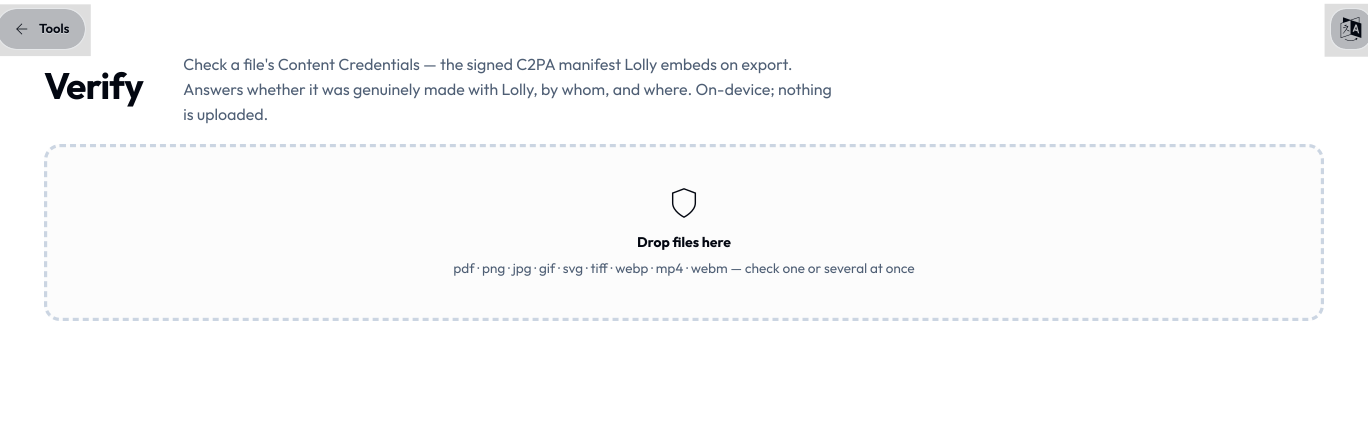
The Verify tab (canonical /verify; the aliases /valid and /v redirect to it) checks any file's credential entirely on-device. It reads the whole C2PA manifest store - Lolly's own credentials and credentials written by other C2PA tools (it reads both C2PA 1.x and 2.x claims, so files from cameras, Adobe apps, Google's Gemini, and other generators verify too) - and headlines the result with one honest verdict:
| Verdict | What it means |
|---|---|
| Made with Lolly | The credential is intact and records a Lolly export - the file hasn't changed since it was made. (Integrity plus the maker's claim, from an on-device key.) |
| Verified | The file matches what it signed and the signing certificate chains to the pinned Lolly CA root - integrity plus a CA-verified identity. |
| Delivered by Lolly | A genuine catalog asset Lolly distributed but didn't author - chains to the Lolly root, so it's intact and its origin is CA-verified; who made it is recorded below. |
| Likely made with Lolly | An amber middle ground: the credential's own signature and everything it references check out and it records a Lolly export, but the file's bytes no longer match the hard binding - it was probably re-saved, re-encoded, or re-uploaded through something that left the manifest intact. |
| Credential intact | The structure checks out and the bytes match, but the signer isn't identified (an anonymous on-device key). |
| Credential expired | The bytes still match exactly - nothing was modified - but the short-lived signing certificate has lapsed, so the credential no longer validates. |
| Credential broken | The file carries Content Credentials, but they no longer match its bytes - modified after signing, or the manifest is damaged. |
| No Content Credentials | Nothing to verify - the file carries no C2PA manifest. |
The page also shows the recorded edit history, the "made from" ingredients, and - when present - the CA-verified signer's email and issuer. And it reads far more than the credential: a file that declares AI-generated content, carries Lolly's own pixel Imprint, or is quietly hiding data in its bytes gets flagged too - see Beyond the credential below.
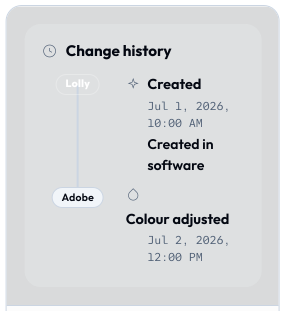
The same credential check runs in the CLI (lolly validate <file>) and in any third-party C2PA validator pointed at the public Lolly root (c2patool --trust_anchors lolly-root.pem).
Beyond the credential: what else Verify shows
Verify is more than a C2PA reader. Every file you drop is put through several independent checks, summarised as a row of pips ("Verification checks at a glance") under the headline verdict and then explained in full below it. They all run on your device - nothing is uploaded. The only two things that ever leave the machine are called out where they apply: a single public-key DNS lookup for SEAL, and a one-time detector download for the opt-in deep scan. The file itself never leaves.
The Lolly Imprint
Alongside its Content Credential, Lolly can seal an invisible watermark into the pixels themselves - the Lolly Imprint. Where the credential travels in metadata and is lost to a re-save, a screenshot, or a metadata strip, the Imprint rides in the image and survives recompression - so it's a durable hint that an image came from Lolly even after the credential is gone. It's a supporting signal, not a cryptographic guarantee. When Verify finds it, a green Lolly Imprint pip joins the scorecard - marked detected, or in an image when the mark sits in a raster embedded inside a PDF or PPTX. The Imprint is now on by default on raster exports; see Exporting → Provenance & watermark.
AI-generated content
When a file declares that its pixels came from a trained model, Verify raises an unmissable AI-generated content flag (or Contains AI-generated content when only part of it was). The declaration comes from one of two places, and Verify says which: a signed C2PA assertion, or a bare IPTC "digital source type" tag written into the file's metadata - the sidecar flag Gemini/Imagen, Midjourney and Meta AI write next to their output. The metadata tag is genuine when present but trivially stripped, so its absence never proves a file isn't AI-made. The flag fires across JPEG, PNG and SVG stills and MP4/QuickTime video.
"Likely carries" a maker's own watermark
Large AI generators also stamp their own invisible watermark into the pixels - Google's SynthID (also adopted by OpenAI) or Meta's Video Seal. Only the maker's own detector can read those; Lolly cannot. So when a file's declared maker is one of them, Verify says the file very likely carries that watermark. This is a likelihood inferred from the maker's declaration, never a claim that Lolly read the watermark itself.
Deep scan (opt-in): TrustMark & Content Seal
For a real read of two open pixel watermarks, Verify offers an opt-in deep scan. A one-click banner - "Scan for invisible watermarks?" - downloads the detector models once (~90 MB), after which every image in the batch is scanned automatically, all on-device, nothing uploaded. It reads two marks:
- Adobe TrustMark - a genuine, error-correction-verified decode. When the
recovered payload passes its ECC check, Verify shows Adobe TrustMark detected with the recovered bytes: a real read, not a guess, so it earns a green pip.
- Meta Content Seal - a read of Meta's open Pixel Seal / Video Seal watermark.
This has no error-correcting gate, so a decode that stays consistent across several re-encodings is reported as an amber Meta Content Seal likely - a statistical match, not a certainty (a flat or low-detail image can read as a false positive). It reads only the open watermark: Meta's production "Muse" image pipeline uses a separate proprietary variant Lolly cannot read, so a hit never means "Meta Muse" or "Meta AI", and absence rules nothing out.
SEAL signatures (a cryptographic signature, not a pixel watermark)
Verify also checks for a SEAL record - the hackerfactor SEAL format, which despite the name has nothing to do with Meta's Content Seal above. SEAL is a cryptographic signature over the file's bytes whose public key is published in DNS. Lolly verifies it on-device; the only thing that leaves the machine is a single public-key DNS lookup - never the file. A signature that verifies against a key found in DNS shows Signed by \<domain\> (SEAL): it proves control of that domain - domain-level attribution, not a CA-verified legal identity - and says nothing about the visual content. A signature that verifies against a key the file itself carries, but which isn't confirmed in DNS, is reported as internally consistent but unattributed.
Hidden data: appended payloads & steganalysis
Two more reads look for data a file is quietly carrying:
- Appended payloads. Bytes tacked on after a container legitimately ends -
after a PNG's IEND, a JPEG's EOI, a GIF trailer, or an APNG - are flagged as Appended data found, and you can View the extracted bytes (a safe hex or text preview) or Download them. The legitimate motion-photo case - a video appended to a still - is recognised and shown as Appended video data with no warning.
- LSB steganalysis. A chi-square analysis of the image's least-significant bits
looks for the statistical fingerprint of LSB-hidden data; a match raises an amber LSB steganography likely heuristic. It's a hint, not proof.
Separately, every file's embedded metadata (EXIF/GPS/IPTC/XMP) is read out in full and grouped, with values that could identify a person, place or device marked - alongside a one-click Download a cleaned copy and a link to the Hidden Data tool to strip it.
Where each check runs
The C2PA verdict runs in the CLI too (lolly validate <file>). The embedded-metadata read (EXIF/XMP, the AI declaration, appended-data) runs over MCP (lolly_verify) and in the web Verify view. The pixel-level reads - the Lolly Imprint, the opt-in deep scan, and LSB steganalysis - and SEAL verification are features of the web Verify view. Wherever they run, they run on your machine.
Why identity, not app identity
Lolly's engine and shells are open source. Once the code is public, "made with Lolly" can never be a cryptographic claim - anyone can fork the repo and emit bit-identical manifests. No certificate scheme fixes that, because the thing being attested (the software) is copyable by design.
So the certificate attests who signed, not what app signed: the Subject Alternative Name carries the OIDC-verified email. A fork can't impersonate a Lolly user - it can only obtain certificates for its own users under our issuance policy, or run its own CA whose root simply isn't our root. The "Lolly" generator name in the manifest remains self-asserted, and the verifier copy keeps making that distinction (which is why "Made with Lolly" is the maker's claim, while "Verified" is the cryptographic one).
This follows Kerckhoffs's principle as practised by Sigstore/Fulcio and Let's Encrypt: the repo holds no secrets - only protocol and public anchors. The CA certificate (public) is committed and served; the CA private key lives only in the host's environment store (or a KMS); the device key is generated locally and non-extractable.
Trust tiers (what a verifier can conclude)
| Tier | Signer | Verifier result |
|---|---|---|
| 0 | Ephemeral self-signed (offline / not enrolled) | Structure valid, signer anonymous ("Credential intact" / "Made with Lolly") |
| 1–2 | Device key + short-lived Lolly-CA cert | CA-verified identity ("Verified" / "Delivered by Lolly") for verifiers pinning the Lolly root |
| 3 (roadmap) | + RFC 3161 timestamp countersignature | proves when signed, so expired certs stay verifiable |
| 4 (roadmap) | C2PA conformance program (audited KMS custody) | green in third-party validators (Adobe Verify etc.) |
Expired-credential honesty: certificates are short-lived and there is no trusted timestamp yet, so a file verified after the cert expired gets a distinct expired verdict - the bytes still match, but the time of signing can't be proven - never silently downgraded to broken, never inflated to verified.
Credential lifetime (7 / 30 / 90 / 365 days, default 30)
Until the timestamp authority lands (Tier 3), the certificate window does double duty: it bounds abuse (expiry is our only revocation) and it is how long an exported file keeps its verified badge - the verifier compares the cert window against verification time, not signing time. So the lifetime is the user's call, offered at the moment the certificate is actually minted:
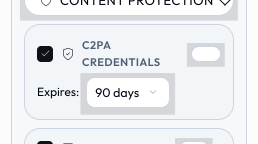
- Not enrolled (ephemeral path): the self-signed cert is generated fresh
per export, so the export panel's Content Credentials card carries the 7/30/90/365 select directly - it sets the credential's validity window on that export. Default 30. Fully offline.
- Enrolled (CA identity): the cert is fixed at enrolment, so the same
7/30/90/365 select lives in Profile → Content Credentials next to the provider buttons; the CA clamps the chosen value to the allowed set {7, 30, 90, 365} (policy stays server-side). The export panel then shows "Signed as \<email\> · verified until \<date\>" in place of the picker, with a renew nudge when expiry is near. A per-export choice can't exist here - you can't sign with validity your certificate doesn't have, and re-issuing at export time would break offline signing.
- URL / CLI:
c2pais a reserved URL-mode param (see URL Mode):
?c2pa=90 on a share/deep-link URL turns the credential on with a 90-day ephemeral window (and pre-sets the export panel), c2pa=off forces it off, and the CLI accepts the same as --c2pa=90 - stamping its native svg output with the ephemeral path (enrolment is a browser feature).
For the device/CA architecture, the engine contracts, the CA service protocol and environment, the web-shell wiring, the one-time operator setup, the threat model, and the roadmap (RFC 3161 timestamps, transparency log, SUSE SSO), see the Content Credentials - engineering & operator guide.