Verify It Yourself
Lolly's privacy and security pages make claims: no analytics, no tracking, files never leave the device, one cookie in the whole system. This page is different: it doesn't ask you to believe any of that. It's a list of procedures, each with the exact command or click-path and the output you will see. Every claim here is falsifiable in minutes, most without installing anything.
If any check on this page doesn't produce the result shown, that's either a bug or a broken promise. Report it either way, and we'll treat it with the severity a broken promise deserves.
See it work, in ten seconds
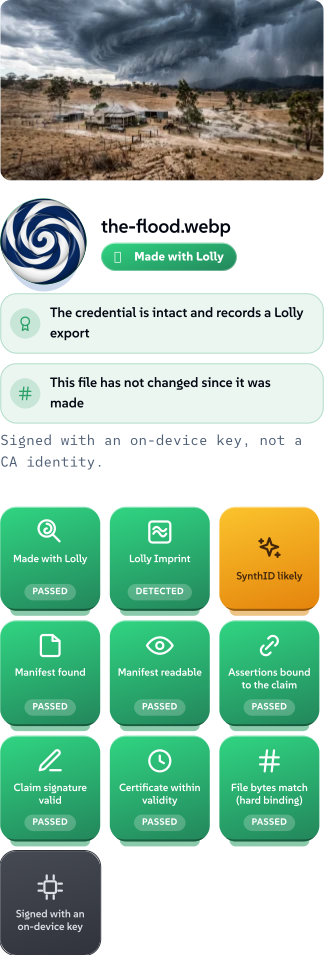
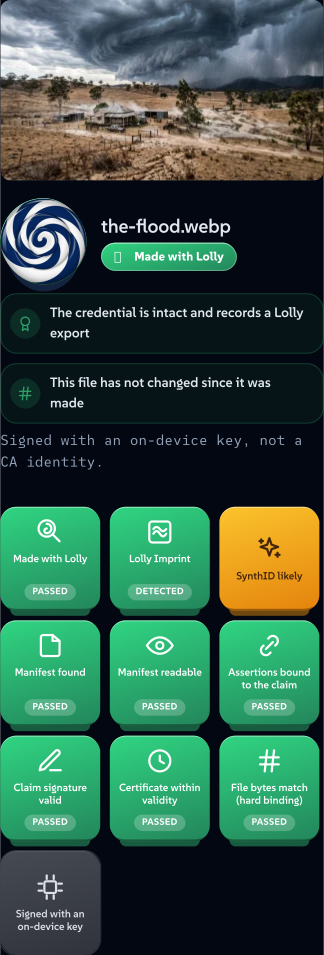
Before the procedures, the payoff. Open /verify and drop a file on it — no upload, no account, no wait for a server. Here it is checking the generated Queensland storm from our AI stance page: a Gemini image Lolly opened, resized and exported. Every badge below was computed on the device, from the file's own bytes.
 签名者 Lolly矢量 SVGAI generated自己验证获取已签名文件147 paths~9.8k nodes72 groups2 images336 KB
 签名者 Lolly矢量 SVGAI generated自己验证获取已签名文件147 paths~9.8k nodes72 groups2 images337 KB


The verdict is not one badge but a small pile of them, each an independent fact:
- Made with Lolly — the credential is intact and records a Lolly export.
- The credential is intact — the signed C2PA manifest parses and its own claim signature verifies.
- The bytes have not changed — the file's hash still matches what was signed. Alter one pixel and this badge flips.
- GEN AI — a machine made these pixels, and the file says so. Lolly reads that assertion back out rather than hiding it.
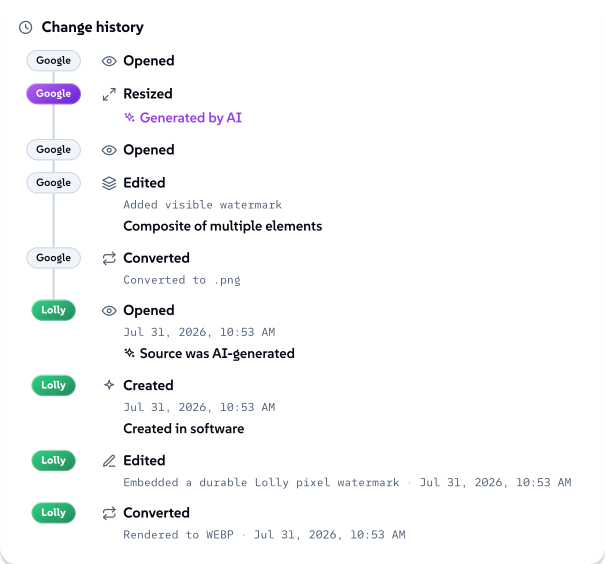
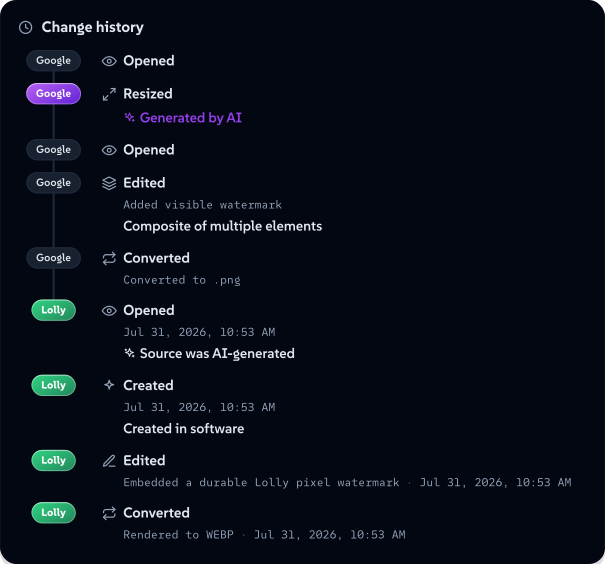
And the whole history travels with the file. Nine steps survive here — five Google recorded as it generated and watermarked the image, then four Lolly recorded as it opened, marked and converted the copy on this page — read straight back out of the bytes, on your device, and rendered as a timeline. This is the same image, verified the same way, as the C2PA timeline on the AI stance page.
 签名者 Lolly矢量 SVG自己验证获取已签名文件71 paths~9.2k nodes78 groups184 KB
 签名者 Lolly矢量 SVG自己验证获取已签名文件71 paths~9.2k nodes78 groups184 KB


None of that is the trust claim, though — it is the demo. The rest of this page is the trust claim: every badge above is reproducible, and here is how you reproduce the guarantees underneath them.
In your browser, no tools required
1. Watch the network. Open lolly.tools, open your browser's DevTools (F12), switch to the Network tab, and use a tool — type a URL into QR Code, change colours, export a PNG. Every request stays on lolly.tools: the app shell, the tool's own files, catalogue assets. No analytics host, no CDN beacon, no font service, no "error reporting" endpoint. What you type into a tool appears in no request at all — rendering is local.
The honest exceptions — every one opt-in, user-initiated, and visible in the same Network tab when it happens: adding a Google Font in the brand editor fetches that one family from Google, after a consent dialog that tells you exactly that, once, before the first fetch; clicking an ICC press-profile preset fetches that profile from the ICC's public registry at color.org; playing the optional built-in radio streams from the station; and URL Screenshot necessarily loads the URL you typed — that's its job, and you watch it happen. A tool whose manifest declares a network capability may fetch only from the hosts its manifest allowlists — the mechanism is fail-closed, and no tool currently shipped declares one. The privacy policy keeps the canonical table of all of these; its standing rule is that a network touch not in that table doesn't happen.
2. Pull the plug. Load the app and open a tool or two, then go offline — airplane mode, or DevTools → Network → Offline. Reload. The gallery and every tool you've opened keep working, including rendering and export in the formats you've used — a tool's files and a format's encoder are cached the first time you use them, so exercise a tool once online before testing it offline. This is the strongest single check on this page: software that phones home doesn't survive its cord being cut.
3. Count the cookies. DevTools → Application (Firefox: Storage) → Cookies → https://lolly.tools. The list is empty — the app sets no cookies. Or paste document.cookie into the console: you get "". (The one cookie in the entire system, lolly_ca_state, lives at most ten minutes during an optional identity sign-in — deleted the moment sign-in completes — is scoped to /api/ca, and is HttpOnly — the privacy policy describes it precisely.)
4. Read your own storage. Same Application panel: everything Lolly keeps is inspectable in front of you — a couple of dozen plain localStorage keys (theme, language, sidebar width, sound and view settings, plus a cached copy of the public tool-catalogue index), and your own documents in IndexedDB. Every value is a readable string or JSON — nothing is obfuscated, nothing is encoded to discourage reading it. Profile → Clear all my data wipes it; so does clearing site data in the browser, because there is no server-side copy to survive it.
5. Check the disclosure contact exists. /.well-known/security.txt answers with an RFC 9116 contact block, not an HTML page.
From a terminal
6. The render endpoint is off on lolly.tools. The one server feature that would put user-typed inputs into a URL — hot-link renders — is disabled here until the service moves to organisation-owned hosting (the privacy policy explains why):
curl -s -o /dev/null -w '%{http_code}\n' 'https://lolly.tools/tool/qr-code.svg?url=test'
# 404
The switch is per-deployment (LOLLY_DISABLE_RENDER_GET=1): on lolly.art, the public demo instance, hot-link renders are deliberately live, so the same probe there returns an image — that difference is the flag working, not an inconsistency.
7. The server surface is enumerable. Server Surface lists every server-side route that exists, with the standing rule that an endpoint not on that page is not part of Lolly. curl them; there's nothing else to find.
In the source
Everything above could still be theatre if the deployed code differed from the public code. So check the code — the deployment builds from the public repository:
git clone --recurse-submodules https://github.com/lolly-tools/lolly.git
cd lolly
8. No tracker, no analytics SDK, anywhere. Search the code that ships — the engine, every shell (including the browser extension, the Tauri bridge overrides and the service worker), the server functions, and the tool packs — for the usual suspects:
grep -rn --include='*.ts' --include='*.js' --include='*.mjs' --include='*.html' \
  -e googletagmanager -e google-analytics -e posthog -e mixpanel -e hotjar \
  -e sentry.io -e segment.com -e '@vercel/analytics' \
  engine/src shells/*/src shells/chrome-extension shells/*/bridge-overrides \
  shells/web/public/sw.js services packages api community brands/*/tools
# (no output)
9. No third-party DNS resolver. Verify's SEAL check never routes lookups through a DNS-over-HTTPS provider — the web app simply has no resolver:
grep -rn --include='*.ts' --include='*.js' --include='*.mjs' \
  -e cloudflare-dns.com -e dns.google -e /dns-query \
  engine/src shells/*/src shells/chrome-extension shells/*/bridge-overrides \
  shells/web/public/sw.js services packages api community brands/*/tools
# (no output — outside this page and its built copies, the only place those
#  hostnames appear in the repo is tests/no-trackers.test.ts, the test that
#  bans them)
10. The certificate service retains nothing. The identity CA has no issuance log — not your email, not a timestamp, not a webhook. The absence is greppable:
grep -rn logIssuance services/ca api/ca
# (no output)
Enforced by tests, not promises
The three source checks above aren't a one-time audit — they're pinned in the test suite, so they can't quietly rot. tests/no-trackers.test.ts fails the build if:
- any analytics or tracking SDK appears anywhere in the shipped source it scans — app, engine, server, extension, and tool-pack code alike,
- any third-party DNS-over-HTTPS resolver appears in that source,
- the CA issuance log comes back — in the source or the generated server bundle,
- the privacy policy loses its legally required statements (named controller, legal basis, right to complain).
Run them yourself in the clone (Node 22.18+; no npm install needed for this file):
node --test tests/no-trackers.test.ts
# ✔ no analytics or tracking SDK appears anywhere in shipped source
# ✔ no third-party DNS-over-HTTPS resolver is contacted
# ✔ the certificate service logs no personal data
# ✔ privacy policy states a controller, a legal basis and a right to complain
The full suite (npm install && npm test) runs several thousand more, including the adversarial cryptography tests described in Security & Verification.
What you can't verify from outside — said plainly
A page like this earns trust by naming its own limits:
- Hosting access logs. Any server that answers a request can log the request — IP, path, timestamp. You can't verify what a host does or doesn't retain, and neither can we beyond our provider's documented behaviour. That's exactly why the architecture keeps your content off the wire entirely: what never leaves your device can't be logged by anyone.
- That the deployment runs this code. You can verify the source is clean and that the deployed behaviour matches it (the checks above do both ends), but binary-level attestation of a web deployment isn't a thing the web platform offers. The mitigations are the public repo, the enforced tests, and the offline check — a tampered deployment that phones home fails check 1 and 2 immediately.
- Tool hooks are not sandboxed — yet. A tool's optional logic runs reviewed-but-unsandboxed in the page; every tool on lolly.tools is first-party and reviewed before it ships, and Worker isolation is on the roadmap. This is stated, not hidden — see the design boundaries section, which has always said so.
If a check fails
A discrepancy between this page and observed behaviour is a security report, and we'd genuinely rather hear it than not: fitzy+security@suse.com, the Report a vulnerability button on any lolly-tools repository, or the contact in /.well-known/security.txt. Coordinated disclosure and reporter credit are the standing policy — SECURITY.md has the details.