Data Transfer - the lolly-backup bundle
Everything a Lolly user accumulates lives on their device - no account, no cloud. The data-transfer bundle is how that value moves: export it on one install, carry the file by any means (USB, AirDrop, email-to-self, a network share), and import it on another. The file is the transport. The target can be offline or online; it makes no difference, because nothing ever talks to a server.
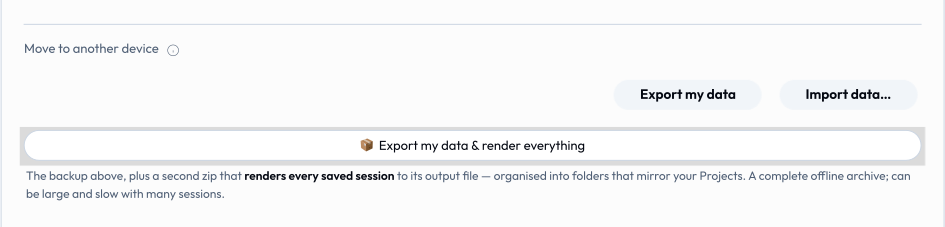
This page is the format spec. For the end-user walkthrough see Using Lolly → Moving to another device; the implementation is shells/web/src/data-transfer.ts with the round-trip contract pinned by tests/data-transfer.test.ts.
Scope. A bundle carries user data, not tools. Tools and catalog assets are synced separately and are assumed to already be present on the target (worst case at a higher version). Importing never installs or upgrades a tool.
Goals
- One format, every shell. The same bytes are produced and consumed by the web PWA, the Tauri desktop/mobile apps, and any future shell. The bundle is the contract; each shell's capability bridge is the per-platform adapter behind it.
- Survives the trip. A bundle mangled or truncated in transit fails loudly on import, never half-restores.
- Outlives this version. An older app can still import a newer bundle's recognised parts; a genuinely breaking format is refused cleanly.
- Safe to merge. Importing onto an install that's already in use never wipes anything that wasn't in the bundle.
The envelope
A bundle is a plain .zip. The download is named for the person it belongs to - LollyTools-<First>-<Last>-<YYYY-MM-DD>-<n>.zip (e.g. LollyTools-Ada-Lovelace-2026-06-26-1.zip) - so a Downloads folder of backups stays legible. The first/last parts come from the profile and are omitted when unset (no profile → LollyTools-2026-06-26-1.zip; first name only → LollyTools-Ada-2026-06-26-1.zip); each is sanitised to a filename-safe token (Unicode letters/digits kept, spaces/punctuation stripped, capped at 32 chars). <n> is a per-day, per-device sequence so repeat exports on the same day don't collide and stay in order. The name is built by backupFilename() in shells/web/src/data-transfer.ts; the zip's contents are identical regardless of name. Inside:
| Path | Required | Contents |
|---|---|---|
manifest.json | yes | Format id, versions, counts, and per-part integrity. The first thing a reader looks at. |
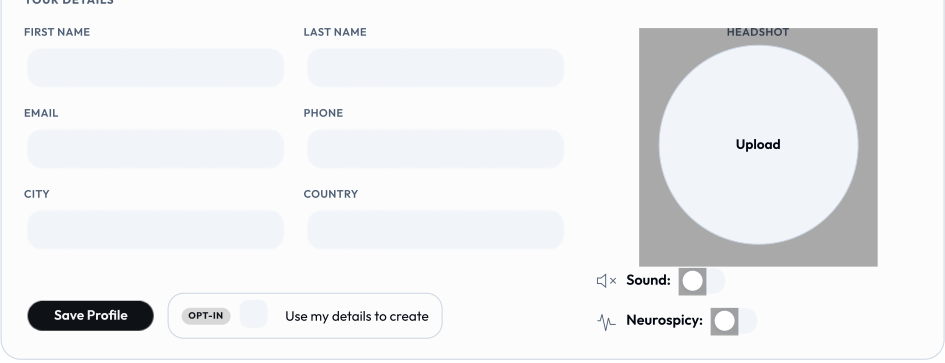
profile.json | when set | The user's me record (name, contact, headshot ref, flags). Read via host.profile. |
sessions.json | yes | Every saved session: slot, tool id/version, label, thumbnail (data-URL), and full input data. Read via host.state. |
assets.json | yes | Metadata for each uploaded image, each pointing at its bytes under assets/blobs/. |
assets/blobs/<n>.<ext> | per image | The raw image bytes. Stored uncompressed (already-compressed formats). The extension is cosmetic; the MIME in assets.json is authoritative. |
prefs.json | yes | User-owned local preferences: theme, sidebarWidth, and the ct-metrics activity tally. |
Being a plain zip is deliberate: it survives any transport intact and can be inspected with any unzip tool.
profile.json is the smallest part and the one a reader sees first in the app: the details a producer fills in once, plus the opt-in that lets tools use them.
manifest.json
{
  "format": "lolly-backup",
  "formatVersion": 1,
  "minReader": 1,
  "app": "lolly",
  "exportedAt": "2026-06-22T09:30:00.000Z",
  "counts": { "profile": true, "sessions": 2, "userAssets": 4, "prefs": 3 },
  "integrity": {
    "profile.json": "sha256-…",
    "sessions.json": "sha256-…",
    "assets.json": "sha256-…",
    "assets/blobs/0.webp": "sha256-…",
    "prefs.json": "sha256-…"
  }
}| Field | Meaning |
|---|---|
format | Always lolly-backup. A file without it is rejected as "not a Lolly backup". |
formatVersion | The layout this bundle was written with. Bumped on any change to the part set or shapes. Readers do not gate on it. |
minReader | The minimum reader version required to import this bundle safely. This is the field readers gate on. |
app | Producing app id, for diagnostics. |
exportedAt | ISO timestamp the bundle was created. |
counts | What the writer put in, for display and sanity-checking. |
integrity | Optional. Maps every part except manifest.json to an SRI-style sha256-<base64> digest of its uncompressed bytes. |
Version policy (forward compatibility)
The split between formatVersion and minReader is what lets the format grow without orphaning older installs:
- A reader imports a bundle when
manifest.minReader ≤its own reader version. It refuses (with "needs a newer version of the app") only when the bundle explicitly demands a newer reader. - An additive change - a new optional part, or a new optional manifest field - bumps
formatVersionbut leavesminReaderunchanged. Older apps still import every part they recognise; parts they don't are skipped (see below), not dropped silently. - A breaking change - one where importing a part wrong would corrupt data, or where a previously optional part becomes mandatory - raises
minReader. Older apps then refuse cleanly instead of importing something they'd mishandle. - If a future bundle sets
formatVersionbut omitsminReader, readers conservatively fall back to gating onformatVersion(treat the change as breaking).
Rule of thumb for authors: if every existing reader would still do the right thing by ignoring your addition, it's additive - bump
formatVersion, leaveminReader. Otherwise raiseminReader.
Integrity
When manifest.integrity is present, a reader verifies each listed part's SHA-256 before writing anything. A mismatch ("failed its integrity check") or a missing part ("incomplete") aborts the whole import - there is no partial restore. This catches the corruption a file transport can introduce (a truncated AirDrop, an email gateway that re-encoded the attachment, a bad USB sector).
Integrity is best-effort by design: it's written only where Web Crypto is available (every secure browser context and modern Node), and verified only when both the map and Web Crypto are present. A bundle without the map - e.g. one from before integrity existed - imports unchanged. "Can't verify" is never treated as "corrupt".
The manifest never lists itself; the digests cover the parts the manifest vouches for.
Import semantics
Import is merge-overwrite, never replace-all:
- Existing data on the target is left in place.
- Any key that collides - the profile, a session slot, an uploaded image id - is replaced by the imported copy.
- Nothing that wasn't in the bundle is touched. A session the target had but the bundle didn't survives the import.
Saved sessions re-link to their images automatically: asset references are kept by id, and the bridge re-resolves them after the uploaded images are restored (it must anyway, since blob: URLs don't survive a reload).
The import summary reports { profile, sessions, userAssets, prefs, skipped }. skipped is the count of parts from a forward-compatible newer writer that this build didn't recognise - surfaced in the UI ("… · N newer items skipped") so the restore is honest about what it left behind.
What does not travel
- Catalog caches (downloaded asset metadata and blobs, the tool index) - re-synced for free on the target.
- Tools and brand assets - out of scope; assumed already present on the target.
blob:/ object URLs - regenerated by the bridge on load.- The export sequence counter - the per-day download-naming counter (
localStoragekeylolly-export-seq) is a local naming convenience, deliberately kept out ofPREF_KEYSso it never rides in a bundle.
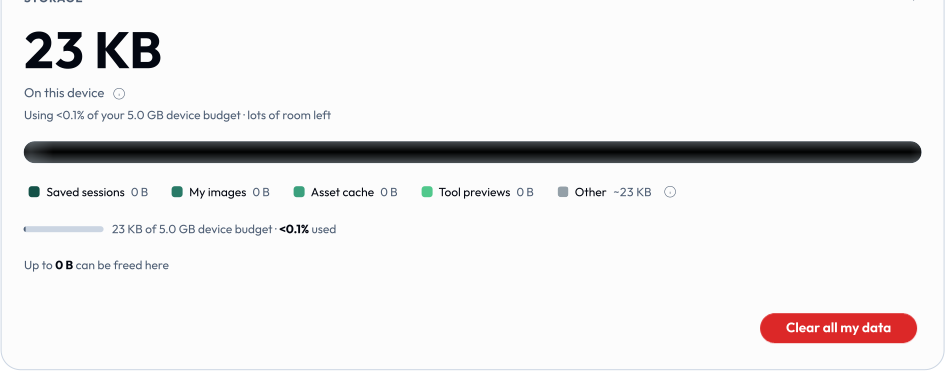
The storage meter itemises the same split. Saved sessions and My images ride in a bundle; the asset cache, tool previews and offline pins below them are all re-derivable, so they stay behind.
Cross-shell guarantee
data-transfer.ts reads and writes exclusively through the capability bridge (host.profile, host.state, host.assets) and the shared localStorage prefs. Because the bridge is the only seam, the same module produces a byte-identical bundle on every shell even though the storage beneath differs - IndexedDB on web, the filesystem on Tauri. The Tauri shells reuse this module unchanged; only their host.state implementation differs. The headless test exercises the full round-trip against an in-memory bridge, which is why it stands in for all of them.
The Node CLI shell is intentionally excluded: its state is in-memory and ephemeral per invocation, so there is no accumulated user data to carry.
Reserved extension points
The envelope is deliberately a manifest plus a set of named parts so that new kinds of portable data can ride it later without a breaking change - they slot in as additive parts (new formatVersion, same minReader), and today's reader skips what it doesn't recognise. These are on the roadmap, not yet implemented; the names are reserved here so the format stays coherent when they land.
tokens.json- design tokens. A W3C DTCG design-tokens document (the format Penpot imports and exports - tokens with$value/$type/$description, organised into groups, sets, and themes). Carrying a token set in the bundle lets a user move their brand primitives between installs alongside their sessions. Longer term, an ingested token set becomes a first-class source that tools and palette assets resolve against.penpot/- ingested Penpot files. A reserved directory for a Penpot file (or its extracted, Lolly-relevant subset) imported and surfaced as a tool. The bundle would carry the ingested definition so it travels with the rest of the user's data.
Anything outside these reserved names and the parts above is, to a reader, an unknown part: left untouched and counted in skipped.
Reference
- Module:
shells/web/src/data-transfer.ts(exportBackup,importBackup,BACKUP_FORMAT,BACKUP_FORMAT_VERSION,BACKUP_READER_VERSION; thebackupFilename()namer is internal). - Contract test:
tests/data-transfer.test.ts- round-trip, merge, integrity, forward-compat, and reader-gate cases. - Bridge surface used:
host.profile,host.state,host.assets- see Host API.