Configuration guide
Everything that shapes what a Lolly instance is - which brand it wears, which tools it exposes, what each tool is allowed to do - is configuration held in files, not settings buried in an app. This guide is the map of those files and the commands that act on them.
Profiles: brand + tool set
A profile binds a set of tool packs to a brand catalog. profiles.json at the repo root declares them:
{
  "default": "suse",
  "profiles": {
    "suse":        { "label": "SUSE",  "tools": ["community", "brands/suse/tools"], "catalog": "brands/suse/catalog" },
    "lolly-start": { "label": "Lolly Start (blank brand)", "tools": ["community", "brands/lolly-start/tools"], "catalog": "brands/lolly-start/catalog" }
  }
}
The repo-root tools/ and catalog/ are gitignored views of the active profile - never edit or commit them directly. Switch profiles with:
npm run profile            # show the active profile + what's available
npm run profile:suse       # community + SUSE tools, SUSE catalog
npm run profile:start      # blank brand: community tools + one neutral tokens asset
scripts/use-profile.ts builds the views: catalog becomes a symlink to the brand's catalog, and tools/ becomes a directory of per-tool symlinks merged from the profile's tool roots - later roots win on id collisions, so a brand pack can override a community tool of the same id. In a hosted or serverless build, pass --copy to materialise the views as real copies instead of symlinks (symlinks don't survive a function bundle). Writes through the views land in the real pack checkouts, so the normal edit → commit workflow is unchanged.
Brand packs
A brand pack is a directory (brands/<name>/) with a catalog/ and optionally its own tools/. Stand one up from a design-tokens export:
npm run ingest:brand -- <source> --name <brand> [--label "Label"] [--register|--activate]<source> is any container Penpot / Tokens Studio export the same DTCG document in - a monolithic tokens.json, a one-file-per-set directory, or a project.penpot archive. The extracted document lands at catalog/assets/<name>/tokens/brand.json as the pack's single core-tier tokens asset. --register upserts the pack into profiles.json; --activate also switches to it and rebuilds the catalog. See Design Tokens for the token model and Quickstart for the end-user brand flow.
Brand lock
A brand's tokens asset can be marked authoritative (brandLock on its index entry). When locked, user-supplied tokens can't override the brand - installUserTokens is the single chokepoint and isLocked() the gate. The SUSE pack ships locked (its brand is non-overridable); lolly-start stays open so the blank-brand onboarding can write to it. Lock a pack when the brand must not drift; leave it open when you want end users to bring their own.
Capability gating (per tool)
Each tool.json declares the host capabilities it needs (schemas/tool.schema.json). The valid flags are:
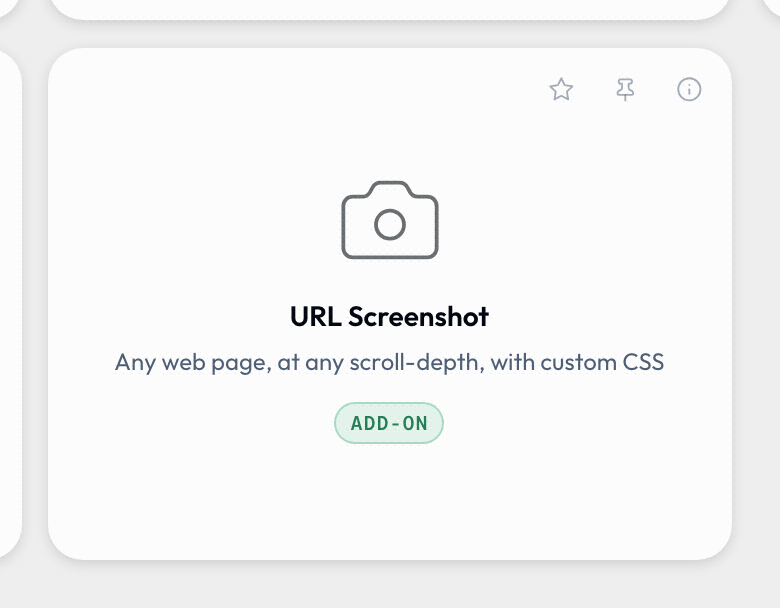
network · filesystem · clipboard · camera · microphone · ffmpeg · wasm · capture · composeA shell that can't provide a capability disables the tool rather than letting it fail - an ffmpeg tool is unavailable in the web PWA; a microphone/camera recording tool is unavailable in the headless CLI; a capture tool offers a browser add-on on Chromium and is marked desktop-only elsewhere. This is how one catalog serves web, desktop, and CLI without per-shell tool lists. network access is additionally allowlisted - a tool declares which hosts it may reach, and host.net enforces it.
Notice the badge: URL Screenshot declares capture, the browser cannot provide it alone, so the tile offers the add-on instead of vanishing.
Curating what users see
Two mechanisms narrow the catalog without forking it:
- Per-instance tool set - point each instance at a different profile (or a brand pack with a curated
tools/root) so marketing, sales, and IT can each see a different library from one codebase. - Per-user feature flags - surfaced in each person's Profile view, stored on their profile (so they sync). The gallery-category and Batch flags default to on (they show/hide whole gallery categories and the Batch entry); one privacy flag, Strip metadata from uploads, defaults to off (opt-in - see below). They are personal preferences, not an admin server setting, and they never gate output formats or any API surface. See Getting Started → Administration for the governance model around this.
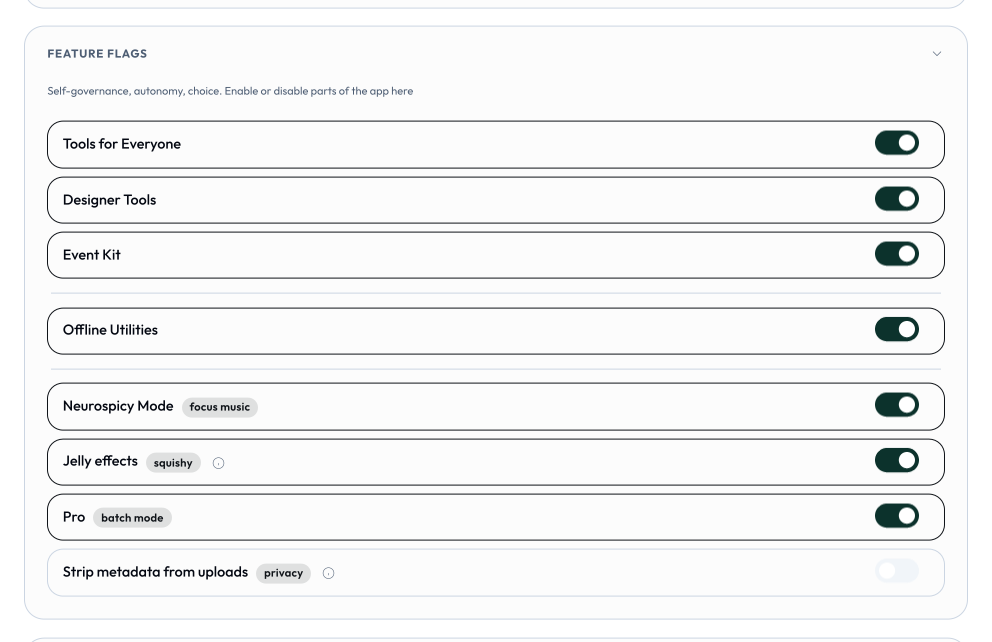
Strip metadata from uploads is the one opt-in (default-off) flag: turn it on and images uploaded to your catalogue are scrubbed of EXIF, location (GPS), and other embedded metadata on import. Content Credentials (C2PA provenance) are always preserved either way - a signed or AI-generated image keeps its credential whether the flag is on or off.
Maturity & watermarking
A tool's status controls trust signalling, enforced by the engine, not by convention:
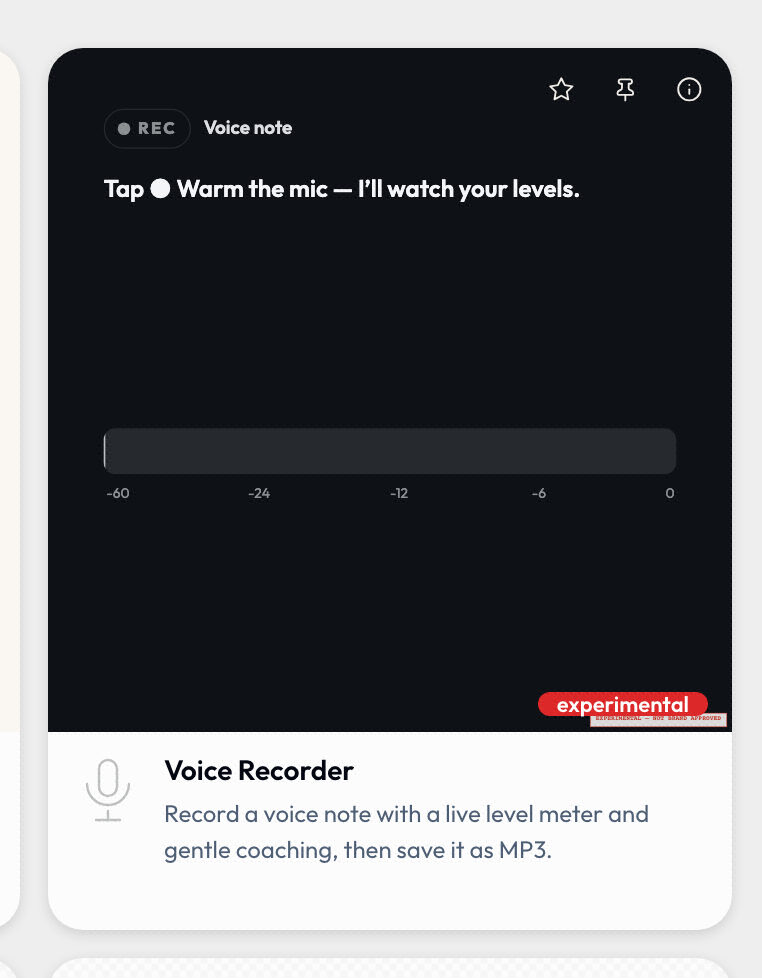
experimental- every export is automatically watermarked by the host (the tool can't remove it), so work-in-progress can't be mistaken for finished output.official- no watermark.
Promote a tool by changing one field in its manifest. The status is not an internal note: every surface shows it, so a reader knows what they are picking up before they open it.
Catalog build & validation
The manifest is the source of truth; catalog/tools/index.json is generated and must not drift.
npm run build:catalog     # index.json + asset checksums + preview bundle
npm run validate:catalog  # schema + invariants: checksums, file existence,
                          #   bindToProfile fields, palette refs, replacedBy chains
validate:catalog fails CI if the generated index drifts from the manifests, so run build:catalog after any tool.json or asset edit. Tool and asset IDs are permanent contracts - version in the manifest, never rename the path.
Engine & runtime knobs
Most runtime behaviour is fixed contract rather than deploy-time config, but two things are worth knowing:
- Engine version -
ENGINE_VERSIONinengine/src/version.ts(read the live value there;engine/CHANGELOG.mdtracks every minor). The capability bridge is additive-only within a major, so shells and tools built against an older minor keep working. See Host API. - Hook budgets -
HOOK_BUDGET_MSinengine/src/runtime.tstime-boxes async tool hooks (onInit5s,onInput2s, export hooks 5–10s). It's exported for tests; async overruns are abandoned, sync overruns only logged (hooks are not a sandbox - see Operators).
The services' own config
- CA service reads
services/ca/.envfor provider credentials and certificate policy (CA_CERT_DAYSdefault 30,CA_CERT_MAX_DAYSdefault 365, allowed day set). Policy stays server-side; see the Content Credentials Identity operator runbook. - MCP server exposes hosted endpoints with OAuth; self-hosting and the tool surface are covered in MCP Server.