
A Lolly link can download the file, ready it for pasting, open at print size, present a deck or sit inside another page with no controls. Each recipe below is an example to copy, with a link to the reserved word's row in Reserved URL parameters.
Most of these words are presence flags: the key alone is enough, and any value is ignored.
Download a file
Add export and the file downloads as soon as the tool finishes rendering. format= picks the file type, and filename= sets the download's name, without its extension:
/t/qr-code?url=https://example.com&format=svg&export
/t/qr-code?url=https://example.com&format=png&export&filename=homepage-qr → homepage-qr.png- The link opens. The tool reads its inputs and the reserved words from the address.
- The tool renders. The app waits until the canvas has settled and the design system's colours are ready.
- The file downloads. No click is needed.
Without format, the download uses the first format the tool lists. Without filename, the file is named after the tool id, as in qr-code.png.
format= takes any value in the tool's render.formats. A format the tool does not list falls back gracefully. Every format Lolly can open and make says what each format is for.
Every format value
Not every tool offers every format. The render.formats list in schemas/tool.schema.json defines the full set.
| Value | What you get |
|---|---|
svg | Scalable vector |
svg-anim | Animated SVG, a self-contained vector flipbook (animated tools only) |
emf | Enhanced Metafile vector, for Office apps |
eps | Encapsulated PostScript vector (RGB) |
eps-cmyk | Encapsulated PostScript vector in DeviceCMYK, a simple conversion with no output intent |
dxf | DXF cut file: AutoCAD R12, paths in millimetres, for laser, vinyl and CNC |
png | Lossless raster |
jpg / jpeg | Lossy raster |
webp | Lossy or lossless raster |
avif | AVIF raster |
jxl / jxl-lossless | JPEG XL raster, lossy or lossless |
tiff | Uncompressed sRGB raster (RGB TIFF) |
exr / hdr | Float raster interchange, OpenEXR and Radiance RGBE, written over a render with real headroom (hdr=1) |
pdf | PDF document |
pdf-cmyk | Print PDF: CMYK with an output intent (Print-ready output) |
cmyk-tiff | Print TIFF: a flattened CMYK raster |
pptx | PowerPoint deck with native editable text and shapes, and images and vectors you can extract |
idml | InDesign IDML: a static subset of the layout (Lolly Design) |
premiere-xml | Premiere XML sequence and its media files, in a ZIP (Lolly Design) |
scorm | SCORM course package, a ZIP a learning system imports (Lolly Design) |
penpot | Penpot design file: boards, editable shapes and the brand's colours, typographies and design tokens |
docx / odt | Word or OpenDocument text: headings and paragraphs read off the render, editable rather than a picture of the page |
ico | Icon bundle (Icon, Lolly Asset Export) |
zip | A bundle of several files, which a password can lock (Exporting) |
html | Static HTML document |
md / txt | Markdown or plain text |
json / csv | Structured data |
css / scss | Colour tokens as CSS custom properties or Sass variables |
gpl / ase | Swatches for other design apps: GIMP palette and Adobe Swatch Exchange |
ics / vcf | Calendar event or contact card |
srt / vtt | Captions: SubRip and WebVTT |
ttml / scc | Broadcast captions: IMSC1.1 timed text and CEA-608 pop-on (Captions) |
ttf / otf / woff | Font files (Convert Font) |
gif | Animated GIF (animated tools only) |
apng | Animated PNG with full colour and real alpha (animated tools only) |
webp-anim | Animated WebP with full colour and alpha, the smallest file (animated tools only) |
lottie | dotLottie animation (Lolly Design) |
webm | WebM video (animated tools only; Chrome, Firefox and Android) |
mp4 | MP4 video (animated tools only; Safari, iOS and recent Chrome) |
wav / mp3 / m4a / opus | Audio only: the sound with no picture |
mid | The notes of a Lolly Rondocode song as a Standard MIDI File (no audio) |
Transparency and outlined text
A tool that supports a transparent background has a transparentBg input. Pass it like any other on-off input:
/t/qr-code?url=https://example.com&color=%230c322c&transparentBg=1&format=png&export&filename=qr-transparentPNG, WebP, AVIF and SVG keep the transparency; the SVG then has no background shape. JPG and PDF ignore the setting.
Tools that export a vector format also get a convertPaths input from the engine: the Convert paths control. ?convertPaths=1 outlines text and ?convertPaths=0 keeps text live. It is off by default, so text stays live unless a link or the export panel asks for outlines. It is off by default. A tool that sets render.convertPaths: false has no such control, and the parameter does nothing.
Copy to the clipboard
copy gets the tool's Copy action ready. Pair it with format= to choose what is copied:
/t/agenda?title=Launch+day&format=html©
/t/qr-code?url=https://example.com&format=png©The copy waits for your first click on the page. A browser allows a clipboard write only after a gesture, so the app highlights the Copy button and copies on the click. Use export when nobody will be there to click. copy is for "open this link, then paste". The CLI ignores copy and writes to --output or stdout.
Set the size
width and height, or w and h, set the canvas size and fill in the export panel. They are not passed to the tool as inputs, and long and short forms mix (?width=1200&h=630):
?w=1920&h=1080 signed by Lollyvector SVG11 groups7 KBCheck it yourselfHent den signerte filen
 signed by Lollyvector SVG11 groups7 KBCheck it yourselfHent den signerte filen


Physical units (unit= + dpi=)
unit says what the numbers mean: px (the default), mm, cm, in, pt or pc. With a physical unit, each format comes out at its real size:
- PDF is a true page of that size, in points, with no resolution.
?w=210&h=297&unit=mm&format=pdfis an A4 page. - SVG carries the unit in its
widthandheight(210mm) with a pixelviewBox, so it scales cleanly. - PNG, JPG and WebP are pixels at
dpi, which defaults to 300: 210 mm at 300 dpi is 2,480 pixels. PNG also records the DPI in apHYschunk, so print and layout software places it at the intended size.
px follows the CSS convention of 96 pixels to the inch. The canvas takes the physical shape straight away, so the A4 link shows a portrait page before you export anything:
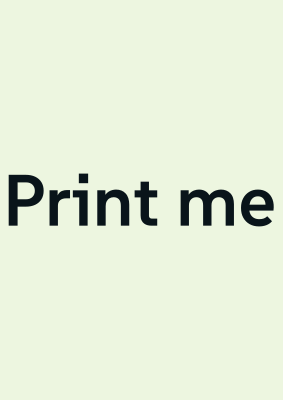 signed by Lollyvector SVG1 path141 nodes4 groups5 KBCheck it yourselfHent den signerte filen

lolly wordmark --text="Print me." --size=120 --width=210 --height=297 --unit=mm --export=svg --output=a4.svgA document with several artboards treats width and height as the size of one board; Reserved URL parameters explains how each format handles the set.
Open clean, embed or publish
Four flags change what the person sees when the link opens.
| Flag | What opens | Use it for |
|---|---|---|
full | The tool with the sidebar collapsed, so the artwork fills the window | Showing a finished piece, or running an unattended export with export |
options | The tool with the export panel already expanded | A link where the recipient is one click from a download |
iframe | Only the rendered output, with no app chrome, keeping nothing on the device | A tool placed inside another page (Embed a tool in a page) |
nostage | On a tool with no export, a plain web page with no controls | Publishing a jump page or a countdown as a page |
/t/gradient?full
/t/qr-code?url=https://example.com&options
/t/qr-code?url=https://example.com&format=png&filename=my-qr&export&full
/t/jump?heading=Our+links&nostage
With full
 signed by Lollyvector SVG54 paths378 nodes46 groups43 KBCheck it yourselfHent den signerte filen
 signed by Lollyvector SVG54 paths378 nodes46 groups43 KBCheck it yourselfHent den signerte filen


With options
 signed by Lollyvector SVG77 paths~6.0k nodes87 groups3 images88 KBCheck it yourselfHent den signerte filen
 signed by Lollyvector SVG77 paths~6.0k nodes87 groups3 images88 KBCheck it yourselfHent den signerte filen


If full and options both appear, full wins, because a collapsed sidebar leaves nowhere to show the export panel. Both are web only.
On a tool that exports, nostage makes the html export drop its fixed-size frame and fill the window, with the tool's content as the page body and no centred card or grey backdrop. It matches the Full page toggle in the export panel. On a tool with no export, the Share dialog offers the visitor page as Open as a web page (no controls) and ticks that box by default.
Present a deck
present opens a Lolly Design document as a fullscreen deck that advances on a click. Its frames become slides in presentation order. s picks where to start, and kiosk loops:
/t/design?z=…&present           ← from the first slide
/t/design?z=…&present&s=2       ← from slide 2
/t/design?z=…&present&s=2.3     ← slide 2 at its third build step
/t/design?z=…&present&kiosk     ← wrap at the end, for a screen in a lobby
A timed document without frames starts its playback instead, and kiosk loops the playback. Give each frame a dur for how long a sign stays on each slide.
Without present, s is a still filter: ?s=2&format=png&export downloads only slide 2. Presenting covers the deck in the app, and Presenting with camera puts your camera over the deck.
Print-ready output
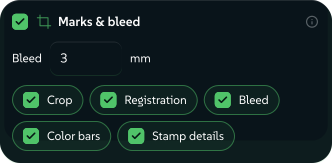
bleed= and marks= add what a print shop expects to pdf (RGB), pdf-cmyk (Print PDF) and cmyk-tiff (Print TIFF). Every other format ignores them.
?format=cmyk-tiff&bleed=3mm&marks=crop,reg,bleed,bars&profile=fogra51&export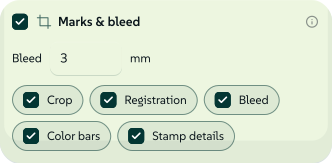 signed by Lollyvector SVG16 paths~1.7k nodes28 groups6 images29 KBCheck it yourselfHent den signerte filen
 signed by Lollyvector SVG16 paths~1.7k nodes28 groups6 images29 KBCheck it yourselfHent den signerte filen


bleed=3mmscales the design to fill the bleed and leaves the trim area unchanged. The PDF declares itsTrimBoxandBleedBoxfor the RIP. The TIFF grows to the full sheet, with the artwork over white to cover the bleed.marks=crop,reg,bleed,barsdraws crop marks, registration targets, bleed marks and a colour bar in the margin. Mark length, gap and stroke weight follow print standards.prov(PDF only) adds a small provenance credit in the proof margin, outside the trim.profile=fogra51sets the CMYK press condition. The Print PDF declares it in its output intent; the Print TIFF records it inImageDescriptionand keeps its pixels untagged DeviceCMYK, so the file is never mislabelled._spots=processprints every spot ink of the design system with the four process inks, so a Print PDF has only the cyan, magenta, yellow and black plates. Finishes such as foil keep their own plates. Spot inks as process explains the choice.
Print finishing and an open password cannot be combined, because the finishing step cannot write an encrypted PDF. A link that asks for a password with marks or bleed on a pdf, or a password on pdf-cmyk or cmyk-tiff, is refused and writes no file. The export panel's Strong lock covers a Print PDF (More on password).
How the marks are drawn in each format
Both CMYK formats use the same engine geometry: the PDF as vectors with declared page boxes, the TIFF rasterised onto an enlarged sheet.
In pdf-cmyk the line marks are DeviceCMYK 1 1 1 1, so they print on every plate. In cmyk-tiff they are written into the pixels as all four channels at full ink (C=M=Y=K=255), after the RGB to CMYK pass so they are not remapped. In the RGB pdf they are black. Registration prints on all four plates in both CMYK formats.
In pdf-cmyk the colour bar becomes a brand verification strip. The four solid process primaries (C, M, Y, K) come first as a fixed reference. After a wider gap, each brand colour that substituted in this artwork appears as an RGB swatch touching its CMYK substitution, so a press operator can confirm the swap happened. Only the inks used are shown, capped by the margin's width and at 12 brand cells. The RGB pdf and the cmyk-tiff, which converts each pixel with no exact substitution to check, show a general process, overprint and tint bar instead.
What the provenance credit says
The prov credit takes its text from the export's authorship metadata: the export time {YYYY-MM-DD HH:MM} at the top left, "Made with https://lolly.tools" at the top right and "{Tool} by {Author}" up the bottom left. It sits outside the trim, so the final cut removes the credit.
The author appears only when you have chosen to share your details (Settings → Your details → Use my details to create). When the export records a colourway, the tool's name carries the colourway, as in "Chart (Beach colourway) by Sam Rivera". With the Design system card off, or _madewith=0, the credit keeps its plain form. The design system's own name never appears in the credit.
When a Print PDF claims PDF/X-4
A named condition tells a RIP what the DeviceCMYK values mean, but PDF/X-4 also needs the profile inside the file. Lolly's one bundled CMYK profile, Coated FOGRA39, converts colours for the default condition but is not embedded, because it is ICC version 4.3 and PDF/X-4 accepts versions up to 4.2. So a named condition writes the output intent and not the GTS_PDFXVersion conformance claim.
Load a CMYK profile of your own, in Lolly Colour Lab or the export panel's Colour profile control, and choose its Embed row (profile=own in a link). The profile is embedded as the DestOutputProfile, and the file claims PDF/X-4 unless something else in the export makes the claim untrue: RGB artwork the CMYK pass could not convert, marks=prov (its credit is set in a standard font that is not embedded) or a strong password (X-4 forbids encryption). The output intent is written either way.
The intent declares the registered condition only where the profile itself proves one, through its own targ characterisation data or a lookup Lolly made in the ICC registry. Otherwise it declares Custom under the profile's own name.
Motion
Motion formats take fps, seconds, wait, codec and vq from the link. They match the export panel's Frame rate, Duration, Start after, Codec and Quality controls. motionblur adds blur and seqrange exports part of a movie. Their rows in Reserved URL parameters give the ranges.
/t/flythrough?format=mp4&fps=60&seconds=8&codec=h264&exportPin codec=h264 when the file has to play everywhere. Left on Auto, the encoder often picks AV1.
Contact sheets
A still export of a timed composition renders the frame at the playhead. A contact sheet asks for cuts=N stills sampled at equal intervals across the sequence, for a storyboard, a thumbnail sheet or a social carousel.
cuts=6 on a 12-second sequence
- 1s
- 3s
- 5s
- 7s
- 9s
- 11s
- The middle of each slice. Still i of N is taken at duration × (i + 0.5) ÷ N.
- Never the two ends. At 0s an enter transition has not faded in, and at 12s every clip has ended.
Six cuts of a twelve-second sequence sample at 1, 3, 5, 7, 9 and 11 seconds.
signed by Lollyurl-export-contact-sheet.htmlHTMLpixels, not shapes8 KBAI editedgenerated by Claude Opus 5.5Check it yourselfHent den signerte filenWith N above 1, pdf gives one PDF of N pages in time order. png, jpg, webp or svg give a ZIP of N files (-01 to -0N), because PDF is the only still format that holds several frames. Choose a .zip output filename. 1 is the single playhead frame.
Values are clamped to 1 to 64; 64 is already an 8 by 8 wall. Anything unparseable falls back to 1 and does not fail the export. For exact times instead of even ones, use sampletimes=0,1.5,3 (MCP sampleTimes: [0, 1.5, 3]).
The export panel's Frames field makes the same request (Exporting).
Contact sheets on the CLI and MCP
Web auto-export, the CLI and MCP send the same cuts request to the browser renderer. The CLI and MCP refuse a sampling request for a format that cannot take one. Ordinary web exports keep each format's own behaviour. The uniform sheet samples layer motion, while an embedded video keeps its parked poster frame; use a draft movie to review video. Explicit raster sampletimes requests drive supported media through the movie compositor.
Resume a saved session
A saved session is a named snapshot of input values stored in the browser. slot loads one by name, and any other parameter in the link overrides the saved value for that visit:
/t/wordmark?slot=launch-wordmark
/t/qr-code?slot=homepage-qr&format=png&export
A slot exists only on the device that saved the session. On the CLI, slot has no effect, and the CLI prints a warning. To move a session to another device, send its .lolly file (What a link carries).