
Declare identity, rendering, examples and a short walkthrough.
Part of Authoring Tools.
The manifest (tool.json)
Validated against schemas/tool.schema.json. Required fields:
id- lowercase, hyphen-separated, never changes once publishednameversion- SemVer; bump on every changeengineVersion- SemVer range, e.g."^1.0.0"status-official|community|experimental. Experimental tools watermark exports by default (the runtime applies it unless the caller overrides that choice). This is the positive counterpart to theprivacy: "on-device""no watermark" rule below.render- see Therenderblock below. At minimum{ width, height, formats }.inputs- array of input declarations (see Tool inputs)
Strongly recommended but not schema-required: description (the gallery's About card reads it), category and tags.
Optional:
requires- the optionalhost.*APIs your hooks call without feature-detecting them:["text", "tokens"], say. The runtime refuses to mount the tool on a shell that lacks one, before any hook runs, and the gallery greys it out there. An API you guard (if (host.text),host.text?.toPath(...)) is progressive enhancement and must not be listed. You do not have to maintain this by hand:node scripts/tool-requires.ts --writereads yourhooks.js, writes the list, and raisesengineVersionto the minor that introduced the newest API you depend on;validate:catalogwarns when the manifest and the hooks disagree.capabilities-["network", "filesystem", "clipboard", "camera", "microphone", "ffmpeg", "wasm", "capture", "compose", "screen"]. Device abilities rather than bridge APIs (that isrequires, above). Required for the host to expose those APIs to your tool, and what shells use to gate/label the tool where a capability can't be fulfilled. Tools without"network"cannot callhost.net.fetch- and a"network"tool must also declare which URLs (seenetwork, next); tools that usecomposesdeclare"compose"; a tool that records audio throughhost.recorderdeclares"microphone".network-{ "allowlist": [...] }. The https URLshost.net.fetchmay reach, for tools with the"network"capability. Fail-closed: no allowlist, no fetch. See Network access.examples- example input value-sets that demonstrate the tool's range, rendered live as the gallery tile's preview strip. See Example looks.listed- boolean, defaultstrue. Whether the tool appears in the gallery listing: the grid, search, favourites and the featured/utility strips. Setfalseto unlist a tool that is a mechanism invoked from context rather than a destination someone browses to -asset-export, reached from the per-asset Download in Assets, is the only unlisted tool in the SUSE pack. An unlisted tool still loads normally via#/tool/<id>, URL mode and the CLI; unlisting only removes it from the listing.new- boolean. Forces the gallery's New badge on this tool regardless of catalog position. Newness is otherwise inferred from catalog order - the most-recently-appended tools wear the badge and it self-expires as later tools ship - so set this to keep a tool flagged after it drops out of that trailing window.privacy-"on-device". Marks a content-transform utility that processes the user's own file entirely on the device. Shows the "Runs on your device - nothing is uploaded" badge; enforces (validated) that the tool is neverexperimentaland (at runtime) that exports carry no provenance metadata and no watermark. See file inputs and theexportFilehook.hooks-{ onInit?, onInput?, onFrame?, onLevel?, beforeExport?, afterExport?, exportFile?, exportStill? }boolean flags. If any are true, you must shiphooks.jswith the matching functions. (exportFileis the transform path - file bytes in → transformed bytes out;exportStilllets a tool own a raster still at a bit depth the 8-bit DOM raster cannot originate (16-bit/HDR PNG, OpenEXR, Radiance);onFramemakes the tool react to a live camera;onLevelmakes it react to live audio levels while recording - all covered in Tool hooks.) The list is exhaustive and the schema setsadditionalProperties: false, so a hook name that is not here is rejected at validation rather than accepted and silently ignored.composes- embed another tool's render as an image (see Tool composition). Requires the"compose"capability.a11yLabel- accessible description of the rendered output. The preview canvas is exposed to screen readers as a singlerole="img"; this is its label. It's a Handlebars string hydrated with the current input values (same context as the template), so it stays accurate as the user edits - e.g."QR code linking to {{url}}"or"Meeting plan for {{default count \"a\"}} people". Use{{default x \"fallback\"}}for empty inputs. Omit it and the label falls back to"<name> preview". Keep it short and factual - it replaces, not supplements, the canvas contents for SR users.
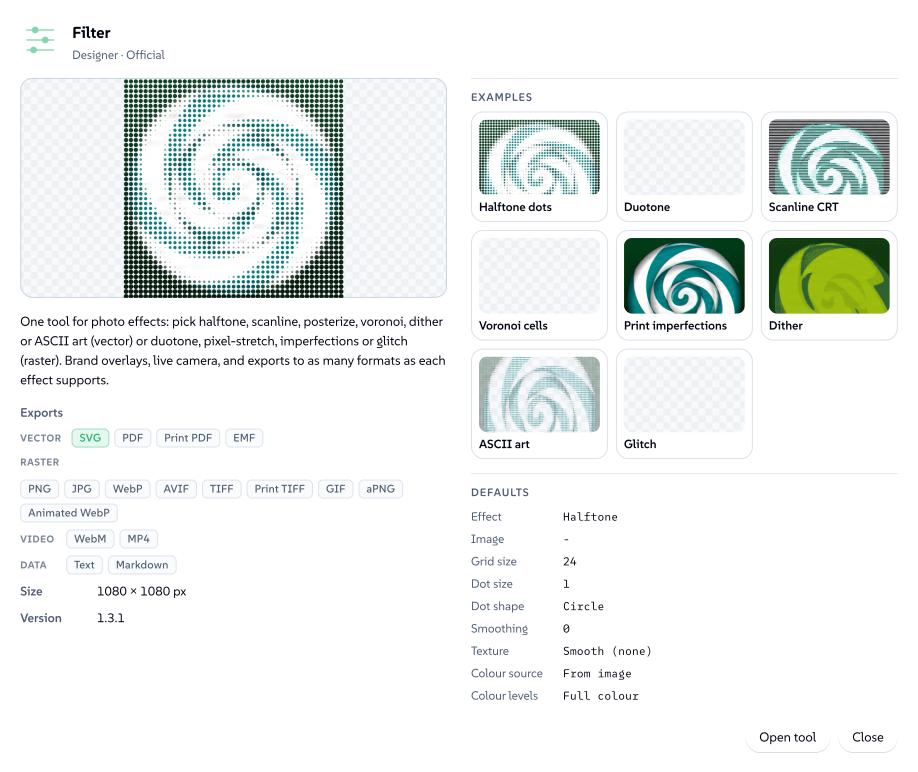
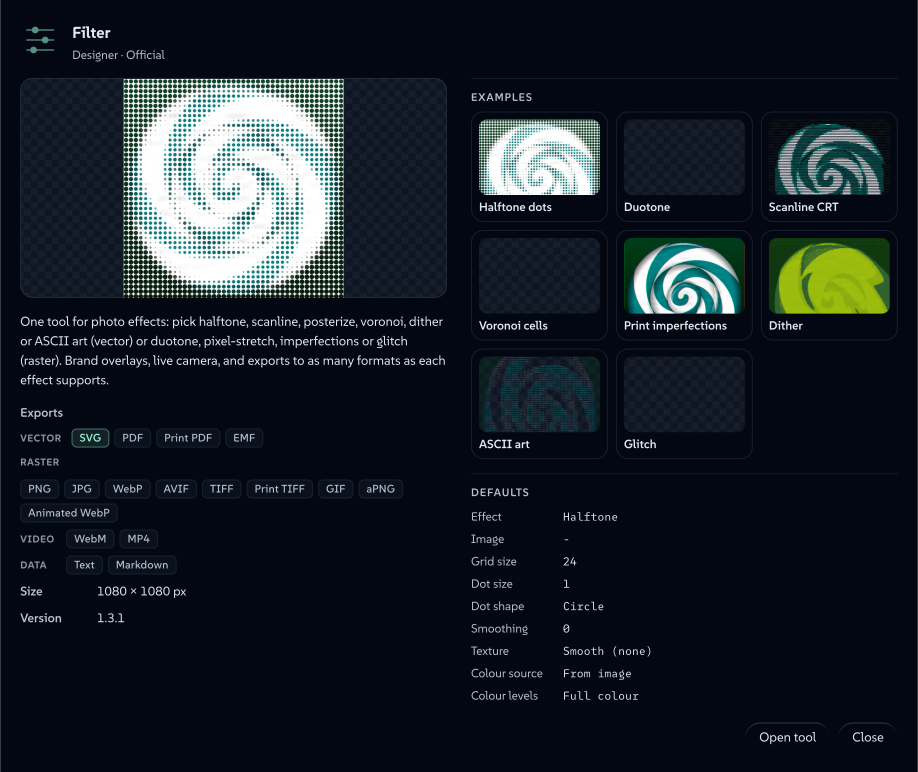
None of those fields stay private to the repo. The gallery's About card is the manifest read back to whoever is deciding whether to open the tool: name, category and status from identity, the export chips and canvas size from render, the version and a capabilities line whenever the tool declared any.
 signed by Lollyvector SVGOvěř si to sámStáhni podepsaný soubor41 paths~12k nodes78 groups130 KB
 signed by Lollyvector SVGOvěř si to sámStáhni podepsaný soubor41 paths~12k nodes78 groups130 KB


The render block
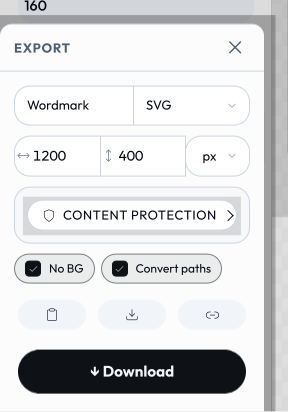
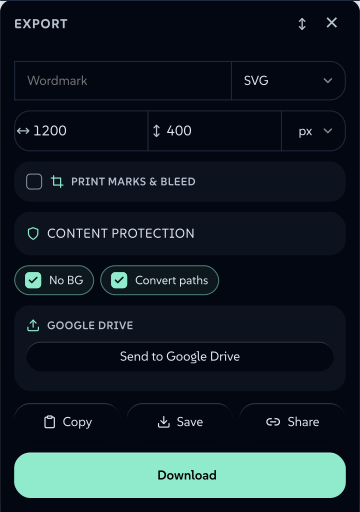
Most of what render declares surfaces in one place the user sees: the export popup. Formats, page size and unit, the Convert paths outlining toggle and the Content Credentials card are all keys below.
 signed by Lollyvector SVGOvěř si to sámStáhni podepsaný soubor60 paths~4.0k nodes75 groups3 images62 KB
 signed by Lollyvector SVGOvěř si to sámStáhni podepsaný soubor60 paths~4.0k nodes75 groups3 images62 KB


render carries width, height, formats (svg, png, pdf and the rest of the ids in the render.formats enum in schemas/tool.schema.json - vector, raster, print, document, motion, audio, data and font outputs. The enum is the authority on the whole set; URL Mode says what each id produces), plus these optional keys:
actions- which action buttons to show. One or more ofcopy,download,save,share. Defaults to['copy','download','save']if omitted.export- setfalsefor utility/interactive tools with no export (hides the download/copy/format/dimension bar; shows Save only when the tool has inputs).layout-sidebar(default),canvas,editor,documentordeck.canvashides the sidebar and presents the tool as a full-bleed working area; a single declaredfileinput becomes a drag-and-drop / click-to-pick zone on the canvas itself (used bystrip-data- drop a file → get a file back).editoris a chromeless free-canvas WYSIWYG surface: the sidebar is hidden but the render canvas and export controls stay, and the shell mounts a select / drag / resize / rotate / snap overlay driven by oneblocksinput whose rows carry acanvasgeometry flag (x/y/w/h/rotation). The shell also provides pasteboard behaviour for free: boxes dragged past the artboard stay visible and selectable (gently faded outside the frame, which keeps its shadow as the export boundary), while exports remain bounded by the canvas in every format - the tool template does nothing to opt in. The data stays flat and URL-expressible, so CLI and URL renders are identical.designis the reference tool.documentis a chromeless multi-page rich-text document surface for paged tools: likeeditorit keeps the render canvas and export controls, but the shell mounts a word-processor editor (an on-canvas format ribbon for paragraph style H1–H4 / bold / italic / lists / colour, per-block width/align/move/delete, click-to-edit contentEditable and rich-HTML paste that becomes headings/lists/tables). It drives oneblocksinput (content) whose rows are content blocks (heading/text/lolly/table); pagination lives in the tool's hook (blocks flow into fixed-size[data-pdf-page]boxes, the same paged-export mechanismmulti-page-pdfuses), so CLI and URL render the same document with no editor.doc-studiois the reference tool.deckis a slide-deck editor and, unlike the other three, it keeps the input sidebar: the shell mounts a live on-canvas overlay over oneblocksinput whose rows are slides, so a slide can be clicked and its text, colour and images edited in place, with a thumbnail rail for navigation. The DOM stays bounded because edit mode renders one active slide plus tiny thumbnails; the overlay restores a full-deck render before export.units- defaultstrue. Setfalseto offer pixels only: it hides the physical-unit (mm/cm/in/pt) selector and the DPI field from the download bar, so width and height stay in px and an on-screen pixel is an exported pixel. Use it for output that is inherently pixel-measured (screen assets, favicons) where a print size would make the width/height inputs disagree with the true raster resolution.convertPaths- defaultstrue. When the tool exports a vector format, the engine auto-injects a "Convert paths" toggle that outlines text to vector paths (in SVG/PDF/PDF-CMYK) so the output renders identically without the fonts installed. Setfalseto suppress it and never outline - e.g. a capture tool whose output is raster (url-shot), or a tool that draws its text as raster/canvas before export (event-name-badge,wayfinding-signage).transparentBg- defaultsfalse. Adds a "No BG" (transparent background) toggle to the export bar; the engine injects it into the input model so hooks can react viaonInit/onInput(chart-creator).preview-{ format?, auto? }. Marks a tool whose live canvas is a placeholder until an explicit, expensive render runs (e.g. a capture tool that screenshots a page inbeforeExport); the shell wires a[data-preview]control.auto: truerenders one frame on load. Used byurl-shot.video-{ wait?, duration? }(seconds; defaults1/5). Capture timing used whenwebm/mp4/gif/apngis informats(digi-ad).liveMaxEdge- integer px. ForonFrame(live camera) tools only: the requested longest edge of the working camera frame handed to the hook. The shell downscales the source camera to a small default that suits a vector trace, so a raster-output effect (thefiltertool's pixel-stretch) raises this for sharper output. The shell clamps it to the native camera frame - it never upscales - and to its own ceiling, and ignores it for tools withoutonFrame. A companionliveMaxEdgeInputpoints at a number input whose value overrides it, so the resolution can be a user-facing slider (re-applied to the live stream on change).c2pa- defaultstrue(Content Credentials are opt-out). The Content Credentials card in the export popup is pre-checked for every stampable format (pdf,png/apng,jpg,gif,svg,tiff/cmyk-tiff,webp,mp4/webm, zip members), so the finished file gets a signed C2PA manifest (on-device key, so viewers report it as an unverified credential). Setfalseto opt a tool out. Forced off forprivacy: "on-device"tools, which must never embed provenance into a user's own file. A?c2pa=link/save value overrides this per export.dims- setfalseto hide the export dimension inputs in the download bar.aspectWarning-{ min?, max?, message }. An editor-only amber caution shown in the Export popup when the chosen page aspect (width ÷ height) falls outside[min, max](either bound optional). It's purely a guard against picking a size that breaks the layout - it never appears in the exported output.multi-page-pdfdeclares{ "max": 1, "message": "…" }(portrait-only).denseSections- an array ofinput.sectionlabels whose short controls the web sidebar lays out two to a row. A presentation hint only: the input model, URL encoding and every headless render are untouched, and the grid drops back to one column on a narrow panel or under large text.sectionIcons- a map from aninput.sectionlabel to the name of a shell icon, drawn before the label on the folded section head so a tool with many sections (chartdeclares sixteen) can be scanned by glyph as well as by word. Same presentation-only contract asdenseSections: an unknown icon name draws nothing, and the CLI and TUI ignore it. Give each authored section an icon from the shell registry. Keep fields in a section consecutive, with primary content before secondary settings. Localized section captions retain their icon and density associations.
Physical units & print. width/height are values in the export's unit (px default, or mm/cm/in/pt), and dpi sets raster resolution for physical units. PDF exports a true page size; the CMYK formats (pdf-cmyk, cmyk-tiff) pair with the convertPaths outlining toggle to produce print-ready, fonts-not-installed output. A select option can also carry width/height/unit to drive the export page size from a dropdown - e.g. wayfinding-signage's Sign size select (A4/A3/A2… in mm) sets the printed page proportions when chosen.
printMarks- unset by default: the print-finishing card is offered for the print-capable formats, but its master toggle starts off for RGB vector output (pdf/svg/eps) and on only for the separating press formats (pdf-cmyk/cmyk-tiff/eps-cmyk). Settrueto declare print intent - the card then defaults on for every print-capable format. Setfalseto opt a tool out of the card entirely (crop/registration/bleed marks). Multi-page PDF tools setfalsebecause their output is a paginated RGB document, not a single marked plate. Physical units (mm/cm/in+dpi) alone never enable marks or bleed - an explicitbleed=/marks=link, a user toggle or declared print intent does.paged- defaultsfalse. Marks a multi-page document tool (one that lays out several[data-pdf-page]boxes, likemulti-page-pdf); the gallery renders each page as its own horizontally-scrollable preview slide rather than input-variant examples.paginate-{ "source": "<tableInputId>" }. Engine-driven pagination: the runtime hydrates your template once per row of the namedtableinput and wraps each hydration in its own[data-pdf-page]box - you author ONE page and never manage pagination, page counts or loops. Each hydration's context gains apageobject:page.index/page.number/page.count,page.first(the row's first cell - the natural page title),page.cells([{ column, value, col }]for every column -colis the cell's original column index, stable even when the template renders only a subset),page.fields(cells minus the first - the labelled body fields, whose labels are the user's own column headings) andpage.byColumn(trimmed lower-cased column name → the row's cell, for by-name lookup:{{lookup page.byColumn "icon"}}). A template can opt any rendered cell into the web shell's on-canvas editing by stamping itdata-cell="{{page.index}}:{{col}}"(adddata-cell-mdwhen the cell holds markdown rendered with{{{markdown value}}}- edits round-trip back to markdown in the table input; without it the cell edits as plain text), and can offer a click-to-pick image slot withdata-cell-pick="{{page.index}}"plusdata-pick-column="Icon"(the column written to, created if absent) and optionaldata-pick-tag="icon"(catalog tag filter). Pair withpaged: truefor the scrolling all-pages canvas and filmstrip.battlecardsis the reference tool: a hook-free one-card template that turns any pasted table into a multi-page PDF, one card per row.filmstrip-"left"(default) or"bottom". Which edge apagedtool's slide-sorter thumbnail rail runs along.leftis a vertical rail beside the canvas, right for tall documents;bottomis the deck-strip shape, for tools whose pages are wide and few (cards, slides), where a left rail eats the width the page needs.battlecardsusesbottom.pages-{ count, width, height, gap?, min?, max? }. Turns aneditor-layout tool into a multi-page canvas (the social-carousel pattern): the shell sizes the canvas to a horizontal strip of N same-size page frames and the free-canvas overlay places boxes across all of them. Box coordinates stay one flat, global, URL-expressible array; the tool's hook derives which page each box belongs to and emits one[data-pdf-page]frame per page, so headless CLI/URL renders match and export fans out (multi-page PDF, or one still per page). Requireslayout: "editor"andpaged: true. Each property holds the input id the geometry is read from (count/width/heightare number inputs), so the shell stays generic.
Multi-page PDF. A tool builds a paginated PDF by marking page boxes in its template with data-pdf-page - each flagged element becomes one true PDF page sized to its own CSS box, so a cover, content that flows across pages and a back page render as real pages rather than one tall image. Pages are drawn as vectors (text outlined to paths) and the document can carry an open-password. The path falls back to the normal single-page renderer when no [data-pdf-page] boxes are present, and it bypasses the crop/bleed print-finishing path (pair it with printMarks: false). See the multi-page-pdf tool for the reference layout (cover + flowing blocks content + back page).
Example looks (examples)
A tool ships one committed thumbnail, but examples lets its gallery tile demonstrate range: an array of example input value-sets, each rendered live on the client (the same off-screen engine path an export takes) as a horizontally-scrollable preview strip - and, when the tool is featured, as the hero row's cross-fade. Each look is memoised, so later visits are instant. Omit it for a tool whose single committed preview says enough.
"examples": [
  { "label": "Launch teal",  "values": { "heading": "Ship it", "background": "#0c322c" } },
  { "label": "Reverse mark", "theme": "dark", "values": { "ink": "mono" } }
]- Key
valuesby inputid- never byurlKey. Example values seed the runtime the way batch-row values do: resolved by input id only. AurlKeyis URL-mode transport, so a urlKey-keyed value would silently render the tool's default look - and the validator errors on it. When copying a compact share link into an example, translate each short key back to its input id first. labeldocuments the look's intent (it isn't shown to end users).theme(light/dark) is only for looks that render ink on a transparent background (e.g. a reverse/white logo) - the clashing theme filters that look out of the strip; omit it when the look bakes its own background.width/heightinvaluesare honoured as per-example preview dimensions even when the tool declares no such inputs.- An
assetvalue must be a ref object, never a bare string:{ "source": "library", "id": "your/asset/id", "_unresolved": true }(optionally with a?theme=suffix on a themable icon id). Ablocksvalue is an array of row objects keyed by the block's declared field ids.
pnpm run validate:catalog checks every look: values keys must be declared input ids (a urlKey gets a pointed error naming the right id), catalog asset refs must exist (and any ?theme= suffix must name a real icon theme), blocks-row keys must be declared fields. It also warns when a tool declares looks but no gallery-displayable format (svg/png/jpg/jpeg/webp), and when a strip exceeds 8 looks - each look is a live render, so keep it to a handful of genuinely different ones.
The pre-examples alias featured.variants still renders but is deprecated - author examples.
A short walkthrough (guide)
Some tools aren't finished when the render is. An email signature is finished the moment it's pasted into Gmail's settings, and nothing on the canvas says so. guide is a handful of steps for that last mile, shown by the shell as a dialog behind a help button beside the tool's name - and opened once automatically the first time a device opens the tool.
"guide": {
  "title": "Put it in Gmail",
  "tracks": [
    {
      "id": "desktop",
      "label": "On a computer",
      "steps": [
        "Open **Export**, set the format to **HTML**, and press **Copy**.",
        "In Gmail, open **Settings** and choose **See all settings**.",
        "Paste into **General → Signature**, then press **Save Changes**."
      ],
      "note": "Outlook and Apple Mail take the same paste."
    },
    { "id": "mobile", "label": "On a phone", "steps": ["…"] }
  ]
}- One track per route the user might take (on a computer vs on a phone). A single track renders as a plain numbered list; two or more render as tabs, so the alternative is visible rather than buried. Up to four tracks, eight steps each.
- Steps are plain text.
boldis the only markup, for naming the control a step points at - everything else is escaped. Link to the docs from a step when the long version is what's wanted: this is a nudge, not documentation. idis a contract like an input id - the i18n sidecar path is built from it (guide.tracks.<id>.label/.note/.steps.<index>, plusguide.title), so renaming one orphans its translations.- Point at controls the shell actually has. If a step says "set the format to HTML",
render.formatshad better still includehtml.