
Agenda turns one session table into screens, an interactive programme, printable pages, calendar files and PowerPoint presentations. Choose a starter such as Foyer screen, Room screen, Animated overview or Interactive programme, then use the active design system for its typography, colours and logo.
Editing the programme
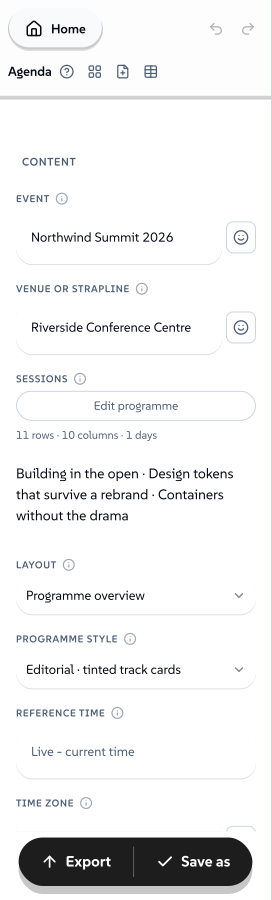
Arrow keys select cells. Enter or F2 starts editing; arrows then move the text cursor. Enter commits and moves down, Shift+Enter moves up, Escape cancels, and Alt+Enter adds a line. Shift+arrows select a rectangle. Copy, paste and Delete act on that selection. Tab leaves the cell so keyboard users can reach the rest of the editor.
 signed by Lollyvector SVGSemak sendiriDapatkan fail yang ditandatangani63 paths~7.5k nodes112 groups2 images98 KB

Paste into a selected cell to fill a rectangle without changing the other sessions. Open Edit programme for a wide grid and a session form. Import programme accepts spreadsheet paste, including HTML tables, or CSV/TSV files. Review the column mapping and sample rows before choosing Add sessions or Replace programme. Unknown columns stay in the source. Undo and redo restore whole table edits. The same virtual grid handles short programmes and 500-row schedules.
The form includes date/time pickers, room/track suggestions, descriptions, links, status and optional image URLs. Insert, duplicate, delete or move sessions without rebuilding the table. Shift times changes the active session or all rows by whole minutes and days, recording end dates when midnight is crossed. Preview this time sets the screen reference without changing the programme.
Keep the Session ID column when revising a session. Together with Event ID, it provides the calendar UID and the portable page's session link. New starters have IDs; the first explicit table edit adds them to an older programme. An untouched legacy programme remains readable without rewriting its URL.
Dates use YYYY-MM-DD. Start and End are event-local times. A blank End means one hour. Use End date for an overnight or multi-day session. Without an end date, End must follow Start on the same day; 24:00 means the next midnight. Invalid dates, duplicate IDs and invalid or ambiguous daylight-saving times remain visible as data issues. Fix these before exporting. Room, track and speaker overlaps are separate warnings. Cancelled sessions remain in calendar revisions and the attendee page but leave the operational screens.
Screens and motion
Overview, Departures, Now and next, Spotlight, Track chapters, Room wall, Wide ribbon, Starting soon, Intermission and Event close share the same session data. Room, track and day filters narrow an individual screen. The page count, event identity and time-zone label preserve orientation while scenes rotate.
Reading distance controls the type size. Long titles hold at the beginning, travel at a constant speed, and hold at the end. The scene extends when its text needs more time. Scenes and coverage shows scene previews, duration, minimum title/anchor sizes, longest wait and fit or timing issues. Advanced Scene order accepts session IDs; unlisted sessions follow in programme order. Type is measured after the brand font loads and after a size change. It is not reduced to make an unlimited programme fit on one screen.
The event clock decides which sessions are happening. The presentation clock decides which scene and title position to show. Set the event time zone so a display in another location uses the event's time. A blank zone uses floating event time and the display device's local clock. Reference time fixes a moment for review.
Video offers three time policies:
- Snapshot holds the reference moment, or the moment export began.
- Evergreen shows the programme without a claim that it is live.
- Rehearsal advances from an explicit reference time.
Recorded video never receives programme updates. Portable screen HTML can follow its device clock, but its schedule is the exported snapshot; export it again after schedule changes. Space pauses a screen, arrow keys change scene, and the playback controls appear on focus or hover. Reduced-motion mode wraps titles and pauses automatic playback.
Silk, luminous and contour backgrounds share the Backdrop shader source. Colour planes, paper, patterns, depth and clear surfaces have CSS fallbacks. All use the selected design system's colours. Background intensity and variation are reproducible. Strict palette mode disables blended shader treatment. Gallery and spotlight layouts can show session photos; an optional background image keeps solid reading surfaces. Reading surfaces stay opaque, the shader resolution is bounded, and the presentation owns one export clock for both the background and the text.
Interactive HTML
Choose Interactive page and export HTML. The file embeds its fonts, logo and declared presentation runtime. It supports search, day/track/room filters, session details, back/forward navigation, calendar downloads for all or selected sessions, and print. It works without a server and provides a readable programme when scripts are disabled.
The page's session links belong to that file or hosted copy. The regular Lolly editor URL remains the editing and sharing route for the source programme.
PowerPoint and print
Editable PowerPoint and PDF use measured pages with full titles. PowerPoint uses native text and shapes, with fades and timed slide advances when motion is enabled. Editable slides name the brand fonts; install those fonts on the presentation computer to preserve their typography. A single-image export that would need multiple pages explains the fit problem instead of silently omitting the rest of the programme.
Animated PowerPoint embeds an H.264 MP4 and a poster, followed by readable slides. Its movie preserves the rendered brand typography and carries autoplay and loop timing. Opening, autoplay and looping were verified in PowerPoint for Mac; Windows and web playback remain unverified. The speaker notes describe the recorded time policy. A browser that cannot encode H.264 refuses animated PowerPoint and offers the editable route. Standalone MP4 and WebM remain available.
Event kit
Export ZIP for a standalone programme, foyer screen, one screen per room, a static scene contact sheet, full-text PDF, poster PNG, ICS calendar and a README with the shared revision and time policy. Enable Include video in event kit for an additional recorded MP4. The source table is shared; room files are display configurations and do not require maintaining separate agendas.
Generation is sequential and bounded: up to 32 rooms, 32 MB of fetched resources per HTML file and 256 MB per bundle. Kit video is limited to ten minutes; longer programmes can be exported separately. The PDF and poster share one frozen reference instant. Each HTML file contains its own permitted fonts and images and works offline. Republish the files after schedule changes.
The programme editor, tool inputs and portable audience controls have translations for all 26 supported interface languages. Programme content remains in the language you wrote. The Two-day conference starter includes long titles, simultaneous tracks and an overnight session.
Authoring contract
render.portable: true declares a tool's presentation.js. The loader fetches and verifies it with the other signed tool files. Trusted installed tools can export the declared script with their hydrated markup through ExportOpts.portableDocument; remote and consented sideloads cannot use this executable export path.
The browser presentation can expose __lollyPresentation on a [data-presentation] element. Its prepare(format, opts) returns a restoration function, so the export bridge can measure full-text pages and then restore live playback, including after an export failure. The existing per-canvas frame-clock contract supplies deterministic motion frames. Hooks remain independent of the DOM. From engine 1.216, export lifecycle hooks also receive the current input model for validation.
tableEditor is an additive input-model hint. Fields have stable semantic keys and persisted column names, optional aliases, editors, primary/required/identity flags and paired dates. Labels can be translated independently of the saved table headings. Other tools can use this editor without Agenda-specific shell code.