
This guide covers the optional organisation service. Configuration, console and API paths refer to your Work instance. The packaged console keeps its release-matched copy of this guide.
The control plane is Lolly's fourth shell: it can render a tool server-side to bytes, and it can wrap that render in a signed, expiring, revocable URL. Everything here enforces policy before rendering.
 signed by Lolly Demovector SVGVerifica tu stessoScarica il file firmato11 paths177 nodes104 groups194 KB
 signed by Lolly Demovector SVGVerifica tu stessoScarica il file firmato11 paths177 nodes104 groups194 KB


Server renders
GET /render/<toolId>.<format>?<tool inputs>Formats: svg and png (rasterised with resvg) always; jpg and pdf too when a Chromium render worker is configured (deployment). The flow: load the tool through the real engine → resolve overlays for the caller's groups → refuse or bake locked inputs → render → optionally watermark → optionally embed provenance / sign → cache.
- Authorization: a signed-in caller needs
export.server(admin default, grantable). A guest admitted to that tool may render that tool. Undergatedmode, no principal at all is a401. - Policy first: a caller-supplied value for a
lockedinput is a422 INPUT_LOCKED; the locked value is baked in regardless of the query.hiddeninputs are absent from the schema the shell ever saw. - Caching: an in-process LRU keyed by the render cache-key contract, plus an
ETag(private, max-age=60). The key folds in the pack version, the overlay state, provider fragment hashes and a fingerprint of the instance's own assets, so a policy edit, a catalog refresh or a new asset version invalidates exactly the affected renders and nothing else. - Hooked tools: a tool shipping
hooks.jsdoes not run in the in-process jsdom fast path unlessrender.allowHooksInFastPathis on. With a Chromium worker configured it dispatches there; without one it is refused with501 HOOKED_TOOL_NEEDS_CHROMIUM. Policy stays in the control plane either way - the worker returns SVG, and watermarking, provenance and rasterisation happen here. - The engine, jsdom and resvg are imported lazily, so a deploy that never renders never loads them.
Signed links
POST /api/v1/links      { kind, target, ttlHours?, password?, projectId? }
GET  /l/:id?s=<sig>
POST /l/:id?s=<sig>     { password } or, on a guest link's landing, { name, password? }
POST /api/v1/links/:id/revoke
GET /api/v1/links[?all=1]| Kind | What it does | Action required |
|---|---|---|
share | resolves to the rendered bytes | link.create |
embed | same, for embedding | link.create |
download | same, with Content-Disposition: attachment | link.create |
guest-edit | admits a guest session scoped to the tool/session | link.create-guest |
target needs a toolId, a sessionId, or an assetId. The signature covers the link id, kind, expiry and a digest of the resolved target - so neither the target nor the expiry can be edited in the URL bar, and the minted parameters are what gets rendered (the caller's query on /l/:id is ignored). Optional passwords are scrypt-hashed; see Password links.
Failure modes are distinct and honest: 403 BAD_SIGNATURE, 410 LINK_EXPIRED, 410 LINK_REVOKED, 401 PASSWORD_REQUIRED, 401 PASSWORD_INCORRECT and 429 PASSWORD_LOCKED. An API client gets them as JSON. A browser (a request that accepts text/html) gets a short page instead that says what happened in words: the link does not work, has ended, was turned off by the person who shared it, or has had too many wrong passwords.
Guest links in a browser
A browser that opens a guest-edit link gets a landing page, not JSON. It says who invited them and to which tool, when the link ends (in UTC, since the page runs no script), and asks for their name, and for the password when the link has one. Opening the page admits nobody, so a chat preview or a mail scanner that fetches the link is not counted as a guest.
Join as a guest posts the form to the link's own address. The server then checks the password, sets the lw_guest cookie, records one guest.admit audit entry and answers 303 into the app at the link's tool, with the inputs the link was made with (/#/tool/<toolId>?…, under instance.appUrl on a split deployment). The app lets a guest past its sign-in screen. A wrong password shows the landing again with the reason and keeps the name typed. When guest links are switched off (policy.guestLinks.enabled: false), or the person who made the link can no longer share it, the page says so and admits nobody.
An API client that sends no Accept: text/html keeps the older answer: GET /l/:id with an optional &name= sets the cookie and returns { kind, toolId, sessionRef, guest } as JSON.
Password links
A link minted with a password asks for it, and the password never has to sit in the link's URL:
- A browser that opens the link gets a short page with a password field. The form posts to the link's own address.
POST /l/:id?s=<sig>takes the password as the form fieldpasswordor as JSON{"password": "…"}. The right password sets an HttpOnly cookie,lw_link_<id>, scoped to that link's path (Path=/l/<id>), for 12 hours at most and never past the link's expiry. A form gets a303back to the link; JSON gets200 {"ok": true}.- The cookie stands in for the password and nothing else. The signature, the expiry and revocation are still checked on every request, and one link's cookie never opens another.
- A collection link's item and Download all addresses carry no password: the cookie opens them.
- A password link answers
private, no-store, because the cookie, not the URL, decides who reads it, so no shared cache may answer that URL for someone else. - Ten wrong passwords from one address within 15 minutes lock the link for that address (
429 PASSWORD_LOCKED, withRetry-After).
Adding &pw=<password> to the link is deprecated. A password in a URL stays in browser history and in server, proxy and CDN logs. It still opens the link for one more release: the answer carries a Deprecation header and sets the same cookie, so the page's own links work without the password in them, and the server logs one warning per link. Move anything that builds &pw= links to the form or the POST.
Linking a catalog asset
share, embed and download also take a catalog asset as their target - an instance asset (inst/…), a federated one (ext/<provider>/<remoteId>) or a pack asset id - with an optional format naming which of the asset's formats to serve (the first, otherwise):
POST /api/v1/links { "kind": "download", "target": { "assetId": "inst/hero", "format": "png" } }Two checks, at two different times, and both matter:
- Exposure, at mint. The minter must be able to see the asset - instance-asset groups, provider group visibility and the provider's exposure slice, exactly as the catalog routes apply them. You cannot mint a link to bytes you could not fetch yourself (
403). - Lifecycle, on every visit. The link resolver asks the same gate the feed and the blob routes ask, so an expired, not-yet-published or revoked asset stops serving on a link that is still live (
410 ASSET_EXPIRED). A hold is not a refusal: it only ever preserves availability, so a held asset keeps serving.
download sets Content-Disposition: attachment; share and embed serve inline. Either way the bytes carry the same private, no-CDN cache headers as /catalog/* plus a content-security policy that sandboxes them and allows no script, so a shared SVG cannot execute as the person who opens the link. An old federated id keeps resolving after an exit through its alias. TTL, passwords, revocation, audit and link.visit telemetry are unchanged - an asset link is an ordinary link that happens to point at an asset, and the console's Links view lists it as one.
Linking a collection
share and download also take a collection as their target - the same signed-target mechanism one level up:
POST /api/v1/links { "kind": "share", "target": { "collectionId": "launch-kit" } }shareresolves to a minimal listing page the instance serves itself: brand chrome from the same unauthenticated/api/brandsources the sign-in screen uses, the collection's assets with previews, a download per asset, and one Download all button.downloadresolves straight to the zip.embedis refused at mint (400). A collection is a list, not a byte stream.
The two checks are the same two, one level up: exposure at mint and lifecycle on every visit, per member. Minting requires the minter to see the collection and every asset it names; a mint that fails is a 403 MEMBER_NOT_VISIBLE reporting how many members were unseen, never which. An expired or revoked asset leaves the page and the archive together, on a link that is otherwise live; the page says how many were left out, never which.
The page shows that collection and nothing else: no search, no browsing past the set, no self-registration, no route into the rest of the catalog. Asking the link for an asset the collection does not name is a 404 NOT_IN_COLLECTION even though the signature is valid.
The archive is built in-process from Node's own zlib, streamed member by member, with entries named for the asset and de-duplicated. A set too large to zip is refused up front rather than truncated silently.
Expiry is enforced from the signature alone, so a link outlives a lost database row only until its own expiry. Revocation is immediate and kills live guest sessions using that link. A member can always revoke their own link; revoking someone else's needs link.revoke.
Guest links are additionally capped by policy.guestLinks.maxTtlHours and can be disabled outright (403 GUEST_LINKS_DISABLED). See identity.
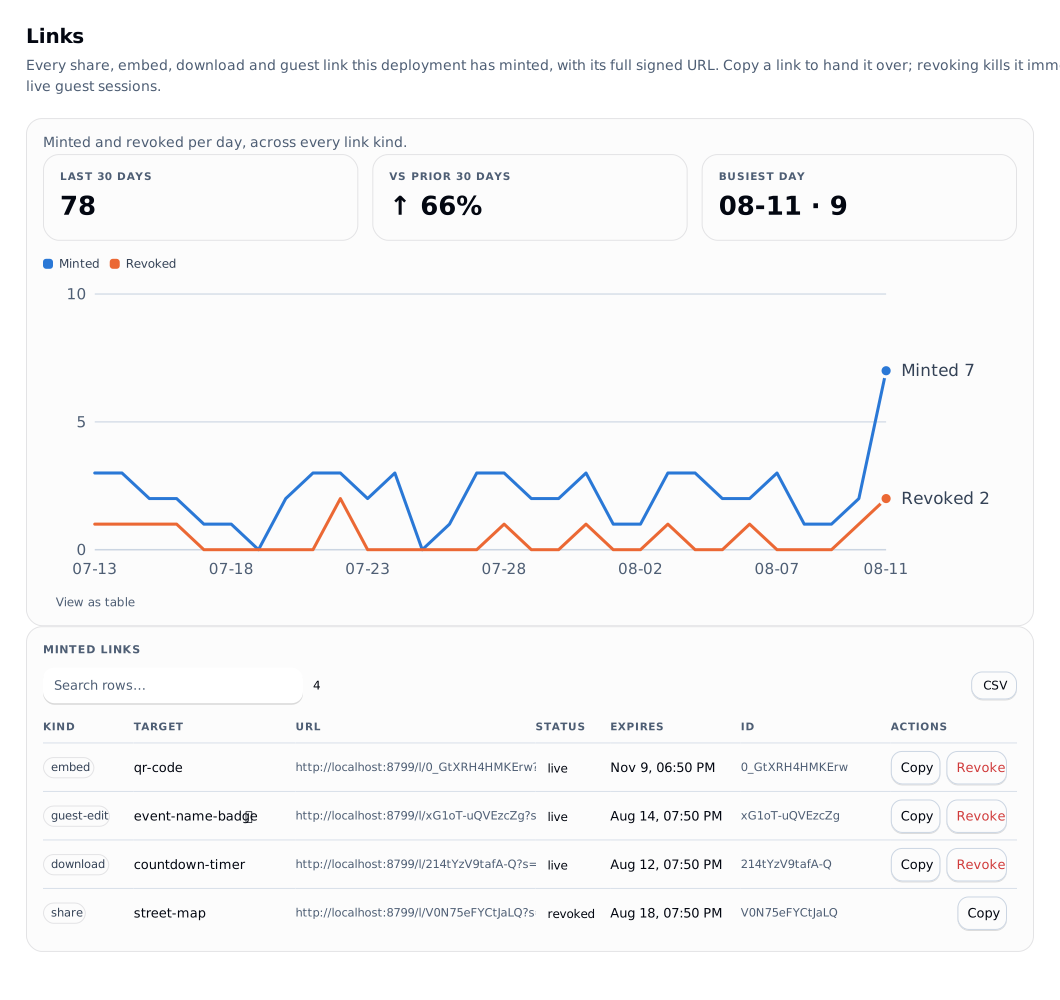
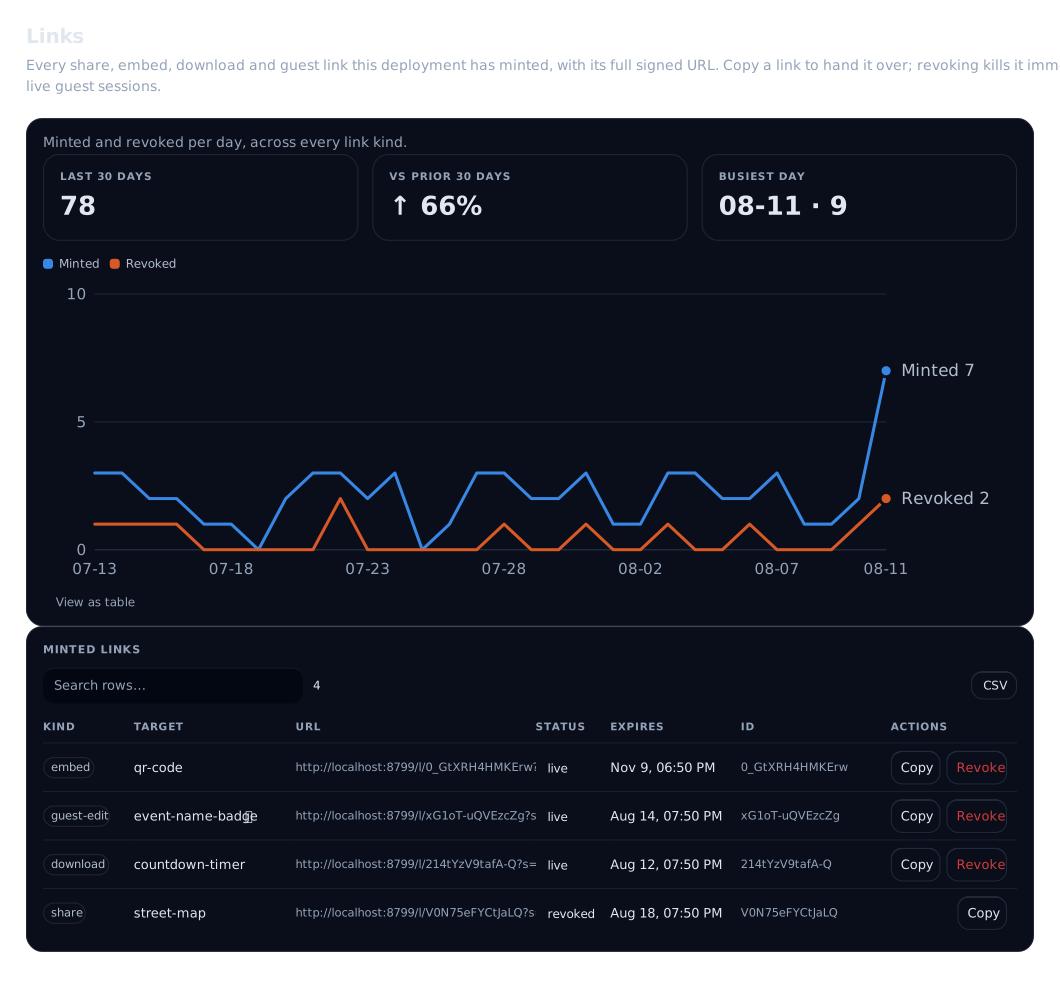
The console's Links view lists every link this deploy has minted with its full signed URL, a one-click copy, its status and its expiry.
Preview watermarking
enforce.watermark on a tool overlay injects a diagonal, tiling PREVIEW brick pattern into the SVG root before any rasterisation, so both svg and png carry the watermark. Alternating brick rows use #0002 and #fff2 so it reads on light and dark artwork alike.
always and never are fully wired. until-approved is the intended pairing with an approval chain, but the per-render linkage to approval state is not built yet - see approvals and status.
Provenance
Every server render that consumed catalog assets carries a machine-readable ingredients list, C2PA-shaped, embedded with zero dependencies:
- SVG: a
<metadata>JSON island. - PNG: an
iTXtchunk (keywordlolly:provenance) spliced afterIHDR. - HTTP: an
x-lolly-provenanceresponse header.
Both survive ordinary copying and are readable with exiftool/pngcheck-class tooling. Each ingredient's c2pa field is the upstream manifest if the source supplied one, and explicitly null when it did not (Brandfolder ships none) - so "«filename» from «provider» was used" still travels with the export, honestly labelled.
With a signing identity configured, exports carry a real, signed C2PA Content Credential instead of the unsigned island. That is one command to set up: c2pa.
Team projects and sessions
A project is a folder of saved tool sessions. A session is one tool with its inputs, saved so that colleagues can open the same work. Both live in the instance's store, so a session saved on a laptop opens on a phone after sign-in.
Who sees a project
Each project is either private (its owner and the people added to it) or shared with one or more groups. A member sees a project they own, one they were added to, or one shared with any group they belong to. Admins and owners see every project. Group membership is the member's effective set: groups from the identity provider plus local groups added in the console.
When Lolly offers a visibility choice, it reads the list from sharing.groups in GET /api/v1/org-config. That list holds the member's own groups minus the groups that make someone an admin or owner, sorted. Those are the names under admin and owner in idp.roleGroups, or the literal admin and owner when that role has no mapping. Admins and owners already see every project, so sharing with their groups adds nobody. Other role groups stay in the list: approvers, authors, members and viewers see a team project only through its groups, so a project shared with the author group reaches every author. An empty list means the member can only make private projects. can['project.create'] in the same document says whether to offer New project at all. Both are hints for the interface: the routes below still decide.
Archiving a project hides it from GET /api/v1/projects, so it drops out of Lolly's team list and save picker. The console's Projects view asks with ?archived=1, lists archived projects with a Restore button and live ones with Archive. Both send PATCH /api/v1/projects/:id with {"archived": false} or {"archived": true}, which needs a manager of the project (below). Handing a project to a new owner (ownerId) needs the current owner or project.manage.
People and roles
Everyone who can see a project has one role on that project. The highest of these applies:
| Role | Who has it | What they may do |
|---|---|---|
| owner | the person who created the project, or the one it was handed to | everything below, and hand the project on |
| manager | added as manager; or anyone holding project.manage (admins and owners by default) on a project they can see | rename, change visibility, archive, delete anyone's session, add, change and remove people, invite |
| editor | added as editor; a member of one of the project's groups; any admin or owner | create sessions, save changes, delete their own sessions |
| viewer | added as viewer | open the project and its sessions, read revisions |
Group sharing works as before: a member of a project's group acts as an editor. Adding someone gives them a role even on a private project. The instance role still applies on top: an account with the instance viewer role cannot save, whatever its project role, and a deny grant on session.edit or project.manage holds here as anywhere else. A viewer who tries to save gets 403 READ_ONLY; someone who cannot see the project gets 403 FORBIDDEN.
Each row of GET /api/v1/projects and the document returned by GET /api/v1/sessions/:id carry myRole, the caller's effective project role, so Lolly can show the right controls. Workspace capabilities still apply on top of that role. GET /api/v1/projects/:id/members lists the owner and everyone added, for anyone who can see the project. Managers also see each person's email and the open invitations that carry the project. For everyone else a person with no first or last name is shown by the part of their address before the "@", never the whole address; the same applies to updatedByName in the project and session lists. Managers change a role with PATCH /api/v1/projects/:id/members/:userId and remove someone with DELETE on the same path. Anyone may remove themselves, which is how to leave a project; the caller's own row in the members list carries isMe: true for that. The owner has no member role and cannot be removed; hand the project on first.
Each row says where its access comes from: via: 'owner' or via: 'member'. Managers also get effective, a separate list of the people who can open the project without a row on it: members of its directory groups (via: 'group') or user-made groups (via: 'custom-group'), with the group's name, and workspace admins and owners (via: 'admin'). They are kept apart from members so a client offers no role select or Remove on them: that access comes from a group or a workspace role, and changes in the project's visibility and share settings or in the directory. They carry no email, and a manager who is not an admin or owner sees group rows only for groups they are in and learns only that admins can open the project (adminAccess: 'note'), never who they are. Expired grants and groups disabled by policy are excluded. Instance-wide access is a separate instanceAudience: { role } summary, capped by policy, so the people panel can say everyone in the workspace has access without listing every account. The full rules are in permissions.
Handing a project on (ownerId) keeps the previous owner on it as a manager, audited as project.member.add with via: 'transfer', so they can still work there, leave, or be removed. A previous owner whose account is disabled is not kept: offboarding (disable, then transfer) leaves no row that re-enabling the account would bring back.
Live editing follows the same roles: a viewer joins a room as an observer, and only an editor or higher holds a writer seat or invites others into the room. A guest-edit link to a session needs editor on its project, at the mint and again on every gesture and keepalive of each guest it let in: removing the person who made the link from the project, demoting them to viewer or making the project private ends those guests' seats.
Inviting people
In Lolly, People with access in the Share dialog and the Team projects view lists the people on a project, and Invite by email adds more. Under the hood that is POST /api/v1/projects/:id/invite with {"emails": [...], "role": "viewer" | "editor" | "manager", "passwordSetup": false}, which needs a manager of the project. Each address gets a result:
added: the address belongs to an account, which becomes a member now. The person finds "name shared project with you" in their inbox, with a link to the project. Only an account that has shown it holds the address counts: one whose IdP verified the address at sign-in, one from a source the operator vouches for (the reverse proxy, an IdP set toemailVerification: "trusted"), the account that accepted the address's invitation, or one provisioned with no sign-in yet. An account whose sign-in only claimed the address is treated as if the address had no account.invited: the address has no account yet. An invitation carrying the project is created, or the open invitation for that address gains the project. The result carries theinvitationId, the address's own invite link for this project (link) and when the invitation ends (expiresAt). At their first sign-in the person joins every project the invitation names, each only while the person who added it is still an enabled account that manages that project and may still invite people, and the role is still one the policy gives. An entry that fails is skipped and audited (invite.project.skip), so removing or offboarding a manager also stops the invitations they had pending.already: nothing to do. The person already has this role or a higher one, or owns the project. A role is raised by inviting again with a higher one, and only lowered on purpose through the members route.refused, with areason:invalid-email;account-disabled(only to a caller who holdsuser.invite);invites-not-allowed(the invite policy does not let you invite new people);domain-not-allowed;invitations-off(idp.admission.invitationsisfalse, so sign-in would never read an invitation);invitation-accepted(the address's invitation was already used; only to a caller who holdsuser.invite, everyone else readsunavailable);invitation-changed(someone else changed the invitation at the same moment; try again).
Which addresses have an account is directory knowledge, which members do not otherwise get. So a caller without user.invite is never told that an account is disabled: that address is handled as if it had no account. Such a caller may also send at most 100 addresses an hour (429 RATE_LIMITED). Sharing still shows them who already has an account, because that person appears on the project; the hourly limit is what keeps this from running over a list. The limit is counted per server process.
The inbox message goes out once, when the person is first added. Raising their role sends nothing, and removing and re-adding them never puts a message they dismissed back in front of them. Each person may send at most 200 of these messages a day; past that the person is still added, and the audit row records the message as held.
The response also carries link, the address of the project in Lolly (<baseUrl>/#/team/project/<projectId>, or <appUrl>/... when instance.appUrl is set, the same address the inbox message opens), and message: the workspace name, the inviter's name, the sign-ins on offer and instance.inviteNote. Nothing is emailed from Lolly Work. Instead, each invited address gets Copy invite message in the People panel: a message naming the inviter, the project and the role, the address's invite link on its own line, which sign-ins to use ("Sign in as … with Google or GitHub."), "Open the link to set your password." when the link may set one, the end date and the invite note. Send it yourself, by chat or email. The invite link shows who invited the person and to what, and opens the project once they have signed in with the invited address; someone who is already a member can use the plain project link.
Managers see the project's pending invitations in the People panel, from GET /api/v1/projects/:id/members: each with its end date, whether it was opened, who invited the person, and Copy link, Copy message, New link and Revoke. New link (POST /api/v1/projects/:id/invitations/:invitationId/link) ends every link copied before for that invitation, the console's included. An invitation that expired in the last 30 days stays listed as Expired with Invite again (POST /api/v1/projects/:id/invitations/:invitationId/reinvite), which needs a manager who may invite new people.
An admin or owner can also tick Can set a password for people who will sign in with email and password. Their invite link then sets the password as well, so they need one link, not two; whoever holds such a link can set the password, so send it privately. The tick starts ticked when every address is at a domain in policy.invites.passwordDomains. See setting a password from the link.
A manager withdraws an invitation from the project with DELETE /api/v1/projects/:id/invitations/:invitationId. When a project invite created the invitation (createdVia: "project") and no project is left on it, the invitation is revoked too, so the address can no longer sign in through that invitation. An invitation made in the console only loses the project: whether it still admits the person is for an admin to decide in People. An invitation accepted in the meantime is never revoked by this route.
Someone who is already on a project is never also listed as invited to that project. When a person becomes a member or the owner, by an invite, by accepting an invitation for another of their addresses, or by a transfer, the project comes off any pending invitation for an address they hold, and a project-made invitation left with no projects and no groups is revoked. Both are audited (invite.project.remove, invite.revoke, with via: "membership"). Two invitations stay open with the project gone instead: one made in the console, for the reason above, and one for an account that has not signed in yet, which may be how that person gets in the first time.
A person can also come to hold an invited address without accepting anything, for example by adding a sign-in for that address from their profile. The members list leaves such an invitation out only while accepting it would change nothing. When it identifies a higher role than the person has on the project, it stays listed, because their next sign-in with that address raises them to that role. A manager who does not want that withdraws the invitation.
In the console, Invite people in People works for the whole instance. An address that already belongs to an account joins the ticked groups at once (status: "applied") instead of receiving an invitation, under the same rule for which account holds the address as above. That never applies to your own account or a disabled one, and only an owner can re-group an owner.
Invite policy
policy.invites in the instance configuration decides who may invite new people and on what terms:
allow:owners(instance owners only),admins(anyone holdinguser.invite, which admins and owners hold by default; the default), ormembers(any member, unless a grant denies themuser.invite). Inviting through a project also needs manager on that project, whatever the tier.domains: when the list is not empty, a new address must be at one of these domains.maxTtlHours: how long an invitation made from a project stays open (default 720, 30 days). Adding a project to an existing invitation keeps its expiry.projectRoles: which roles may be given, by invitation or role change (default all three).passwordDomains: domains whose addresses usually sign in with a password. When every address on an invite is at one of them, Can set a password starts ticked. It only suggests; the tick stays an admin's choice.
The tier and the domain list apply to invitations, which let a new person in, from a project or from the console and lw invite add alike. Sharing a project with someone who already has an account, or giving their account groups in the console, needs manager on the project (or the console's own checks) and an allowed role. maxTtlHours is for invitations made from a project; the console sets its own expiry. Lolly reads can['user.invite'] and invites (domains, maxTtlHours, projectRoles) from GET /api/v1/org-config to offer only what the server accepts; older servers send neither, and Lolly then hides inviting. The same invites block also carries passwordSetup (the caller may tick Can set a password) and passwordDomains. The policy is part of the instance configuration, so changing it means editing the configuration and redeploying.
Asking for access
Someone who opens a project or session link they cannot open sees "You do not have access to this team project." and can Ask for access: they choose the access they need (Can view or Can edit) and may add a note of up to 280 characters. A viewer can Ask to edit the same way, from Share > Team and from the People panel. Both are a request of kind project, filed with POST /api/v1/projects/:id/access-requests or, from a session link, POST /api/v1/sessions/:id/access-requests (see the API). The same request for a person who is not on the instance at all is asking to join.
Filing never tells the requester anything about the project. The answer is the same 202 whether the project exists, is archived, the person already has that access, a request is already open, or requests are switched off (policy.requests.project). The requester never learns who manages a project until someone approves.
Who answers. The project's owner and its managers, when at least one of them is an enabled account. Otherwise, everyone who manages the project through project.manage (admins and owners). They get an inbox notice, "Sam asks to edit Brand refresh", and see the request under Asking for access in the project's People panel. The approver is checked again on every list and answer, against the project stored on the request.
- Approve with a role, by default the one asked for. The role must be one
policy.invites.projectRolesallows and one the approver could give directly. The person is added to the project and gets a notice, "Andy gave you edit access to Brand refresh", with Open. Approving fails when the project was archived (PROJECT_ARCHIVED) or the requester's account was disabled (REQUESTER_UNAVAILABLE); the request then closes as expired. - Decline. The requester gets "Your request for Brand refresh was not approved".
- Withdraw. The requester can withdraw an open request.
- Already handled. When two approvers answer at once, one wins. The other sees who answered and how ("Priya already approved this"), and nothing changes.
- Access another way. When the person is added to the project with that role or a higher one, by an invite, a share or an accepted invitation, their open requests for it close as
superseded. Nobody gets a second notice; the share covers that access. - Expiry. A request expires after
policy.requests.ttlDays(14 days), and its notice expires at the same time. - Limits. One open request per person and project, and 20 requests a day per requester (
429 RATE_LIMITEDpast that).
Every step is audited (access.request, access.approve, access.decline, access.withdraw, access.supersede). The note is recorded only as its length.
Notices
The people steps above reach people through their inbox. The server writes every one of these notices in one place (server/src/notify/people.ts), in English, naming people by name and never by email to anyone who could not already see the address:
data.kind | Goes to | Title |
|---|---|---|
access-request | the people who may answer it | "Sam asks to edit Brand refresh", "… asks to view …", "Sam asks to join lolly.ing", or "Sam asks to use their own account for an invitation", with the address, the sign-in and the note in the body, and Review |
access-answer | the requester | "Andy gave you edit access to Brand refresh" with Open, or "Your request for Brand refresh was not approved" |
invite-accepted | each person who invited them (at most 5) | "Sam accepted your invitation", with Open (the project) or Open People (the console) |
invite-skipped | the invitee | "Your invitation to Brand refresh no longer works", when the person who added the project can no longer add people to it, or the project was archived |
welcome | the invitee, on accepting | "Welcome to lolly.ing", with the inviter and, for a project, its name, the role and Open |
comment-mention | a person mentioned in a comment | "Ana mentioned you in Spring poster", with the start of the newest message and Open thread |
comment-reply | the people in a comment thread when someone replies | "Ana replied in Spring poster", or "New replies in Spring poster: 3", with Open thread |
A request notice has kind: "request" and severity action; the others have kind: "notice". Each carries data.at, the time it happened, and the ids a client needs (requestId, projectId, invitationId and so on). A request notice disappears when the request is answered, withdrawn, superseded or expires. The others stay until dismissed, and an answer or acceptance notice for 30 days at most.
Comment notices (kind: "comment", id cn_…) work differently. There is one per person per thread, updated as replies arrive. It stores no text and no names: the inbox writes the title, the excerpt and participant labels each time it is read, so an edited or deleted message never lingers there. It is shown only while the person can still open the document and read its comments. Dismissing it removes it, and the next reply brings it back. Reading the thread in Lolly removes it too. The API reference has the details.
The inbox also stops showing a share or a collaboration invite once the person can no longer see its project (an invite also once its session is deleted), and a project access request once they no longer manage that project.
GET /api/v1/inbox answers with an ETag and an unread count, and 304 when nothing changed, so Lolly checks it when the tab comes back into view (at most once a minute) and every 60 seconds while it is visible. The banner shows one message at a time and the next after a dismiss; View all opens the inbox, where project requests have Approve (with a role) and Decline. Requests to join and to use another account are answered in the console.
Notices are not emailed yet. notify.people.email is the switch for that, off by default, and this release sends no people email even with it on (see configuration). Until then, copy invite messages and links and send them yourself.
Saving from Lolly
Signed in to an instance, the Share dialog offers a Team section:
- Save to a team project picks an existing project or creates one with the chosen visibility, then saves the current tool and inputs as a new session (
POST /api/v1/projects/:id/sessions). - Save changes writes an opened team session back (
PUT /api/v1/sessions/:id) with the revision it was opened at. - Copy team link copies the session's link (below).
A session body may be up to 4 MiB, enough for a large Design document; a larger one is refused with 413. Images uploaded on one device are stored on that device. Where shared files are on (below), saving to a team project copies the images a session uses into the project's files, so the session opens elsewhere with them. Where they are off, the session opens elsewhere without those images, and Lolly warns about this when you save.
Saving needs editor on the project and session.edit; creating a session needs editor and session.create. Deleting a session needs session.delete, editor on the project and one of: being the person who created the session, or being a manager of the project (its owner, a manager member or a holder of project.manage). Admins and owners hold project.manage by default, so a deny grant on it also stops them deleting a colleague's session. Being able to see and edit a team project is not enough on its own, so a colleague's session stays put. Deletion leaves a tombstone, so a stale copy cannot bring the session back.
Shared files
A project can hold files: the images and other uploads its sessions use, kept by the instance so every member gets the same bytes. A session refers to a file by the asset id user/team/<fileId>.
Shared files are on when policy.projectFiles.enabled is true (the default) and the instance keeps its data in Postgres. On the memory store they are always off, because an upload would vanish with the process. sharing.projectFiles in GET /api/v1/org-config says which, and while files are off every file route answers 404.
| Who | May |
|---|---|
| anyone who can see the project (viewer and up) | list the project's files and download them |
editor and up, with session.create | upload a file; the project must not be archived. Service tokens cannot |
editor and up, with session.edit | rename a finished file; the bytes and id stay the same, so sessions that use the file still open. The project must not be archived. Service tokens cannot |
| the person who uploaded the file | delete it, or cancel their own unfinished upload |
manager and up (owner, manager member, project.manage) | delete any file in the project |
An upload is reserved first, then sent in parts of 1 MiB, then finalized. Each part is checked against the digest declared at the start, and the whole file is checked before it is listed. Only finished files are listed, newest first, and only the uploader can send parts or finish an upload. An unfinished upload expires 15 minutes after it starts or after its last accepted part, and at the latest 24 hours after it starts (policy.projectFiles.uploadTtlHours), so an upload a closed tab left behind stops holding room within minutes. After that it cannot be finished and counts toward no limit. Once it is an hour past its expiry it is removed with its parts, when someone next starts an upload or when retention runs.
The limits come from policy.projectFiles (see configuration):
- one file: 25 MiB by default (
maxFileBytes), never more than 4 GiB; - one project: 128 MiB of files (
projectBudgetBytes); - the whole instance: 256 MiB of files (
instanceBudgetBytes); - one person: 16 unfinished uploads at a time, declaring twice the largest file in all;
- one person's downloads: twice the instance budget a day.
Finished files and unfinished uploads that have not expired both count, each at its size plus 4 KiB for its database rows, so many tiny files fill a budget too. The defaults suit a small hosted Postgres, which holds the file bytes as well. The file list reports projectUsedBytes and instanceRemainingBytes so Lolly can say how much room is left.
Deleting a file that a live session in the project still uses is refused with 409 FILE_IN_USE, naming those sessions; that session would otherwise open without the file. A manager can delete it anyway with ?force=1. Every finished upload is audited as project.file-upload, every rename as project.file-rename and every delete or cancel as project.file-delete. A person's finished files block erasing their account, like their sessions do; their unfinished uploads are removed when the account is erased. The API reference lists the routes.
Who changed what
Project rows in GET /api/v1/projects carry updatedAt and updatedByName: the newest of the last session save and the last rename, visibility or archive change, and the name of the person who made it (null when nobody has changed the project since it was created). Session rows in GET /api/v1/projects/:id/sessions carry updatedByName beside updatedBy. Lolly shows these in its lists, so a team working one after another can see who saved last.
Team links
A team project opens at <app>/#/team/project/<projectId>, which shows Lolly's Team projects view on that project. A team session opens at <app>/#/team/<sessionId>. Lolly loads the session, opens its tool with the saved inputs and remembers the revision for the next save. The link carries only the session id, and opening one needs the same visibility as reading the session through the API. A signed-out reader goes through the sign-in gate first and returns to the session afterwards. Collaboration invites in the inbox use this link too.
A link to a comment thread adds ?thread=<threadId>: <app>/#/team/<sessionId>?thread=<threadId>. Lolly opens the session, connects and shows that thread. The link grants nothing: someone who cannot open the session sees the usual refusal and can ask for access, and the thread opens once access is approved.
When two people save the same session
Session writes are compare-and-set on rev. When someone else saved since you opened the session, your save answers 409 CONFLICT with the newer version in current, and nothing is overwritten. Lolly then offers a choice: open their version, or save yours as a new session so both survive. Every refused save is recorded as session.conflict in the audit log (ids and revisions only, never input values). The API reference lists the routes.
Related
- Restricting formats and inputs: governance
- What renders get recorded as: telemetry, audit
- Worker deployment: deployment
Shared subfolders
Subfolders belong to their project and inherit its membership. Viewers can browse folders and their contents; editors can create folders, rename them and move sessions or finished files between them. A move changes only the folder listing, so open documents, their links and the assets they use keep working. Personal folders remain on the person's device until they choose to share them.