
This guide covers the optional organisation service. Configuration, console and API paths refer to your Lolly Work instance. The packaged console keeps its release-matched copy of this guide.
This page is for the brand or library admin who decides what members can use in Lolly Work: which tools and brand assets they see, where those come from, how long each one stays available and how to retire an asset. The catalog holds tools, brand assets, tokens, fonts and logos from three sources, and every source passes through the same governance before it reaches a member.
An existing DAM can remain the source of record. Lolly Work connects its selected assets to Lolly production while the organisation retains the choice to keep the connection or plan a transition. Use Lolly with your existing DAM explains the responsibilities; SUSE's Brandfolder experience records successful integration and administrator change management.
- The packtools, design systems and assets on diskProviders15 kinds, read-onlySubmissionsmember files, optional review
- Governanceaccess mode, tool visibility, exposure and groups, lifecycle, hidden tags
- Each person's feedonly what their groups may see, while it is live
The pack, connected providers and member submissions pass through exposure, lifecycle and tag rules into each person's feed.
signed by Lollywork-catalog-sources.htmlHTMLpixels, not shapes11 KBAI generatedgenerated by Claude Opus 5.5Check it yourselfGet the signed file signed by Lolly Demovector SVG125 paths~1.5k nodes577 groups1 image379 KBCheck it yourselfGet the signed file
 signed by Lolly Demovector SVG125 paths~1.5k nodes577 groups1 image379 KBCheck it yourselfGet the signed file


The pack
instance.pack points at a directory, a "brand pack". Everything brand-shaped lives there, including the design systems the deployment can serve:
catalog/tools/index.json      the tools this deployment offers
catalog/assets/index.json     assets, with a formats list per asset
catalog/fonts/webfonts/       self-hosted woff2
tools/<id>/tool.json          per-tool input definitions
The pack is served at /catalog/ (files) and /api/v1/catalog/assets/, filtered per caller. Its design tokens also theme the console: This Deploy → Design system shows the live tokens the tools use, and the sign-in screen takes the pack's colours, fonts and logo through a narrow unauthenticated /api/brand route that serves brand chrome only, never the governed catalog.
A pack does not change while a process runs: publish a new pack and restart, or roll the replicas, to pick it up.
Which design system members get. The deployment default and the downloadable connect pack are separate choices. In This Deploy → Design system, inspect source details, preview a replacement or retirement, then apply the reviewed revision. Stopping a connect download keeps the mounted catalog, and selection, retirement and suppression persist in PostgreSQL without changing mounted files. Source layouts, permissions, reference impact and rollback are on Design-system administration.
Access modes
policy.defaultAccessMode decides who may read the catalog at all:
| Mode | Behaviour |
|---|---|
open | anonymous reads allowed |
gated | sign-in required (401 UNAUTHORIZED, "this deployment is sign-in gated") |
per-tool | a per-resource decision through grants |
On top of that, an overlay's visibility removes individual tools from the feed for groups that should not see them (governance). Assets can be narrowed to groups when they are submitted (below), and each provider has its own exposure rules.
Submitting an asset
The pack does not change at runtime and providers are read-only, so submission is how a member puts a file into the catalog.
POST /api/v1/catalog/submit?name=Campaign%20Hero&tags=campaign,hero&groups=design
                                                             # catalog.submit (author role)
The file is the raw request body, and the declared metadata travels as query parameters (name, description, tags, type, groups). The response gives the new inst/<id> asset, its checksum and the state it arrived in.
Anyone holding catalog.submit can submit, and the asset is live the moment it is stored. To require review, set policy.submit.chain to an approval chain. A submission then waits in state submitted, invisible in the feed, unservable at /catalog/* and not linkable, until an approver publishes the asset. If policy.submit.chain gives a chain this instance does not have (a rename, a deletion, a first boot in the wrong order), submissions are refused with 503 SUBMIT_CHAIN_MISSING, giving the chain to fix. Lolly Work never falls back to publishing without review.
What happens to the file, in order:
| Step | What it does |
|---|---|
| Size cap | policy.submit.maxBytes, 64 MiB by default, the same cap publish-out uses |
| Quota | per-group counters (policy.submit.quota), both 0 (unlimited) by default |
| sha256 | an exact duplicate of an asset the submitter can already see returns that asset (200, duplicate: true); a checksum match on anything they cannot see stores a second copy, so the shortcut reveals nothing hidden |
| Scan hook | the operator's pre-store veto, if one is wired (operations) |
| Store | BlobStore.put, then an instance-asset record with the submitter, the declared metadata and the detected type and pixel dimensions |
| Credentials | a C2PA detection pass, recorded and badged. A submission is an arbitrary organisation file, so unlike publish-out no Lolly export assertion is required, and detection never refuses a file |
| Decision | an approval with subject asset when a chain is configured, otherwise live at once, with a lifecycle row so the expire, hold and revoke controls work from the first moment |
The type and dimensions come from the bytes, never from what the client claimed: a file that says image/png and is not one is stored as what it is.
- Exposure.
groupsnarrows who sees the asset, and only to groups the submitter is in, so nobody publishes into a group they are not a member of. With nogroups, every member sees it, like a pack asset. People in a partner programme are the exception: an asset shared with everyone does not reach them. - Quota. A quota scope is a group name, and a submission is charged to every group its submitter belongs to, before the file is stored, so extra memberships only tighten a budget. A refused submission is refunded; a returned one is not, because the file was still stored.
- Your own reference. A submitting client can pass
clientRef=<its own reference>. It is returned on the submission so an app can show the state of what it sent. - Safe serving. Submitted files are served with a content-security policy that sandboxes them and allows no script. An SVG is markup rather than a picture, and the console shares this origin, so a member's file never runs as whoever opens it: through
/catalog/*, through a share link or in the review preview.
The console's Catalog view has a Submit an asset button for anyone holding catalog.submit: choose a file or a template's JSON, give it a name and tags, then send the file. The button reports whether the asset went live or is waiting for review. From a terminal:
lw catalog submit ./hero.png --name "Campaign Hero" --tags campaign,hero --groups designTemplates and user tools
A member's saved template, or a tool they built on another tool, can go into the catalog the same way. Both are JSON data for one of the pack's tools, never code, so they take the same path as a file: quota, duplicate check, scan hook and review.
POST /api/v1/catalog/submit?type=template&toolId=design&tags=launch      # body: the template JSON
POST /api/v1/catalog/submit?type=user-tool # body: the user tool JSON- A template body is
{ "toolId", "name", "description"?, "values" }: the file the app's Export as file writes, plus the tool id, whichtoolId=supplies when the file does not carry one. - A user tool body is
{ "baseToolId", "title", "description"?, "icon"?, "formats"?, "values" }. - The
namequery parameter is optional for both; the document's own name is used.
Before anything is hashed or stored, the server checks that the body is one JSON object of at most 4 MiB, that values is an object, and that the tool it seeds exists in this instance's pack. A refusal is 422 INVALID_SUBMISSION with the reason. What is stored is the normalized document, so a reviewer approves exactly what the feed will serve. A user tool's icon is kept only as a short glyph such as an emoji, because markup one member submitted would otherwise draw inside every other member's app.
The review queue shows what each one seeds ("Template for Lolly Design (design), 12 values") where a file would show a thumbnail, and keeps its type: a reviewer can rename or retag it but not turn it into an image. Once live, it appears in the feed as an asset of type template or user-tool with one json format, and its entry's meta carries toolId (or baseToolId) and valueCount, so an app can offer it before downloading the collection.
Reviewing what was submitted
GET   /api/v1/catalog/submissions[?state=submitted|live|returned]     # catalog.read
GET   /api/v1/catalog/submissions/<id>/bytes                          # preview, before publication
PATCH /api/v1/catalog/submissions/<id>         { "name": "…", "tags": ["…"], "type": "…", "description": "…", "fields": {…}, "extractedText": "…", "collectionId": "…" }
POST  /api/v1/catalog/submissions/<id>/act     { "action": "approve" | "reject", "comment": "…" }
The queue needs catalog.read, which the viewer role carries, but the rows are the real gate: a caller sees their own submissions plus the ones open on a step their groups may act on, the same two-sided rule the approvals inbox uses. Deciding goes through the approvals engine, so separation of duties and step eligibility are enforced in one place, and the same decision made from the Approvals view settles the asset identically. Approve publishes the asset and reject returns it with the comment. Either way the submitter is told through the inbox.
A reviewer can fix the metadata instead of returning the asset over a metadata mistake. PATCH corrects a pending submission's declared name, type, tags and description, fills in your own custom fields ("fields": { "region": "EMEA" }), and takes the submitter's on-device extractedText so the words on the file are searchable the moment it publishes. The submitter can do all of this to their own submission while it waits. It touches nothing else: not the file, and not the exposure the submitter chose. It refuses once the submission has settled, because a published asset is an ordinary catalog asset from then on.
Choosing a collection. A reviewer who also holds catalog.collection.manage can set "collectionId": "launch-kit" (or null to clear the choice). Nothing joins while the submission waits: on approval the asset is appended to that collection, keeping the curated order, and the approval's audit event records the collection. A collection deleted in the meantime is left alone.
The console's Catalog view shows the queue above the served assets. Reviewing one opens a panel below the table with the preview, the metadata as an editable form and the decision with its comment. Approving saves an unsaved correction first, so a fixed name is never lost on the way to publishing. From a terminal:
lw catalog queue                                  # --all to include settled ones
lw catalog edit    inst/ab12cd34 --name "Campaign Hero 2026" --tags campaign,hero
lw catalog approve inst/ab12cd34
lw catalog return  inst/ab12cd34 --body "wrong logo lockup"
Audit records catalog.submit on the way in (stored or refused, because a refused submission has nothing else to attach the event to), catalog.approve-submission and catalog.return-submission on the way out, and catalog.edit-submission with the before and after of every field a correction moved. These are audit actions, not grantable permissions.
Org-defined metadata
Tags are a flat list. Custom fields let your organisation define the fields it files assets under, and fill them in on any asset the deployment serves.
Definitions are policy. They live in the governance document beside grants, overlays, chains and flags, so lw export and lw apply carry them, the boot seed brings a fresh deployment up with your taxonomy in place, and a change can be reviewed like any other policy change.
"catalogFields": [
  { "id": "region",   "label": "Region",   "kind": "select", "options": ["EMEA", "AMER"], "required": true },
  { "id": "campaign", "label": "Campaign", "kind": "text" },
  { "id": "shot-on",  "label": "Shot on",  "kind": "date" },
  { "id": "brief",    "label": "Brief",    "kind": "url" }
]| Attribute | Meaning |
|---|---|
id | a slug, and the key the value is stored and served under |
label | what the editor and the details view show |
kind | text, select, date (YYYY-MM-DD) or url (http or https) |
options | the values a select allows: required for select, refused on every other kind |
required | a save that leaves it empty is refused |
required gates the editor, never the feed: an asset that predates a definition keeps serving exactly as it did, and the first edit is where the field must be filled in.
GET    /api/v1/catalog/fields                 # catalog.read - the definitions, plus a canEdit bit
PUT    /api/v1/catalog/fields/<id>            # policy.edit
DELETE /api/v1/catalog/fields/<id>            # policy.edit
Values are a local overlay keyed by asset id, so they work the same for all three kinds of asset: an instance-owned inst/ asset, a federated ext/ asset whose record belongs to an upstream DAM, and a pack asset that is a file on disk.
PUT /api/v1/catalog/assets/<id>/meta          # catalog.edit
{ "fields": { "region": "EMEA", "campaign": "Autumn Launch" },
"name": "Campaign Hero 2026", "tags": ["campaign"], "description": "Q4 hero" }fieldsis a sparse merge: a field you leave out keeps its stored value, and one you send empty (ornull) is cleared.name,descriptionandtagsapply to aninst/*asset only. A federated asset keeps the name its source gives it, because the deployment does not own that record and a shadowed title would make the two disagree with nothing to say which was written here.- Every change is audited as
catalog.editwith its before and after. Defining or retiring a field is audited ascatalog.field.editorcatalog.field.delete.
Values reach the feed as one additional fields bag on the entry that carries them:
{ "id": "lolly/tokens/brand", "name": "Brand tokens",
  "fields": { "campaign": "Autumn Launch", "region": "EMEA" } }
Lolly's asset schema is untouched: a shell that knows nothing about the bag ignores it, one that draws unknown keys shows the values as ordinary rows, and no shell version is required in step. GET /api/v1/catalog/search matches the values too, so an asset can be found by what your organisation filed it under.
Retiring a definition (DELETE, or a --prune apply that drops it) removes the definition and takes its values off every served surface at once. The stored values survive, so adding the definition back brings them back. The console's Catalog view puts the editor in the inspect panel, and the review queue uses the same one, so a reviewer can file a submission under your taxonomy before publishing the asset.
Reviewed text from the Assets inspector
An asset can also be found by the words printed on the file. The text is read on the device that submits or curates the asset; the server never runs a recognition model for this workflow.
The Assets inspector can offer locally extracted image, SVG and PDF text for a curator to review. Reading a file writes nothing to Lolly Work. A curator saves a reviewed excerpt explicitly with PUT /api/v1/catalog/text-index/<assetId>, sending text, sourceRevision, fileId and method (ocr or digital).
- Only visible
ext/andinst/assets are accepted, and the caller needscatalog.edit. - A nonblank excerpt is limited to 8192 characters; longer text is refused, not shortened.
text: nullclears the index and keeps your organisation's fields.- A changed revision returns
409 SOURCE_CHANGEDon save. Reviewed text records the chosen file, revision, method, reviewer and time. - Asset inspection returns
textIndexstatus andtextIndexFileswithout returning the words. Indexed browse, and the local part of live search, leave out bound words once that indexed revision or file no longer matches. - Ordinary feeds and audit events carry no extracted words; audit records counts and source identity.
A revision binding is an indexed snapshot check. It does not verify historical bytes or promise instant detection of upstream changes: real source updates and withdrawals still depend on provider sync and file-access checks.
The earlier extractedText path
An asset's metadata overlay can also carry extractedText. A curator posts it through the live-asset editor (PUT .../meta, catalog.edit), and a submitter can attach their own reading of their own file to a pending submission through the review queue's PATCH, with no curation right needed. The text is whitespace-collapsed, capped and added to the search haystack beside the fields, and it stays off the served feed. It works for inst/, ext/ and pack ids alike. This path creates unverified text with no revision binding; the inspector shows that state, and existing unbound text stays searchable for compatibility.
Hiding tags
excludeTags on a provider drops a whole asset. Most DAM noise is a label on a good asset instead: "approved-2019", a workflow state, a section called "Internal". Hide those labels and keep the asset. A hidden tag comes off an entry's tags and its meta.providerTags, meta.providerSections and meta.providerCollections, so it leaves the app's filters, tag chips, folder list and server search. The asset, its exposure and its lifecycle are untouched.
A rule is a list of exact tags, or prefixes ending in (internal:), matched without regard to case, in one of two scopes: * for every entry the catalog serves (pack, uploads and every provider), or provider:<id> for one provider's entries. The provider:<id> tag itself is never hidden, because apps filter by source. Rules apply when the index is served, not when a provider syncs: hiding and showing take effect on the next catalog read, nothing re-syncs, and a hidden tag is still counted so it can be found and shown again.
GET /api/v1/catalog/tags[?provider=<id>]       # every label, with counts per source and what hides it
PUT /api/v1/catalog/tags/rules  { "scope": "*", "hide": ["approved-*"], "show": ["Internal"] }
PUT /api/v1/catalog/tags/rules  { "scope": "provider:brand-dam", "hidden": ["legal:*"] }
The instance scope needs policy.edit and a provider scope needs catalog.provider.manage. hide and show edit the list; hidden replaces the whole list. Every change is audited as catalog.tags.update with the list before and after, and the rules travel in the policy document as tagRules.
In the console, Catalog → Tags lists every label with a search box, a filter for shown or hidden, and each label's source; hide or show one tag, a selection or every tag starting with a prefix. Providers → Tags on a provider's row opens the same list for that provider only. A provider that instance.json manages can declare mapping.hiddenTags there, and those show in the list as set in instance.json.
Collections
A collection is a named, ordered set of catalog assets with its own group visibility: the lookbook, the launch kit, the set you hand an agency. Managing them is catalog.collection.manage (admin by default, grantable); reading them needs nothing extra.
curl -X PUT https://work.example.com/api/v1/catalog/collections/launch-kit \
  -H 'content-type: application/json' -b lw_session=... -d '{
    "name": "Launch kit",
    "description": "Everything for the spring launch.",
    "members": ["inst/hero", "ext/brandfolder/a1", "lolly/logo/primary"],
    "groups": ["design", "sales"]
  }'
Members are ids, not rows, so:
- one set mixes instance-owned (
inst/), federated (ext/) and pack assets freely; - the order is yours and is kept exactly; a repeated id keeps its first position;
- nothing reads a member until it is served, so an asset that is later expired, revoked or deleted simply stops appearing. There is no repair step, and deleting a collection deletes the list and nothing else.
A PUT refuses any member the curator cannot see, and making a link to the set refuses any member the link's maker cannot see. Together those two keep a link from widening exposure (the two rules).
The per-caller feed carries collections as one additional collections key beside assets:
{ "assets": [ ... ],
  "collections": [
    { "id": "launch-kit", "name": "Launch kit", "members": ["inst/hero", "lolly/logo/primary"] }
  ] }
The collection is admitted by its own groups, and its members are narrowed to the assets that caller is already being served. A collection whose members have all expired still lists, empty, so "why is this empty" has an answer where "where did my collection go" would not. A deployment with no collections serves an identical index. Changes to a collection are audited as catalog.collection.edit and catalog.collection.delete, each with the before and after of the whole set.
Collection links
A signed link can point at a collection instead of a single asset:
POST /api/v1/links { "kind": "share", "target": { "collectionId": "launch-kit" } }shareopens a minimal listing page the instance serves itself: the same brand chrome the sign-in screen uses (from the unauthenticated/api/brandsources), the collection's assets with previews, a download per asset and one Download all button.downloadserves the zip directly.embedis refused at creation (400). A collection is a list, not a file, so there is nothing for an image tag to point at.
The two link checks apply one level up: exposure when the link is made, and lifecycle on every visit, per member. Making the link requires seeing the collection and every asset it holds; a refusal is 403 MEMBER_NOT_VISIBLE, reporting how many members were unseen, never which. An expired or revoked asset leaves the page and the archive together, on a link that is otherwise live, and the page says how many were left out, never which.
The page shows that collection only: no search, no browsing past the set, no self-registration and no route into the rest of the catalog. Asking the link for an asset the collection does not hold is 404 NOT_IN_COLLECTION, even with a valid signature.
The zip is built in the process from Node's own zlib, streamed member by member with no temp files, and its entries are named for the asset and made unique. Every zip starts with CREDITS.txt and credits.json, listing only the files in that zip, and the listing page shows one credit line where a licence asks for a credit. A set too large to zip is refused before a byte is sent, rather than cut short silently; download those assets one by one. Expiry, passwords, revocation and audit follow the ordinary link rules, and making a link audits as link.create.
Versions
New bytes for an asset that is already in the catalog do not make a second asset. They become the next version of the one you have, and the id keeps meaning what it meant.
- Version 1.
inst/herois published and served at/catalog/inst/hero/png. - Version 2. New bytes for the same id become the head. The address stays the same, and the feed's checksum and size move, so shells holding an old copy fetch again.
- Roll back to version 1. The head points at version 1 again. Nothing is copied or deleted, so the rollback is itself reversible.
- Delete version 2. Allowed now that it is not served. The number 2 is never reused.
curl -X POST 'https://work.example.com/api/v1/catalog/submit?assetId=inst/hero¬e=reshot%20in%20studio' \
-H 'content-type: image/png' -b lw_session=... --data-binary @hero-2027.png
# → { "assetId": "inst/hero", "version": 2, "checksum": "…" }A new version runs the same pipeline as a first submission (size cap, quota, type detection, the operator's pre-store scan hook, credential detection) with a different ending:
- The served address does not change.
/catalog/inst/hero/pngis the id's address, not a version's, so every link, collection, session and rendered reference keeps resolving. - Prior versions are kept, and stay reachable at
?v=Nfor a session that pinned specific bytes:GET /catalog/inst/hero/png?v=1. That fetch answers to every gate the head answers to (your groups, submission state, expiry, revocation), so version history is not a way around lifecycle. - A version snapshots the asset's whole format set, and a head move replaces that set. Uploading a PNG to an asset that served PNG and SVG leaves it serving the PNG alone, and rolling back restores both, because the earlier version kept the pair.
- A pinned copy of a federated asset refuses versioning (
409 ASSET_IS_PINNED): its identity still belongs to the provider until the exit's cutover.
Replacing a published asset's bytes needs catalog.edit, the curation right, not the catalog.submit right that adds a new asset. An approver already decided this asset belongs in the catalog, so policy.submit.chain gates contributions and not versions. Exposure, name, tags and description keep their own route (PUT …/meta) and are refused here rather than silently ignored.
Rollback
lw catalog versions inst/hero          # the history, newest first, * marks what serves
lw catalog rollback inst/hero 1        # point the head at version 1
A rollback points the head at a version that already exists, and the version that was head stays in the history. The bytes behind a stable id changed, so cached renders that could have used the asset are invalidated: the render cache key includes a fingerprint of the instance's own assets, so a head move ripples the same way a pack publish does.
Deleting a version, and retention
lw catalog version-rm inst/hero 2The served version is never deletable (roll back first, then delete), and a held asset refuses entirely with 409 ASSET_HELD, because a hold only ever keeps things available. Version numbers are never reused after a delete: someone may still hold a ?v=N address, and handing them different bytes under the same number would be worse than a 404.
Retention is policy, and the default keeps everything:
{ "policy": { "catalog": { "versionKeep": 0 } } }0 keeps every version. A positive number keeps that many per asset, head included, trimming the oldest first and deleting their bytes. The head is never trimmed, even when a rollback made an old version current, and a held asset is never trimmed at all. Sizing advice is in operations. Versions, rollbacks and deletions are audited as catalog.version, catalog.rollback and catalog.version.delete, each with the version it moved.
Supersession
A version says these bytes changed. A supersession says stop using this asset, use that one:
lw catalog supersede inst/hero-2026 inst/hero-2027 # or: lw catalog supersede inst/… --rmIt writes replacedBy onto the asset, which reaches the served feed as an additional key. The key is already in the open-source asset schema, so a shell that does not read the key yet ignores the key. Any asset can take one (pack, federated or instance-owned), because it points at a successor id rather than editing a record the deployment owns. The successor has to be an asset you can see, and an asset cannot replace itself.
Supersession is advice to consumers, never a takedown: the asset keeps serving until its lifecycle says otherwise. The two work together: retire it in favour of the new one, then expire the old one on a date you choose.
Content lifecycle
Every asset can carry a lifecycle row, the "stop sharing" control, as one action:
GET /api/v1/catalog/lifecycle
PUT /api/v1/catalog/lifecycle/<assetId> # catalog.expire (holds: catalog.hold)| Field | Meaning |
|---|---|
validFrom | not live before this instant |
validUntil | expired at or after this instant |
revokedAt | revoked for good, whatever the dates say |
onExpiry | hide (default) or warn |
A revoked asset never serves again. To take an asset out of use for a while, end its window with validUntil instead.
- scheduledbefore
validFrom - liveserved in the feed and by links
- expiredafter
validUntil: hidden, or kept with a warning
- revokedFrom any state, permanently. Revoked always wins over the dates.
- A holdRefuses revoking or ending the asset now. Future expiry and extending still work, and serving never stops.
- An upstream windowNarrows the dates, never widens them. Upstream expiry always hides.
An asset is scheduled, live, expired or revoked, and revoked always wins. A hold blocks only the changes that would remove the asset now.
signed by Lollywork-catalog-lifecycle.htmlHTMLpixels, not shapes11 KBAI generatedgenerated by Claude Opus 5.5Check it yourselfGet the signed fileAn asset that was never live reads scheduled even if its end date has also passed. The feed drops revoked, scheduled and expired-hide entries, and keeps expired-warn entries marked expired: true so a client can warn without a second fetch. The file route applies the same state to individual files, so hiding an asset from the feed also stops serving its bytes.
The console's Catalog view lists every asset the deployment serves, with a thumbnail, expiry and revocation state. A revoked or hidden-on-expiry asset stays listed there, without its catalog metadata, so it can still be managed. The console sets dates as whole days in the admin's own time zone: a start date opens at the first moment of that day and an end date closes at the last, so an asset set to end on 31 December is still live all of 31 December where the admin is. The API takes any instant.
Holds
A hold is the one governance action that only ever keeps an asset available: a permissioned block on making it go away. It uses the same lifecycle row and the same PUT, as its own operation:
PUT /api/v1/catalog/lifecycle/<assetId>   { "hold": { "note": "legal review" } }   # catalog.hold
PUT /api/v1/catalog/lifecycle/<assetId>   { "hold": null }                          # catalog.hold.release
While a hold is set, a revocation, or any edit that would make the asset unavailable now (a validUntil in the past, a validFrom in the future), is refused with 409 ASSET_HELD, and the hold note travels with the refusal. Release the hold first; that friction is the point. Edits that remove nothing (scheduling a future expiry, extending a window) still go through, and a hold never blocks serving. Setting and releasing needs catalog.hold (admin, grantable to a group or a person), and is audited as catalog.hold and catalog.hold.release. An owner is not required.
A hold on a federated ext/ asset implies a pin: its bytes are copied into the instance's own store (leaving a DAM) while the identity stays ext/, and the row reports pinned: true. The pin is best-effort: if the provider is disabled or the fetch fails, the hold still applies and the row reads pinned: false until a later copy succeeds. A held pack asset is already durable, because its bytes are on disk.
Imported availability windows
A federated asset can carry an upstream availability window: the DAM's own scheduling and expiry, imported where the provider exposes a window. Native fields are read on brandfolder, acquia-dam, intelligencebank and optimizely-cmp; a mapping.availabilityFields custom-field map serves imagerelay, canto and webdav. The window travels on the feed entry as availableFrom and availableUntil.
The window and the local lifecycle row combine most restrictive first: the asset is scheduled if either start is still in the future, and expired if either end has passed. A local admin can narrow an upstream window (pull the end earlier, delay the start) but never widen it past what the DAM allows, so the DAM stays the source of truth for its own asset. Upstream expiry always hides and stops the bytes too, because onExpiry: 'warn' only softens a local expiry. Providers with no availability API set no window, and the manual catalog.expire control is the whole story for them.
GET /api/v1/catalog/assets/<id> reports the resolved state plus a lifecycle object that separates where each constraint came from: local validFrom, validUntil and revokedAt, and the imported upstream.availableFrom and upstream.availableUntil. The console can then label a hidden asset "unavailable upstream" separately from a locally expired one.
Catalog providers
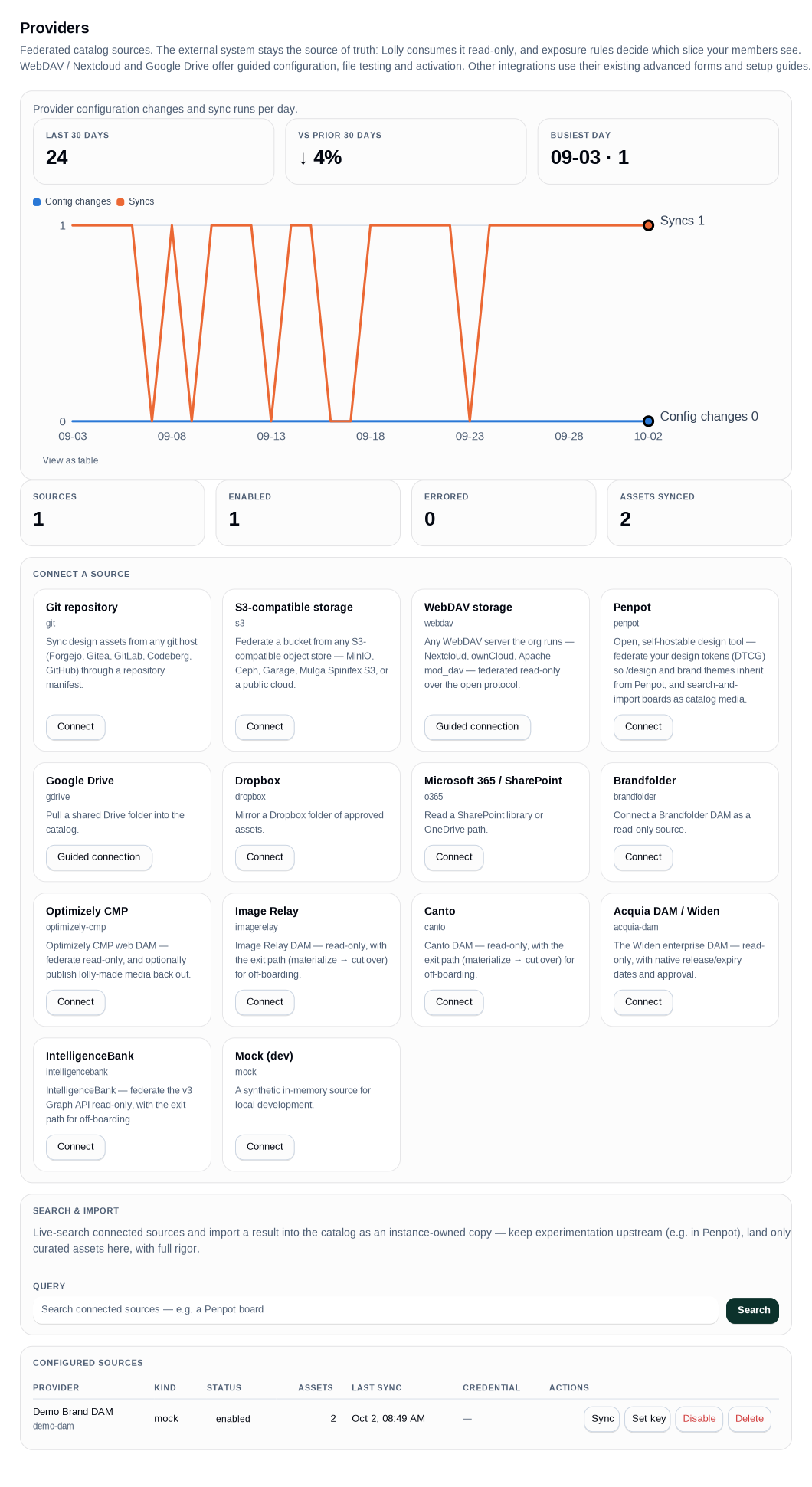
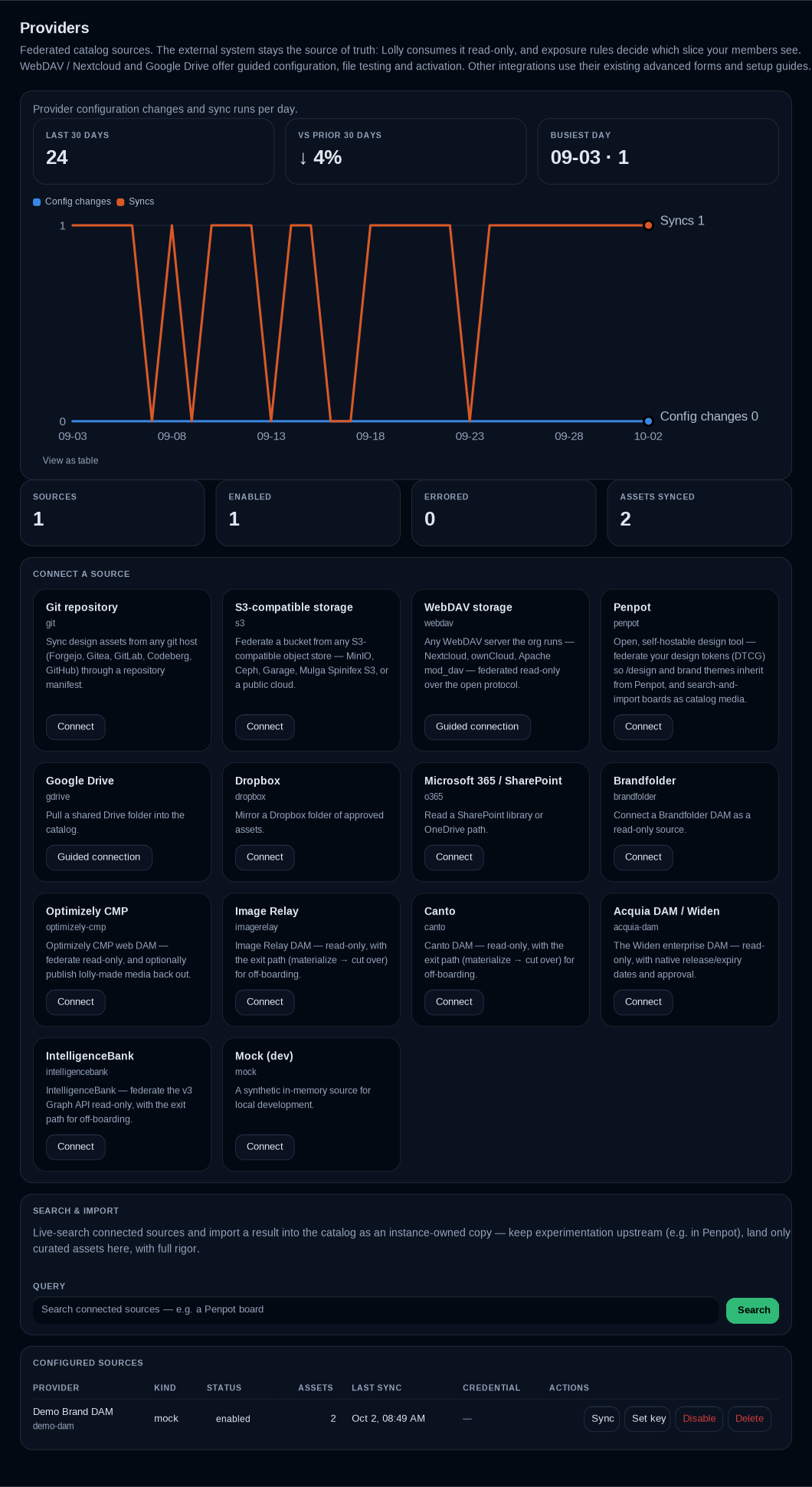
A provider is an admin-configured, read-only connector to a system that stays the source of truth. Its assets join the feed namespaced ext/<providerId>/<remoteId>, so lifecycle rows, grants and render-cache invalidation work on them unchanged. Lolly stores references plus its own governance overlays, and deleting a provider never touches remote content.
 signed by Lolly Demovector SVG22 paths320 nodes167 groups229 KBCheck it yourselfGet the signed file
 signed by Lolly Demovector SVG22 paths320 nodes167 groups229 KBCheck it yourselfGet the signed file


Kinds, the open and self-hostable ones first: webdav (RFC 4918: Nextcloud, ownCloud, Apache mod_dav), brandfolder, s3 (hand-written SigV4), git (raw-HTTP manifest), dropbox, gdrive, o365 (Microsoft Graph), penpot (a design-system source), optimizely-cmp (CMP DAM v3, OAuth2), imagerelay (v2, OAuth2), canto (REST v1, OAuth2), acquia-dam (Widen v2, bearer token, native availability), intelligencebank (v3 Graph API, login handshake), cloudinary (originals by asset ID) and orange-logic (public Search v4 renditions). No vendor SDKs; only publicly documented endpoints. The provider guides give each kind's --options, where its credential comes from and what to check on your tenant.
lw providers list
lw providers add acme-bf --kind brandfolder --label "Acme Brandfolder" \
  --options '{"brandfolderId":"…"}' \
  --exposure '{"groups":["marketing"],"requireApproved":true,"tier":"reference"}'
lw providers credential acme-bf     # prompts; never argv, never shell history
lw providers sync acme-bf
lw providers health acme-bf
lw providers enable acme-bf         # owner-only
lw providers credential is the credential step for every kind, Brandfolder's bearer key included. lw providers auth <id> replaces that prompt with a PKCE loopback consent flow, only for the kinds that have one registered (dropbox, gdrive, o365). The other OAuth kinds capture the same sealed blob through credential until their authorize endpoint is confirmed against a real tenant. The console equivalent is This Deploy → Providers.
Notes on Cloudinary, Orange Logic, Image Relay, Canto and Optimizely CMP
A few kinds need a note:
- Cloudinary and Orange Logic use the advanced source form and sealed credentials. Their files declare
originalorrenditionin the servedmeta.assetFilesentries, withproviderOriginalsAvailablebeside them. Orange Logic protected originals are unsupported, and DAM cutover is refused. See Cloudinary and Orange Logic for scope, API costs and tenant checks. - Image Relay and Canto have no native availability field, so they import expiry from a custom-metadata field given in
mapping.availabilityFields, the generic path for any DAM that models expiry as custom metadata. Which of the two an Image Relay tenant leaves through depends on which API serves it (Leave a DAM). - Optimizely CMP is a source you keep, read-only: the CMS owns those assets. It maps CMP's native
expires_atto an availability window and usesis_public(and notis_archived) as the approved gate; a folder name or a label can scope anincludeSectionsslice. It is also the only kind that accepts published exports.
Exposure governance
| Field | Effect |
|---|---|
groups | which member groups see these assets (* or absent means all members) |
requireApproved | only assets the upstream marks approved |
includeSections | provider-native folder or section scoping |
excludeTags | drop assets carrying these tags |
tier | the catalog tier stamped on the entries |
The slice filters (requireApproved, includeSections, excludeTags) apply when the provider's fragment is built, so excluded assets never enter the feed or the store. Group visibility applies per caller, when the feed is composed. requireApproved maps an upstream flag; it is not a general territory or channel check, and not proof that every historical file was approved. A provider shared with all members does not reach people in a partner programme: it needs the programme's group. To give a programme, or one company in it, a single folder of a source, use provider folders. With the licence gate on, a file reaches partners only when its licence lets it be passed on, your team marked it as your own, its type is exempt or someone chose to share it anyway. lw catalog rights records marks and licences.
Credentials
Credentials are write-only. A stored credential is sealed with AES-256-GCM under LW_CREDENTIAL_SECRET, and the APIs only ever return a display fingerprint (a hash prefix and the last four characters). Storing one needs the owner-only catalog.provider.credential, and so does the enable switch: an admin can shape a provider, but only an owner turns it on.
Providers declared in instance.json are added at boot as managedBy: 'config', point at their secret with credentialRef (an environment variable name), and are read-only in the API: editing one returns 409 CONFIG_MANAGED, so change the file and redeploy. This suits GitOps or air-gapped installs.
A credential can carry the vendor's rotation date: lw providers credential <id> --expires 2026-12-01. lw providers list then warns cred expires in Nd, and flags CRED EXPIRED once the date passes (operations).
Sync and resilience
Sync is request-driven, not a timer. Each provider keeps an in-process fragment with a lifetime (sync.ttlSeconds, default 300). An expired fragment is served as it is while a background refresh runs, and the last successful fragment is persisted, so a cold boot or a provider outage serves something marked stale rather than a 500. Fragment hashes feed the catalog version, so a refresh ripples through render-cache invalidation.
GET /api/v1/catalog/searchfans out live to providers that support server-side search, through the same exposure gates.- One sync reads at most 100,000 assets from a provider. Set
sync.maxAssetson the provider, orcatalogServing.maxProviderAssetsfor the whole instance, to move that limit. A walk that stops at the limit with more left upstream is markedtruncated, with a note giving the setting: the sync result, the provider record (state.truncated,state.notes) andGET /api/v1/catalog/sourcesall show the mark, so a shortfall is never silent. - Providers with no cached fragment yet sync three at a time.
GET /api/v1/catalog/sourcesreports only enabled connections visible to the caller, with counts derived from the visible catalog. It includes no credentials, vendor options or raw error strings. Cached listings are marked stale when an upstream refresh fails, and file access is checked on every read.
Publishing lolly exports out
The reverse direction, for a source you keep (Optimizely CMP): push Lolly-made exports into the destination DAM, so they are usable there and stay attributable on downstream sites.
lw providers publish web-cmp --in ./summit-badge.png --name "Summit Badge"The path is narrow. The provider must declare the publish capability (optimizely-cmp with options.publish: true), the action is owner-grantable (catalog.provider.publish), and the bytes must carry Lolly's C2PA export assertion, verified on the server, so a federated or pack asset can never be pushed out. Each publish is audited with the export's provenance chain, and exports arrive in the web DAM already carrying their signed Content Credential (Configure Lolly Work export signing). To send finished exports to storage or a DAM that is not a catalog source, use organisation delivery destinations.
Leaving a DAM
Migration is a separate decision from connecting a library. You can keep a provider connected for production without materializing or cutting over. Plan a DAM transition covers inventory, administrator responsibilities, coexistence and acceptance before changing source authority.
When you want to leave a DAM, lw providers materialize <id> copies its assets into the instance's own store, and lw providers cutover <id> moves their identities from ext/ to inst/ while every old address keeps resolving. The same copy powers a hold's implied pin. The whole motion, per vendor, with when to start and how to run it, is Leave a DAM.
Third-party terms
Providers are integrations, not replacements. Every deployment brings its own API tokens and OAuth apps (none ship in the repository), and provider names appear descriptively only. Lolly Work includes an integration for those services and is not affiliated with them.
Reference
Large catalogs
The feed at /catalog/assets/index.json is composed once per input state and per caller visibility, then served again until the pack, a provider fragment, a governance row or a lifecycle date changes. Each response carries an ETag, and a client that sends it back in If-None-Match gets 304 Not Modified while nothing changed.
Paging, browsing, caching and ranges
Paging. A shell that should not mirror a DAM-sized source asks for index.json?paged=1. Providers holding more than catalogServing.pagedProviderThreshold assets (default 2000) then leave assets and appear under pagedProviders: [{ id, label, count }], where count is what this caller would see after lifecycle. Without paged=1 the feed is unchanged. Cold sources also appear in pendingProviders as visible source IDs, without an invented count. The shell keeps held references from these sources while their first listing is pending; removed or inaccessible sources get no such deferral.
Browsing. GET /api/v1/catalog/assets browses the same feed one page at a time:
| Param | Meaning |
|---|---|
q | case-insensitive text over id, name, description, tags, field values and extracted text |
source | a provider id, pack or instance |
scope | shared excludes pack entries; omit it for the whole served index |
types | a bounded comma-separated list of catalog types |
taxonomyKind, taxonomyId | an exact native or legacy node identity; supply both |
section, collection | a provider section or collection name |
tag, type | an exact tag or catalog type |
limit | page size, default 100, at most 500 |
cursor | the nextCursor of the previous page |
The answer is { assets, total, nextCursor, facets, version, sources, complete, countsScope, capabilities }. Entries have the feed's shape, sorted by name and then id. total counts every match, and facets counts the matches by sources, sections, collections, tags (top 50), types and taxonomy nodes (top 200); facets.truncated marks capped value lists. version is the feed version the page came from. The cursor records the last entry returned, so an insertion before that position does not shift later pages, but renames, removals and changing membership can alter a walk. Refresh to read the current listing; a walk is not a historical snapshot.
The shell requests ?paged=1 at catalog startup and shows shared records in bounded pages. Cold providers sync in the background and appear as pending; cached, outage, truncated and skipped states stay visible. total and facets count caller-visible indexed matches, and complete is false when a relevant source is pending, stale, unavailable or incomplete. These counts never promise complete upstream recall.
Signed clients opt into the same bounded inventory with ?paged=1 on the envelope and hash-addressed index requests. Paging has its own catalog scope and keeps signature, hash and watermark checks. A retained paged source summary is refused after source access is withdrawn, and requests without the paging flag keep the full-inventory contract.
Live search. /api/v1/catalog/search supports text, source and shared scope, with an explicit incomplete candidate result. Exact type, tag and taxonomy filters and cursors are refused there; use indexed browse for those. The shell also refuses unsupported local search operators in shared browse instead of dropping them. A live candidate may need a source sync before its original can be read, and browse and search never start a transformation or AI processing.
Inspection. The inspector enforces source exposure and keeps the selected file's identity. Lifecycle diagnostics and materialized pins stay inspectable by callers with source access, and inspection never grants permission to read unavailable bytes. Field edits use the catalog.edit overlay route, and upstream facts stay separate. Cross-page selections keep their observed reference; known version changes are reported, and byte requests carry the observed cache token. This is change detection, not durable historical pin retrieval. Large provider pages are not mirrored on the device, and deferred catalog pages are never a signal to delete saved file references during cache pruning.
Federated bytes. /catalog/ext/... bytes are kept in a bounded memory cache keyed by the entry's version (catalogServing.extCache, 64 MiB in total and 2 MiB per item by default), after every visibility and lifecycle check has passed. A file the fragment declares as SVG is served as image/svg+xml whatever label the upstream gives it, under the same sandboxing headers as every stored file. The browser keeps federated bytes for five minutes and then revalidates them against the ETag, which costs no bytes while the entry is unchanged. They are never cached as immutable: they sit behind access checks, so a person who loses access must not keep a valid copy.
Ranges. A viewer can read a large federated file in parts with an HTTP Range header, and Lolly Work answers 206 Partial Content with one range. Each part is a separate request that passes every visibility, source and lifecycle check again, so revoking access, disabling the source or expiring the asset stops the next part. A whole response says Accept-Ranges: bytes when parts are available: from a small file in the memory cache, or from a source whose driver forwards ranges and checks the partial reply (currently Orange Logic renditions). Such a driver resolves the asset again for every part, so the source's own scope is checked too. A part never enters the memory cache. A stale If-Range validator returns the whole current file, and a range outside the file returns 416. Pinned local copies, previews and other sources return the whole file, because a pinned copy is read from the store from its first byte.
Cache versions and exact source references
An asset group can hold several files, including two with the same format. Lolly Work selects a file by its attachment identity, not by extension or list position, and a thumbnail and a selected original stay separate resources.
A federated entry's version is a cache change token calculated from the source's updatedAt and mapped file metadata (server/src/catalog/federation.ts). It does not hash the original bytes. Changed metadata can give a new token for unchanged bytes, and an upstream overwrite that leaves those fields unchanged can give different bytes under the same token. The byte cache and ETag use that token; neither is a durable, immutable source pin.
The provider contract resolves the current file by asset and file reference, with no general historical-revision argument. Before promising that a federated revision can be reopened exactly, qualify source-native revision retrieval or a permitted retained copy, and verify the observed digest. An unavailable exact revision must be reported, never replaced with the current head, another attachment or a preview. Instance-owned version history and explicit materialization keep their own behaviour, described above.
Source review, current access, contextual use and approval of final output bytes are separate facts. Replacing an admitted instance asset is curation (versions), and approval of a final file before it is sent follows outbound delivery.
Byte history and attribute history
Byte history and attribute history need separate qualification. A provider can keep older originals while exposing only current metadata. Record metadata and policy observations with their own time, origin, mapping revision and completeness, and do not present current attributes as a historical snapshot. An unchanged byte digest or mapped cache token cannot preserve current access or review. The source-observation test exercises fresh requireApproved exposure after the source flag changes without changing bytes or the mapped token; it does not prove upstream revocation against a fragment that is already cached.
Where instance bytes live
Lolly Work's own stored bytes (materialized and submitted assets and their versions, project files and uploads, render outputs and delivery staging) live in a BlobStore chosen by blobs.driver:
| Driver | When |
|---|---|
pg (default) | no extra services: PostgreSQL works everywhere Lolly Work runs, including a single node. Each blob is held whole in memory and is at most 500 MiB |
s3 | any S3-compatible store (AWS, MinIO, Ceph RGW) for media-sized estates and air-gapped installs: a configuration change, not an architecture change. Blobs upload in 8 MiB parts |
// instance.json
"blobs": { "driver": "s3", "s3": { "bucket": "lolly-assets", "endpoint": "https://minio.internal:9000", "prefix": "inst" } }
The S3 credential is environment-only: LW_BLOBS_S3_CREDENTIAL="<accessKeyId>:<secretAccessKey>". S3 access is hand-written SigV4 (signed GET, PUT, DELETE and multipart uploads), with no AWS SDK. inst/* bytes stream from /catalog/inst/<id>/<format> with an ETag, gated by lifecycle like any asset. Blob limits and integrity covers each driver's size limits, memory use, checksums and the S3 permissions and lifecycle rule.
Related
- Per-provider setup: the provider guides, one per platform.
- Connect your first source: install section 9.
- Leave a DAM: Leave a DAM.
- Restricting tools and inputs: governance
- Sharing what the catalog holds: Share renders and links
- Where provenance for federated assets comes from: provenance and Configure Lolly Work export signing