
The things people ask most.
Why is it free? What's the catch?
We built Lolly for ourselves. SUSE needed thousands of on-brand files, made without handing anything to outside services. So we built a tool that does all of it on the device, and released it as open source, like everything else we make. We keep maintaining it because we use it every day. There is no obligation: everything here works with or without us.
That line is drawn in the licence, not in a promise: anything that runs locally is free, forever. A released version is licensed so it cannot be taken back, and there is no contributor agreement that could relicense anyone's work.
How much is SUSE keeping private? (aka when is the rug-pull)
The engine, the shells, the schemas and the brand-agnostic tools are open source. SUSE's trademarks and branded tools are the part that stays private, and they are already separated out. The public instance at lolly.tools runs Lolly Demo, Lolly's own design system.
Nothing here rests on a promise: every released version stays open source, and the only thing held back is the trademark. When another company closed its enterprise Linux sources in 2023, SUSE co-founded OpenELA to keep that code open, the same posture this project inherits.
Full disclosure: SUSE is building internal tooling to connect Lolly to its own IT systems. That is SUSE's internal set-up, not a split between public and private development. Lolly also aims to be built through Open Build Service, with secure supply-chain artifacts delivered by the SUSE Application Collection.
Why the name "Lolly Tools"?
Lolly because freedom is sweet, and because in Australia, New Zealand and Britain a lolly is a sweet.
Tools because a tool sits still until you pick it up. It does not run when you are not using it, and it does not watch you while you are.
Why is everything green?
lolly.tools opens in Lolly Demo, Lolly's own sample design system, and its lead colour is green. It is a sample, not a rule. Switch to Lolly Starter, a blank design system, or to your own in Settings → Design systems.
Can I use my own brand?
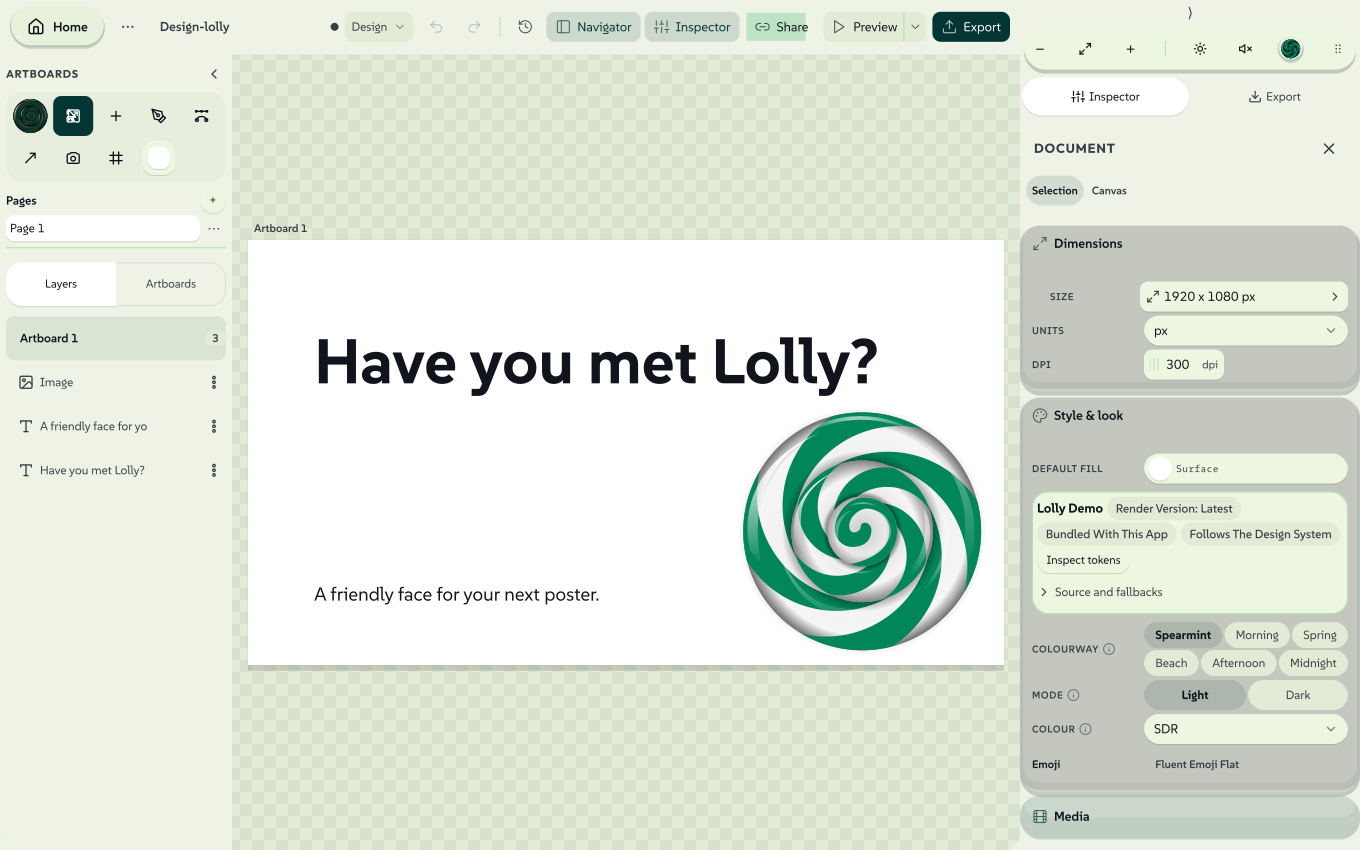
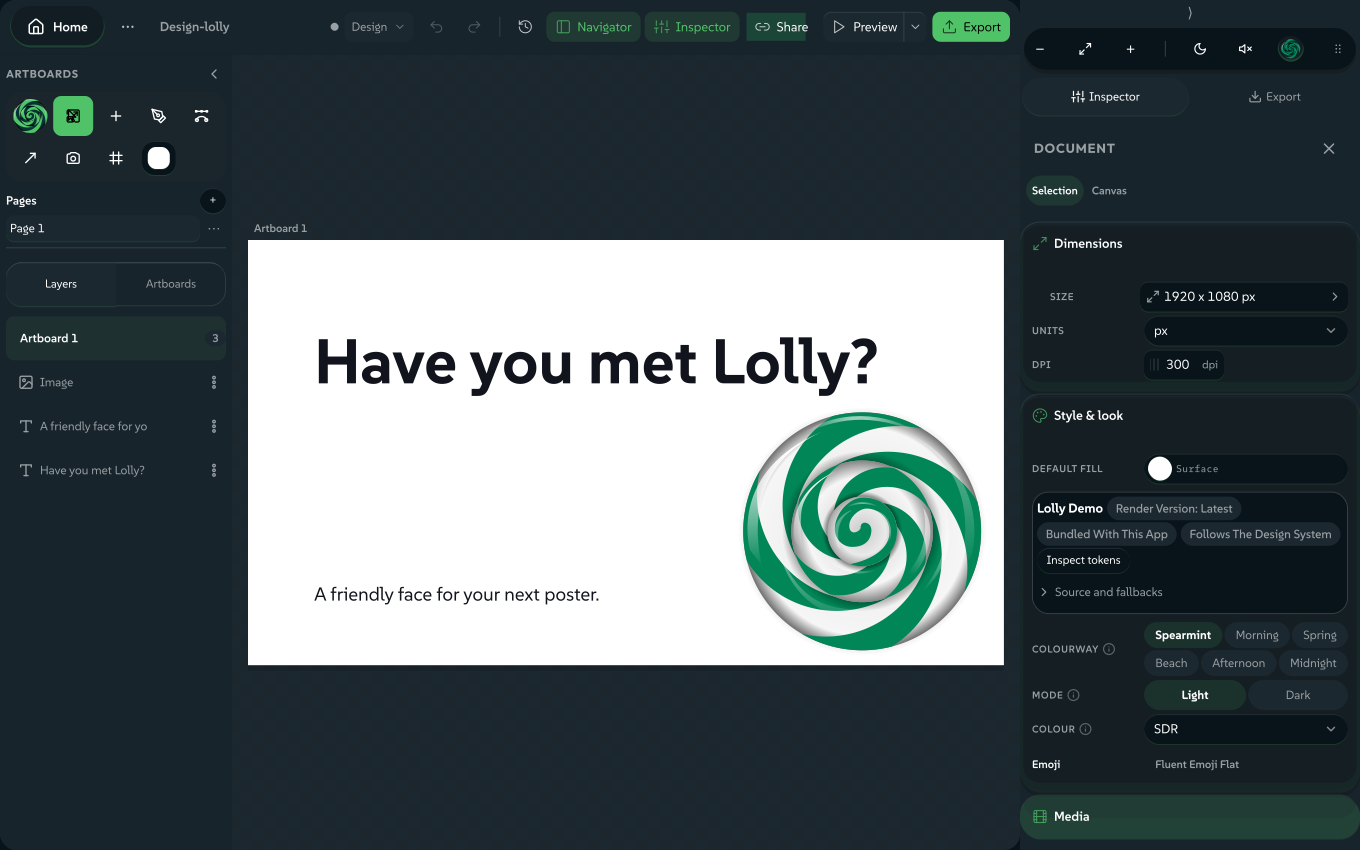
Yes. Design System Setup (#/start) builds a design system from one colour, a design tokens file or a finished design, and every tool then draws with your design system. Start walks through the three routes.
A design system your organisation or your build supplies is managed: it shows a lock and stays read-only, and you can make an editable copy to change.
Where is the thing I made yesterday?
If you pressed Save as or Save, it is in Projects, on the home screen, in the browser or app you saved from. If you only pressed Download, the file is where your browser or system saves downloads, and usually a copy is in Assets. Tools that save as you work also keep unsaved work in Projects. Find and recover your work covers every case.
I closed the tab. Is my work gone?
Saved work is still in Projects. Unsaved work is gone, except in the tools that save as you work, which keep it in Projects too. Next time, press Save as before you leave. See If you closed the tab or left the tool.
What do my profile details do?
Your details in Settings pre-fill the tools that ask for them, such as a name on a badge. They stay on this device. If you also turn on the opt-in, the details you pick are sealed into what you make, naming you as the source. Nothing is included unless you choose to include your details.
Sharing and Sync send only the content you choose. On an organisation's Lolly Work instance, shared sessions and governed work also go to that server. See Privacy.
How do I get the mobile or desktop apps?
Download them from Install Lolly. The page lists every build for macOS, Windows, Linux and Android, and shows how to check the file you downloaded. iPhone and iPad get Lolly Tools from the App Store; the iPhone and iPad section has the link.
Anyone can also build and hand out their own copy of the app, with the tools and settings their audience needs. The Build Guide shows how.
Lolly says it requires WebGPU. What can I do?
The web app draws with WebGPU, a graphics feature of current browsers, and it checks for it before opening a tool. Try these in order:
- Update your browser to its current version.
- Turn on graphics or hardware acceleration in the browser's settings, then restart the browser.
- Try a browser that has been tested: Supported environments lists them.
- On a Mac, iPhone or iPad, install the app instead.
Can Lolly edit and render my Figma, Penpot, Illustrator or InDesign files?
Yes. Open Design and click Import a design: it accepts a native Figma .fig (Save local copy), a Penpot .penpot export, an Illustrator .ai or .pdf, an InDesign .idml (File → Export → InDesign Markup) or any SVG. You need no account, no plugin and no design app licence.
 signed by Lollyvector SVG288 paths~14k nodes329 groups3 images282 KBCheck it yourselfGet the signed file
 signed by Lollyvector SVG281 paths~14k nodes329 groups3 images281 KBCheck it yourselfGet the signed file


Layers arrive as editable boxes: text stays retypable, shapes stay shapes and images join your own library. Save it, and Share with rules can turn the layout into a tool anyone with Lolly can refill. See Import a design.
Can two people work on the same design without the internet?
Yes. One person shares an invite, as a link, a QR code or a short code, and the other accepts. Both devices then hold the same session live, presence and focus rings included. It works on any shared network, including a phone hotspot in a basement, because there is no server in the middle. See Working together. For colleagues on different networks, an organisation's Lolly Work instance provides authenticated work collabs.
What are the feature flags?
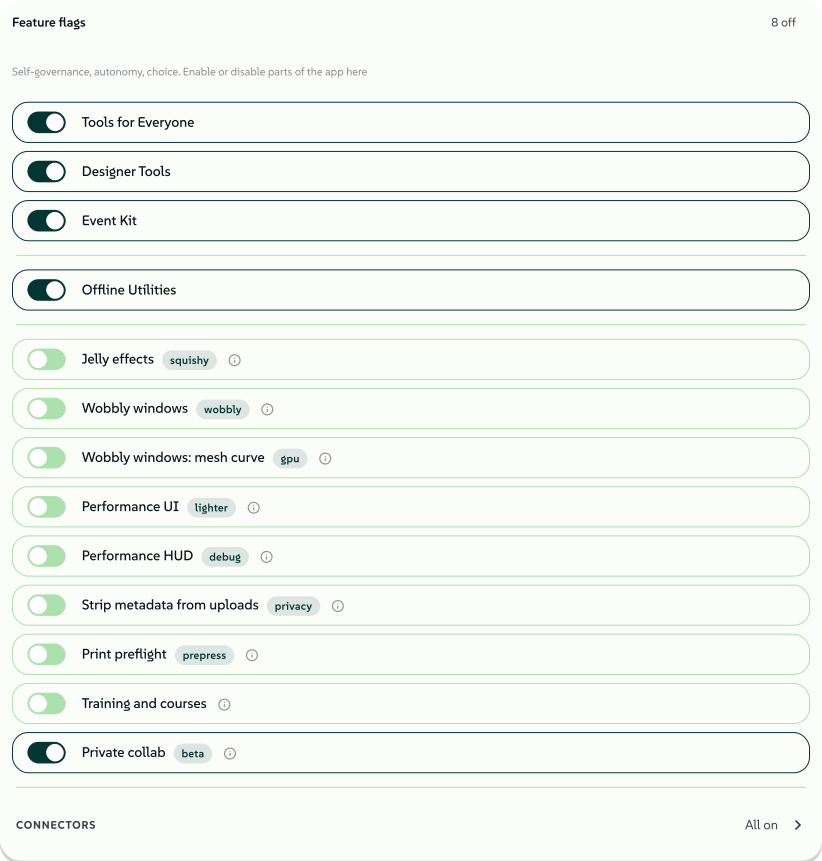
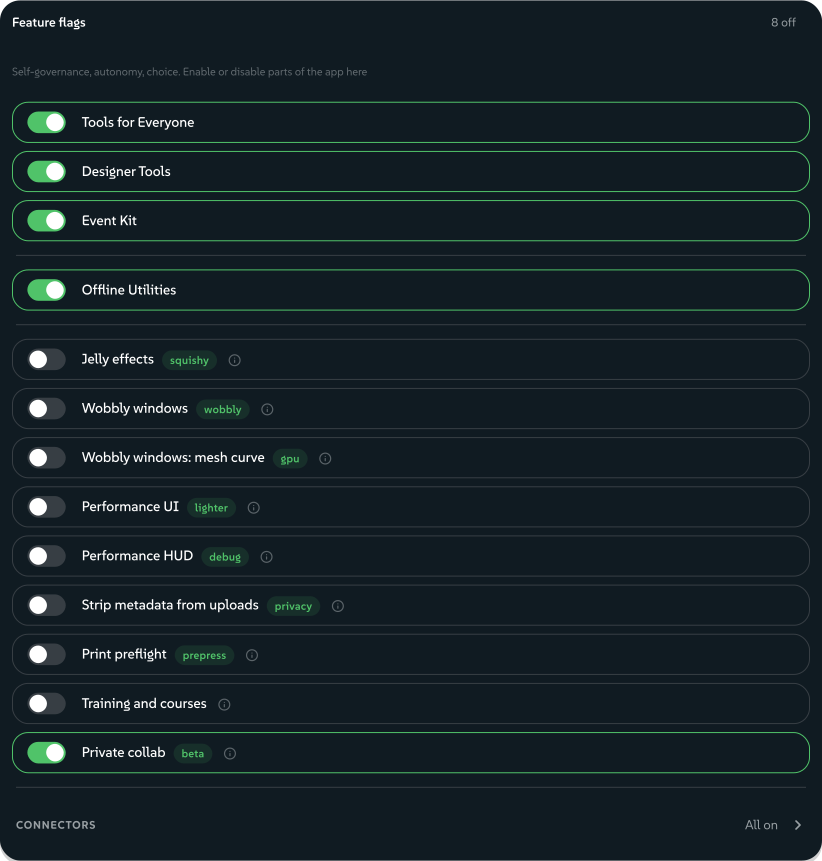
Feature flags turn parts of Lolly on or off. In standalone use, you choose your personal settings. An organisation using Lolly Work can set defaults or hide selected switches under its policy, and managed controls are labelled. See Use Lolly at your organisation.
 signed by Lollyvector SVG45 paths~8.0k nodes118 groups98 KBCheck it yourselfGet the signed file
 signed by Lollyvector SVG45 paths~8.0k nodes118 groups98 KBCheck it yourselfGet the signed file


What makes utilities different from tools?
A utility does one quick job on a file you already have, such as compressing a PDF, converting a photo or stripping hidden data, and many of them run on your device with nothing uploaded. They exist so the jobs people usually hand to a random website stay inside Lolly. Compressing a contract, converting holiday photos with their location still inside or pasting a token into an online formatter should not mean giving the file to a site with unknown retention, jurisdiction and business model. Utilities lists them, and The trade we never agreed to tells the story behind them.
 signed by Lollyvector SVG124 paths~29k nodes324 groups395 KBCheck it yourselfGet the signed file
 signed by Lollyvector SVG124 paths~29k nodes324 groups396 KBCheck it yourselfGet the signed fileTry it in the app


What hurdles could I expect adopting Lolly?
Mostly change on the producing side rather than technology. A team that wants a governed set of tools needs someone to author its design system and the first templates, although anyone can start making their own tools in Design on day one, with no git required. And existing processes keep working even when their output is off-brand, so converting one visible output well, before and after side by side, makes the case faster than a plan.
Adoption & Governance covers onboarding by role, how to measure a pilot and what a governance process can look like.
Was Lolly "vibe coded"?
Lolly was developed with AI-assisted coding, AI-assisted discovery and, in many places, AI-assisted content, using a mix of models and vendors, including those from public-cloud frontier companies. A human created the architecture, curated the code with intention and art directed the experience.
A high or critical advisory in Lolly's dependencies blocks CI. An advisory that cannot be fixed yet is held back only as an approved exception with a written reason. SECURITY.md lists each exception held today, and the release notes list the ones each release carries. SECURITY.md also says how to report a vulnerability.
Checks in the build also reject wording that reads as machine-made in the code comments, the app and these docs, to keep the text plain for every reader. A side effect is that a detector may find it harder to tell which text a model wrote. We did not set out to cause that.
Most importantly, Lolly stands on the shoulders of decades of open source work by experts around the world.
Generative AI disclosure:
- LLM-written code: Opus 4.8, Gemini 3.1, Qwen3-Coder-Next, Codex Sol (this list may expand)
- LLM discovery: Gemini 3.1, Fable, Codex Astra
- Documentation: Sonnet 5
- Open source libraries: Their respective authors, expressed in the SBOM, comments and file headers
This list does not include models vendored into Lolly.
Human claims:
- Ideation, review and feedback: Ravan Naidoo, Matthias Eckermann, Kelly Andrews, Ryan Kleeman, Peter Chamalian, the Penpot Community, Tim Hildred (list not exhaustive)
- Architecture, art direction & slop janitor: Andy Fitzsimon
Where did the SUSE-branded tools go?
They live in a separate, private repository. A public clone does not fetch the SUSE brand pack at all, so a build from it uses the neutral lolly-start profile unless you choose another: the brand-agnostic community tools plus a blank brand you fill in with your own. lolly.tools is built with the lolly-demo profile and opens in Lolly Demo, Lolly's own design system. SUSE operates its own instance to protect its trademarks.
What flavour is that Lolly logo?
Some say Lime, others say Mint and sometimes Apple, Lolly brings the sweetness, you make the flavour happen!