
Lolly keeps your personal library on the device. A backup bundle is how that library moves: export it on one install, carry the file any way you like (USB, AirDrop, email to yourself or a network share) and import it on another. Exporting and importing need no server, and the target can be offline.
This page is the format specification, for people who build shells, tools or scripts around backups: what is in the zip, how versions are gated, how an import merges and what is checked. The walkthrough for people moving their own work is Move your work to another device.
 signed by Lollyvector SVG9 paths~4.9k nodes11 groups56 KBCheck it yourselfGet the signed file
 signed by Lollyvector SVG9 paths~4.9k nodes11 groups56 KBCheck it yourselfGet the signed file
Scope. A bundle carries user data, not catalog tools. Catalog tools and catalog assets are synced separately and are assumed to be present on the target already, at worst at a higher version. Tools a user made themselves travel inside
profile.json. Importing never installs or upgrades a catalog tool.
Goals
- One format, every shell. The web app, the desktop and mobile apps and future shells share the same envelope and part schemas. Optional parts depend on each shell's capabilities, and unsupported parts are reported. Each capability bridge supplies its storage adapter.
- Survives the trip. A bundle mangled or truncated in transit fails loudly on import and never half-restores.
- Outlives this version. An older app can still import the parts of a newer bundle that it recognises. A truly breaking format is refused cleanly.
- Safe to merge. Importing onto an install that is already in use never wipes anything that was not in the bundle.
The envelope
A bundle is a plain .zip, so it survives any transport intact and any unzip tool can inspect the contents.
The download is named for the person it belongs to: LollyTools-<First>-<Last>-<YYYY-MM-DD>-<n>.zip, for example LollyTools-Ada-Lovelace-2026-06-26-1.zip, so a Downloads folder of backups stays readable. The first and last names come from the profile and are left out when unset: no profile gives LollyTools-2026-06-26-1.zip, and a first name alone gives LollyTools-Ada-2026-06-26-1.zip. Each name is reduced to a filename-safe token (Unicode letters and digits kept, spaces and punctuation stripped, at most 32 characters). <n> is a per-day, per-device sequence, so repeat exports on one day do not collide and stay in order. backupFilename() in data-transfer.ts builds the name, and the zip's contents are the same whatever its name.
| Path | Required | Contents |
|---|---|---|
manifest.json | yes | Format id, versions, counts and per-part integrity. The first thing a reader looks at. |
profile.json | when set | The user's whole me record: name, contact, headshot ref and flags, plus folders, Trash, project blueprints, user templates and user-made tools, favourites, hidden tools, language and emoji choice. Read via host.profile. |
sessions.json | yes | Every saved session: slot, tool id and version, label, thumbnail (data URL) and full input data. Read via host.state. |
assets.json | yes | Metadata for each uploaded asset (images, fonts, brand tokens, logos, saved copies of downloads), each pointing at its bytes under assets/blobs/. |
assets/blobs/<n>.<ext> | per asset | The raw asset bytes, stored uncompressed because most are already compressed formats. The extension is cosmetic; the MIME type in assets.json is authoritative. |
assets/blobs/<n>.c2pa | when present | Extracted Content Credentials as exact binary bytes, referenced by _credentialFile in the asset record. These are not device signing keys. |
design-systems.json | when present | The design systems made or added on this install, as { active, records }. See Import rules. |
file-history.json | optional | Versioned asset snapshots, finished file-operation reports and complete batch manifests, with a version of its own. Provided by the shell's internal fileHistory backup adapter. |
revision-history.json | optional, manual backups | Stable creation IDs, kept checkpoints, thumbnails and rolling recovery drafts. Provided by host.state.history.backup where supported. |
file-history/versions/ | per snapshot | Previous asset bytes and extracted credentials, whether or not the current asset still exists. |
file-history/results/ | per finished operation | Exact output bytes. No original file selected for conversion is kept or included. |
prefs.json | yes | User-owned local preferences: theme, sidebarWidth and the ct-metrics activity tally. |
lolly.txt | yes | A readable summary of the bundle (counts, profile, filename) for anyone who opens the zip without Lolly. Regenerated on every export and recognised on import, so it never counts as a skipped part. It is written after the integrity map, so the map does not cover this file. |
How export writes the zip
Export writes the zip a part at a time (shells/web/src/lib/zip-stream.ts). Uploads, saved results and saved asset versions are read in 4 MiB slices, never whole, and saved results and versions are first checked against their recorded SHA-256. Every file is then read for its checksum and integrity digest, and the zip refers to it where it is.
Nothing is re-encoded, so a file carrying Content Credentials keeps the exact bytes its signature covers, and every part keeps its exact bytes and digest. For the same parts and time the zip is identical to the earlier in-memory writer's, except that a history file over 16 MiB is compressed in pieces. tests/backup-streaming.test.ts checks this against recorded reference digests.
On a 192 MiB synthetic library, measured in Node, finishing the backup took about 125 to 150 MiB on top of the library, against about 850 MiB for the in-memory writer (node scripts/bench-backup-finalise.ts). Import still reads the whole zip into memory.
manifest.json
{
  "format": "lolly-backup",
  "formatVersion": 3,
  "minReader": 1,
  "app": "lolly",
  "exportedAt": "2026-06-22T09:30:00.000Z",
  "counts": { "profile": true, "sessions": 2, "userAssets": 4, "prefs": 3, "assetVersions": 1, "fileOperations": 1 },
  "integrity": {
    "profile.json": "sha256-…",
    "sessions.json": "sha256-…",
    "assets.json": "sha256-…",
    "assets/blobs/0.bin": "sha256-…",
    "file-history.json": "sha256-…",
    "file-history/versions/0.bin": "sha256-…",
    "file-history/results/0.bin": "sha256-…",
    "prefs.json": "sha256-…"
  }
}| Field | Meaning |
|---|---|
format | Always lolly-backup. A file without it is rejected as "not a Lolly backup". |
formatVersion | The layout this bundle was written with. Bumped on any change to the part set or shapes. Readers do not gate on this field. |
minReader | The minimum reader version that can import this bundle safely. This is the field readers gate on. |
app | Producing app id, for diagnostics. |
exportedAt | ISO timestamp the bundle was created. |
counts | What the writer put in, for display and sanity checks. |
integrity | Optional. Maps every part except manifest.json to an SRI-style sha256-<base64> digest of its uncompressed bytes. |
Version policy
Two version numbers let the format grow without stranding older installs.


- A reader imports a bundle when
manifest.minReaderis at most its own reader version. It refuses, with "needs a newer version of the app", only when the bundle demands a newer reader. - An additive change, such as a new optional part or a new optional manifest field, bumps
formatVersionand leavesminReaderalone. Older apps still import every part they recognise, and parts they do not recognise are reported as skipped, not dropped silently. - A breaking change, where a wrong import of a part corrupts data or an optional part becomes mandatory, raises
minReader. Older apps then refuse cleanly instead of importing something they cannot handle. - If a future bundle sets
formatVersionbut leaves outminReader, readers fall back to gating onformatVersionand treat the change as breaking.
Rule of thumb for authors: if every existing reader would still do the right thing by ignoring your addition, the change is additive: bump
formatVersionand leaveminReader. Otherwise raiseminReader.
Integrity
When manifest.integrity is present, a reader checks each listed part's SHA-256 before writing anything. A mismatch ("failed its integrity check") or a missing part ("incomplete") stops the whole import, so there is no partial restore. This catches the damage a file transport can do: a truncated AirDrop, an email gateway that re-encoded the attachment, a bad USB sector.
Integrity is best effort. It is written only where Web Crypto is available (every secure browser context and modern Node), and checked only when both the map and Web Crypto are present. A bundle without the map, such as one from before integrity existed, imports unchanged: "cannot verify" never counts as "corrupt".
The manifest lists neither itself nor the regenerated lolly.txt. The digests cover the parts the manifest vouches for.
Import rules
An import runs in one of two modes.
- Merge is what Import data… does, and what sync's first join, Bring it to this device, does. Data on the target stays, and nothing that was not in the bundle is touched: a session the target had and the bundle did not survives the import.
- Replace is what device sync uses to keep devices in step: it takes the synced copy's profile record, preferences, sessions, images and choice of active design system, and removes only items another device deleted since the last sync. Restoring an earlier copy goes further and makes the device match that copy, removing everything the copy does not hold, after saving the device first. Sync your devices covers what a person sees.
In a merge, anything only on the target is kept, and each kind of data in the bundle meets the target like this:
| Data | Already on the target | Only in the bundle |
|---|---|---|
| Sessions (by slot) and uploaded images (by id) | The copy saved more recently is kept, so an older backup never overwrites newer work. Equal or unknown times keep the target's copy. | Added |
| Folders | The target's name and parent are kept, and the folder gains the bundle's members it lacks. A session filed in a folder on the target stays filed there. | Added |
| Favourites (tools, catalog assets and Projects items) | Combined | Added |
| Templates, Projects templates and user tools (by id) | The target's record is kept. | Added |
| Trash entries | The target's entry is kept. | Added, so an item that could be restored on either install still can be. An entry whose folder is back in use on the target, or whose Trash slot the target already uses, is left out. |
| Other profile fields (name, contact details, language, feature flags, hidden tools and other settings) | The target's value is kept. | Taken where the target's field is empty |
Preferences (prefs.json) | The target's value is kept. | Written where the target has none |
| Design systems (by id) | The bundle's record replaces the target's. | Added. The bundle's active choice applies only when the target has no design system of its own. |
| Creation history | The copy saved more recently stays current, and the other is kept as a protected draft. | Added |
Saved sessions re-link to their images automatically. Asset references are kept by id, and the bridge re-resolves them after the images are restored, which it has to do anyway because blob: URLs do not survive a reload.
History records never change after they are written. A repeat import of asset versions and operation IDs adds nothing, and an ID that already names different bytes or history is refused, not overwritten. Re-importing an identical current asset keeps its version, and a changed current asset must carry a different version.
Creation history has a few more rules. A creation whose slot the target uses for a different creation is added as a separate creation, and a creation in the target's Trash stays there. A checkpoint id that names different content on the target keeps the target's. An archive that fails its own checks stops the import before any profile, session, asset or preference changes, and an identical repeat import adds no storage.
The summary reports what happened. Every import returns profile, sessions, userAssets, prefs, skipped and failedAssets.
failedAssetscounts uploaded assets that could not be restored, for example because device storage is full.skippedcounts parts from a newer writer that this build did not recognise. The app shows it ("… · N newer items skipped"), so a restore states what it left behind.- With file history, the summary adds
assetVersions,fileOperations,fileBatchesandfailedHistory. Storage exhaustion or an immutable-ID conflict can cause a partial restore, and the app then tells the person to keep the source backup. - With creation history, it adds
revisionsandrecoveryDrafts, counting only what this import added, andadded,kept,replaced,copiesandhiddenfor how each creation was merged.skippedCheckpointscounts checkpoints whose id names different content on the target, andhistoryLeftOutcounts older checkpoints and drafts that did not fit the device's history space. - A replace import adds
removedandfailedRemovals.
Restore is not one transaction across the profile, session, asset and history stores. Cloud sync does not advance its applied revision after a partial or unsupported restore, so the copy stays available to retry.
What does not travel
- Catalog caches (downloaded asset metadata and blobs, the tool index), which the target re-syncs for free.
- Catalog tools and catalog assets, which are out of scope and assumed present on the target. Brand tokens, fonts and logos the user added are user assets, so they do travel.
blob:and object URLs, which the bridge regenerates on load.- Conversion originals, live execution leases and machine-local access or signing secrets. These are not portable history. A saved result is a copy, not a promise that the original source was backed up.
- The export sequence counter, the per-day download-naming counter in
localStorage(lolly-export-seq). It is kept out ofPREF_KEYS, so it never rides in a bundle.
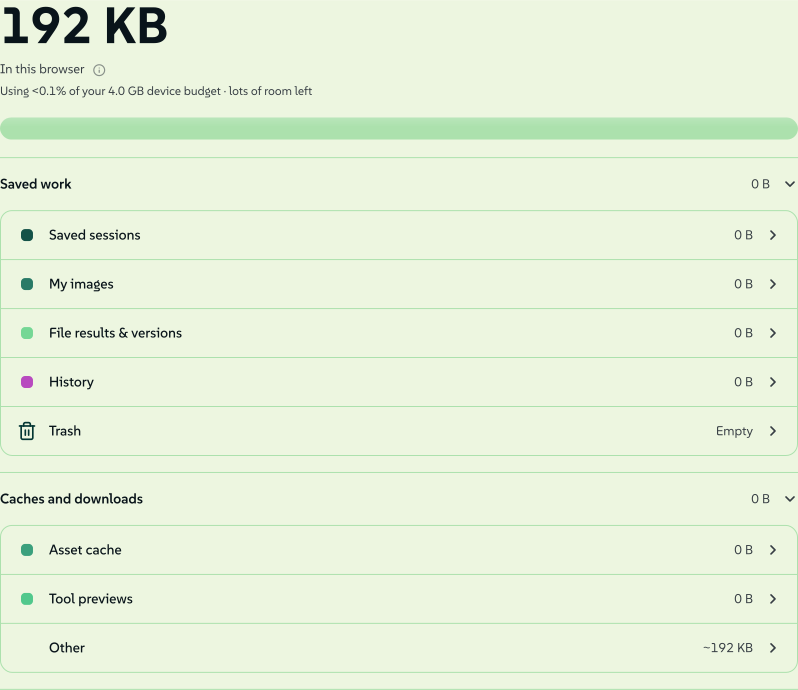
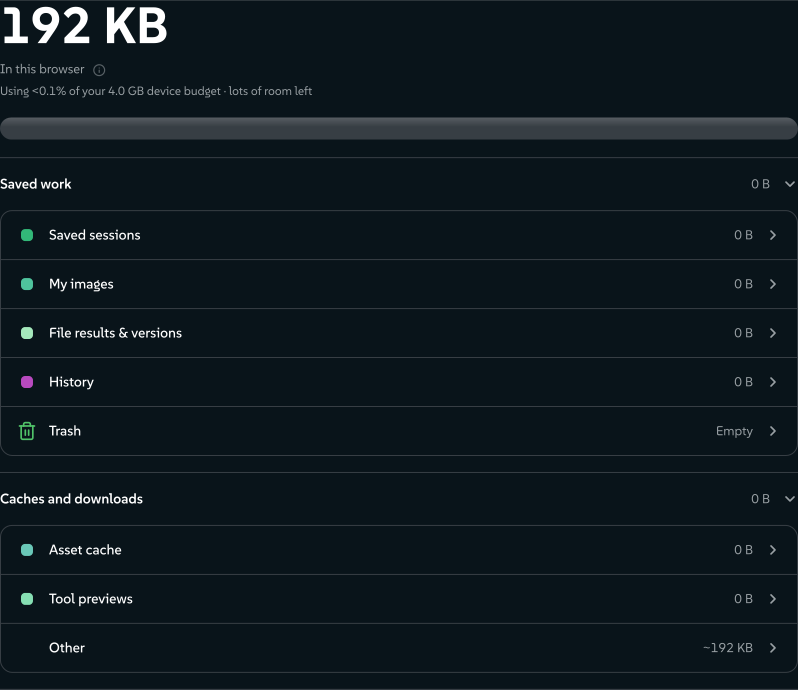
The storage meter shows the same split. Saved sessions, My images and File results & versions go into a bundle. The asset cache, tool previews and offline pins below them can all be rebuilt, so they stay behind.
 signed by Lollyvector SVG37 paths~4.9k nodes85 groups65 KBCheck it yourselfGet the signed file
 signed by Lollyvector SVG37 paths~4.9k nodes85 groups65 KBCheck it yourselfGet the signed file


Organisation data with Lolly Work
This bundle backs up the device's personal library. It is not a backup of a Lolly Work instance: organisation accounts, access policies, shared projects, catalog versions, approvals, render jobs and audit records are held by that service. Reconnect and sign in to regain access to shared work; importing a personal bundle does not grant that access.
Operators back up, retain and erase server data with Lolly Work's own guides: Backup and restore and Work storage and data lifecycle. Clearing or exporting a device does not do any of those server operations.
Across shells
data-transfer.ts reads and writes only through the capability bridge (host.profile, host.state, host.assets) and the shared localStorage preferences. The same module reads and writes the common envelope on the web and in the desktop and mobile apps, over IndexedDB or filesystem storage. Optional history parts appear only where their adapter is available, and an unsupported part is reported as skipped on import. The headless suite exercises the common parts against an in-memory bridge, and history transactions also have real-browser tests.
Two shells sit outside that guarantee, for different reasons:
- The one-shot CLI has nothing to carry: its state is in memory and lasts one invocation.
- The TUI keeps state in
~/.lolly(sessions, folders, profile), and its Profile view can back it up, but it writes a simpler archive of its own:saved-state/<slot>.jsonper session plusprofile.jsonandfolders.json, with no manifest, noformatVersionorminReaderand no integrity map. This format cannot import it (a reader rejects it as "not a Lolly backup"), and its name is confusingly similar (lolly-backup-<stamp>.zip). Unifying the two is a known gap.
Not yet portable
The envelope is a manifest plus named parts, so new kinds of portable data can join later as additive parts (a new formatVersion, the same minReader), and today's readers skip what they do not recognise. Design systems already travel this way, as design-systems.json plus their user assets.
Two names are reserved for data that does not travel yet:
tokens.jsonwould carry a whole W3C DTCG design-tokens document with its groups, sets and themes, the format Penpot imports and exports. A user's own brand tokens already travel as theuser/tokens/brandasset inassets.json, and a design system's tokens travel with its record.penpot/is reserved for an ingested Penpot file, or its Lolly-relevant subset, surfaced as a tool.
Today's readers know neither name yet. Like anything else outside the parts above, each is an unknown part to them: left untouched and counted in skipped.
History parts
The two history parts are optional and have their own versions. Most readers can skip this section.
Creation history (v3)
Manual backups from a web install with creation history include revision-history.json, with its own { version: 1, documents, revisions, recoveries } schema. It carries the kept IDs, canonical input snapshots, version stamps, raster previews and separate writer drafts. The history adapter captures current sessions and their heads in one read transaction, and sessions.json uses the same current snapshots for older readers.
Restore checks payload SHA-256 and byte counts, unique identities, document and head relationships, ancestry, timestamps, preview types and limits before committing the archive in one transaction. Compacted parent references may be missing. Existing current work is never replaced silently: when a creation is on both sides, the side not kept current becomes a protected draft.
The archive's 384 MiB transfer limit is checked explicitly, and storage limits are enforced without truncating kept checkpoints. Export writes revision-history.json and sessions.json in chunks, with the same bytes a single JSON.stringify gives, so the file text is never held whole. A history file that would pass the limit is dropped the moment it does and only counted from there. The archive is then made again without its oldest automatic checkpoints, and the export summary counts those as checkpointsLeftOut, or the archive is refused whole.
A shell without this capability restores ordinary sessions and reports the history part as skipped. Native filesystem history stays unsupported until its adapter supplies durable history transactions. Guests in a private collab have no durable history or recovery archive.
Personal snapshot sync leaves creation history out. Applying a snapshot to a local document with history keeps its previous working state as a separate recovery draft and invalidates any open editor's write token. Its immutable checkpoints stay on the device. This protects local history during a snapshot replacement; it does not merge concurrent device histories.
Historical asset references are kept, while rendering still resolves assets through the destination's existing library. This archive does not yet guarantee exact old asset bytes or old tool renders. Asset-version and file-result bytes travel in their own backup part.
Saved versions and file results (v2)
The optional history part holds { version: 2, assetVersions: [...], operations: [...], batches: [...] }, and readers also accept the earlier history-v1 shape without batches. Each snapshot gives the stable asset ID and exact version, its save time, byte length and hex SHA-256, plus an asset record whose _file and optional _credentialFile point to binary parts. Operations carry the original file facts, request, report, timestamps and optional result _file. Storage backend names, OPFS handles and execution leases do not travel. Readers that know only history v1 refuse the new history version before importing, rather than silently dropping batch membership.
Batch manifests record every selected source before processing, including files never read, cancelled members, failures to reserve result space and interrupted work. Each member has a stable operation ID, source reference and facts, requested output name and final report. An unread source has declared facts, not an invented digest. Import validates member identity and consistency with any carried operation report. Batch reports stay available when individual results have been removed, but a receipt does not mean its output bytes are still stored.
- Validation first. Every known history record, report and referenced file is validated before any profile or asset import writes. Missing bytes and mismatched SHA-256 fail even when the envelope has no integrity map. Extracted credentials stay byte arrays, including imports from older writers that serialised them as numeric-key objects.
- Running work. Running operations become interrupted records in the backup, with an explanatory failure report and no result. Restoring never restarts background work or imports an active lease. Retrying means selecting the original file again, checked against its recorded SHA-256 when available.
- Storage. Restored results commit their bytes and metadata together in IndexedDB. Ordinary new results use OPFS where available, with an IndexedDB fallback. An existing live operation is never replaced by an import.
- Backup limits. Export streams these bytes into the archive, but restore still unzips a whole backup in memory, so the limits stay: 256 MiB of history payload, 4 MiB of history metadata, at most 100 operations, 100 batches and 2,000 snapshots. Export refuses oversized or incomplete history explicitly and never silently leaves it out. Download important versions and results one by one before removing older local copies. These limits are not a measured peak-memory guarantee for phones.
- Local budgets. Local result history has a 512 MiB budget and a 100-record cap. Asset snapshots have a separate 512 MiB budget and at most 20 historical versions per asset, and extracted credential bytes count toward that budget. Restore respects these limits and never silently evicts existing user data.
- Batch metadata. Local batch metadata has a separate 4 MiB budget, at most 100 manifests and 20 members per batch. Pending members reserve metadata capacity, with a 32 KiB report ceiling per member. This is a logical budget, not a browser disk-space guarantee: a real quota failure is shown, and the in-memory report stays downloadable. Retrying a batch member creates a new batch without overwriting the old report. Removing a batch record does not remove individual result bytes or library assets.
- Results in the library. Converted results can be added to the library without normalisation or re-encoding, with the source and output hashes and the operation relation attached. Repeated adds reuse an unchanged copy, and an edited copy is never overwritten. Raster images can start a new Design document, which uses the current library asset ID; enforcing exact version pins throughout Design's runtime and URL path is separate work. SVG, HTML, PDF and ZIP results are kept as opaque file assets, not promoted to trusted interactive or vector content.
- Where people see this. Convert → Recent file operations shows history usage, reports, downloads and the version manager, which also finds earlier versions of deleted library assets. Restoring a snapshot creates a new current version and keeps the selected snapshot. Settings → Preferences → Storage counts results and versions separately from disposable caches.
- Cleanup. Explicit temporary-file cleanup removes only operation-owned, unreferenced bytes. Current records protect their files, and recent OPFS files have a one-hour grace period. Saved results and asset snapshots are not cleared automatically.
Older readers still accept the v2 envelope (minReader: 1) and restore the parts they know, counting unsupported history parts as skipped. Full history recovery needs a shell with the fileHistory adapter, a seam inside the shell rather than a new tool-facing HostV1 capability. Real two-device restore is covered by the local Chromium gate; recovery on installed desktop, iOS and Android apps is still to be accepted separately.
Reference
- Module:
shells/web/src/data-transfer.ts(exportBackup,importBackup,BACKUP_FORMAT,BACKUP_FORMAT_VERSION,BACKUP_READER_VERSION; thebackupFilename()namer is internal). - Contract test:
tests/data-transfer.test.ts, covering round trip, merge, integrity, forward compatibility and the reader gate. - History contract tests:
tests/file-history-backup.test.ts,tests/file-batch-history.test.tsandtests/file-result-library.test.ts. Browser acceptance:tests/file-history.browser.test.ts,tests/file-batch-history.browser.test.tsandtests/file-result-reuse.browser.test.ts. - Bridge surface used:
host.profile,host.stateandhost.assets; see Host API.