
Every promise on this site can be checked, with no account. Most checks need only a browser; the rest need a terminal and a copy of the source. If a check below does not give the result shown, that is a bug or a broken promise, and we want to hear about it: see If a check fails.
Start with the quickest one: drop a file on Verify. Then go further: watch the network while you use a tool, pull the plug and keep working, count the cookies and read the source.
These checks cover Lolly on its own. If your organisation runs Lolly Work, it adds sign-in, shared content, configured telemetry and audit records; check those against Server Surface and the organisation section of the privacy policy.
See it work, in ten seconds
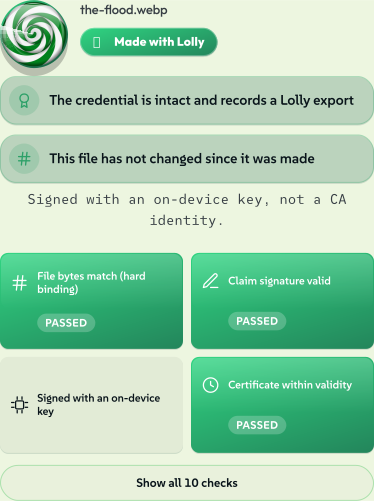
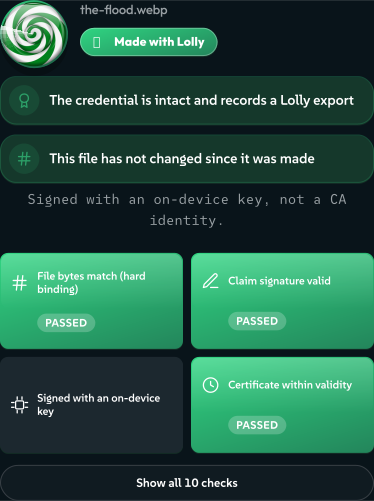
Open /verify and drop a file on the page. There is no upload, no account and no wait for a server. Here it checks the generated Queensland storm from Our AI Stance: an image Gemini generated, which Lolly opened, marked and converted. Every badge was worked out on the device, from the file's own bytes.
 signed by Lollyvector SVG79 paths~6.4k nodes48 groups1 image157 KBCheck it yourselfGet the signed file
 signed by Lollyvector SVG79 paths~6.4k nodes48 groups1 image157 KBCheck it yourselfGet the signed file


The verdict is a small pile of badges, each an independent fact:
- Made with Lolly: the credential is intact and records a Lolly export.
- The credential is intact: the signed C2PA manifest parses and its own claim signature verifies.
- The bytes have not changed: the file's hash still matches what was signed. Alter one pixel and this badge flips.
- GEN AI: a machine made these pixels, and the file says so. Lolly reads that declaration back out rather than hiding the fact.
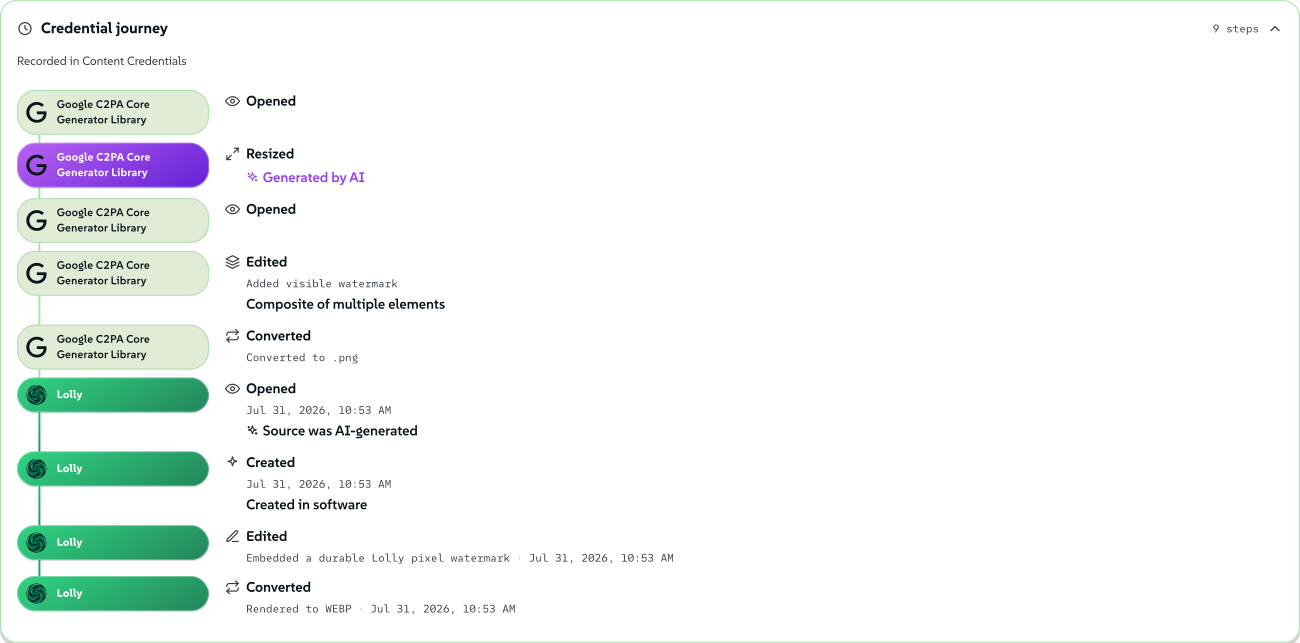
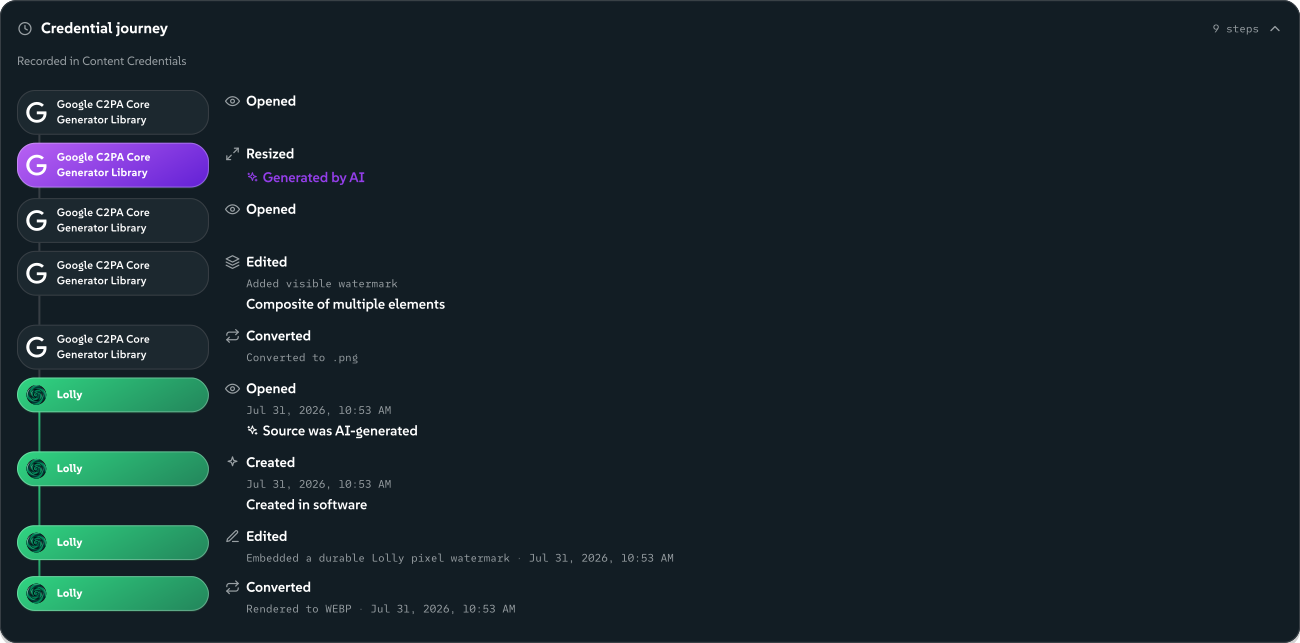
The whole history travels with the file. Nine steps survive here: five Google recorded as it generated and watermarked the image, then four Lolly recorded as it opened, marked and converted the copy on this page. Verify reads them straight out of the bytes and draws them as a timeline.
 signed by Lollyvector SVG255 paths~14k nodes162 groups287 KBCheck it yourselfGet the signed file
 signed by Lollyvector SVG255 paths~14k nodes162 groups287 KBCheck it yourselfGet the signed file


That is the demo. The checks below are the guarantees underneath it, and each one is reproducible. Content Credentials explains every verdict.
In your browser, no tools required
- 1. Watch the network. Open lolly.tools, open your browser's DevTools (F12), switch to Network and use a tool: type a web address into QR Code, change colours, export a PNG. Every request stays on
lolly.tools: the app shell, the tool's own files and catalog assets. There is no analytics host, no CDN beacon, no font service and no error-reporting endpoint. What you type into a tool appears in no request at all, because rendering is local. - 2. Pull the plug. Load the app and open a tool or two, then go offline (airplane mode, or DevTools → Network → Offline) and reload. The gallery and every tool you opened keep working, including rendering and export in the formats you used. A tool's files and a format's encoder are cached the first time you use them, so use a tool once online before testing it offline. This is the strongest single check on this page: software that phones home does not survive its cord being cut.
- 3. Count the cookies. DevTools → Application (Firefox: Storage) → Cookies →
https://lolly.tools. The list is empty: the app sets no cookies. Pastedocument.cookieinto the console and you get"". The optional CA enrolment sets a short-livedHttpOnlycookie,lolly_ca_state, scoped to/api/ca, whichdocument.cookiecannot show. A Lolly Work instance uses its own sign-in cookies; compare them with Privacy. - 4. Read your own storage. In the same panel, everything Lolly keeps is in front of you: a couple of dozen plain
localStoragekeys (theme, language, sidebar width, sound and view settings, and a cached copy of the public tool catalog index) and your own documents in IndexedDB. Every value is a readable string or JSON, with nothing obfuscated. Clearing site data removes these local records, but not a Sync backup or records held by a Lolly Work instance. Settings → Storage → Clear all my data does the same from inside the app, and you can watch the stores and caches empty. - 5. Check the disclosure contact exists.
/.well-known/security.txtanswers with an RFC 9116 contact block, not an HTML page.
What else you may see in the Network tab
Some features reach the network only when you use them, and each is visible in the same tab:
- adding a Google Font in Design System Setup fetches that one family from Google, after a consent dialog that says so, once, before the first fetch;
- clicking an ICC press-profile preset fetches that profile from the ICC's public registry at color.org;
- playing the optional built-in radio streams from the station;
- entering a location in Meeting Planner looks that place up at open-meteo's geocoding service for its coordinates and time zone, once per city (answers are saved on your device), and the field says so where you type;
- URL Screenshot loads the address you typed, because that is its job, and you watch it happen.
A tool that declares a network capability may fetch only from the hosts its manifest allowlists, and that check fails closed. No tool shipped today declares one, so the browser-enforced Content-Security-Policy is what holds the list above to its hosts. The privacy policy keeps the canonical table of all of these, including managed-instance traffic such as policy refreshes and enabled reporting.
From a terminal
6. The render endpoint answers with public data only. The one server feature that puts typed inputs into a URL, hot-link renders, is live here. The privacy policy says what that means for the inputs you put in a link.
curl -s -o /dev/null -w '%{http_code}\n' 'https://lolly.tools/tool/qr-code.svg?url=test'
# 200
Each deployment chooses (LOLLY_DISABLE_RENDER_GET=1): on an instance that sets it, the same probe returns 404. That difference is the setting working, not an inconsistency.
7. Check the services your deployment enables. Server Surface lists the optional services and links their detailed references. For Lolly Work, include its authenticated APIs, collaboration connection, storage and configured providers. A probe of the public lolly.tools does not test a private organisation instance.
If you run your own instance, Delivery deployment has the release checks for it: model integrity, the edge probe and its sample list, display renditions, the private download gateway and the signed catalog in a browser.
In the source
All of the above could still be theatre if the deployed code differed from the public code. So check the code. The deployment builds from the public repository:
git clone https://github.com/lolly-tools/lolly.git
cd lolly
8. No tracker and no analytics SDK, anywhere. Search the code that ships (the engine, every shell including the browser extension, the Tauri bridge overrides and the service worker, the server functions and the tool packs) for the usual suspects:
grep -rnF --include='*.ts' --include='*.js' --include='*.mjs' --include='*.html' \
  -e googletagmanager -e google-analytics -e posthog -e mixpanel -e hotjar \
  -e sentry.io -e segment.com -e '@vercel/analytics' \
  engine/src shells/*/src shells/chrome-extension shells/*/bridge-overrides \
  shells/web/public/sw.js services packages api community brands/*/tools
# (no output)
This scan looks for third-party tracking SDKs. It does not show the absence of first-party usage reporting: Lolly Work supports organisation telemetry and a separate audit log, with their own policy and tests.
9. No third-party DNS resolver. Verify's SEAL check never sends a lookup through a DNS-over-HTTPS provider, because the app has no resolver:
grep -rnF --include='*.ts' --include='*.js' --include='*.mjs' \
  -e cloudflare-dns.com -e dns.google -e /dns-query \
  engine/src shells/*/src shells/chrome-extension shells/*/bridge-overrides \
  shells/web/public/sw.js services packages api community brands/*/tools
# (no output: outside this page and its built copies, the only place those
#  hostnames appear in the repo is tests/no-trackers.test.ts, the test that
#  bans them)
10. The certificate service keeps no issuance log. The identity CA keeps no log of what it issued and no inventory of identities: no stdout line, no webhook, no certificate store. The absence can be searched for:
grep -rn logIssuance services/ca api/ca
# (no output)
The CA does keep short-lived working state: rate-limit buckets hold hashed IP and email keys for their window, and a managed deployment's admission store keeps a keyed identifier and request digest for at most ten minutes. Content Credentials engineering has the detail.
Enforced by tests
The source checks above are not a one-time audit: they are pinned in the test suite, so they cannot quietly rot. tests/no-trackers.test.ts checks a longer list of tracker names than the scan above and fails the build if:
- any analytics or tracking SDK appears anywhere in the shipped source it scans, across app, engine, server, extension and tool-pack code;
- any third-party DNS-over-HTTPS resolver appears in that source;
- the CA issuance log comes back, in the source or the generated server bundle;
- the privacy policy loses its legally required statements (named controller, legal basis, right to complain).
Run them yourself in the clone (Node 22.18 or later; this file needs no pnpm install):
node --test tests/no-trackers.test.ts
# ✔ no analytics or tracking SDK appears anywhere in shipped source
# ✔ no third-party DNS-over-HTTPS resolver is contacted
# ✔ the certificate service logs no personal data
# ✔ privacy policy states a controller, a legal basis and a right to complain
The full suite (pnpm install && pnpm test) runs several thousand more, including the adversarial cryptography tests described in Security & Verification.
What you cannot verify from outside
- Hosting access logs. Any server that answers a request can log it: IP address, path and time. An outside probe cannot establish how long logs are kept. The operator controls logging, rotation and exports, and must disclose those choices. Local rendering keeps ordinary edits on your device; optional server rendering and shared workspace services have the separate data flows the privacy policy describes.
- That the deployment runs this code. You can check that the source is clean and that the deployed behaviour matches it, and the checks above do both. Binary-level attestation of a web deployment is not something the web platform offers. The mitigations are the public repository, the enforced tests and the offline check: a tampered deployment that phones home fails checks 1 and 2 at once.
- Tool hooks. A built-in tool's optional logic is reviewed rather than sandboxed: it runs in the page unless the tool opts into a Worker. Every tool on lolly.tools is first-party and reviewed before it ships. The Threat Model sets out where hooks run and what limits them.
If a check fails
A difference between this page and what you observe is a security report. Send it through the private channels on Security & Verification. We practise coordinated disclosure and credit reporters.