
This guide covers the optional organisation service. Configuration, console and API paths refer to your Lolly Work instance. The packaged console keeps its release-matched copy of this guide.
Share one folder from a file server you run, such as Nextcloud, and its files appear in the Lolly Work catalog for the groups you choose. Lolly Work reads the folder and never writes to it, so the server stays the place where files are added and approved.
The kind is the protocol, not a vendor. Nextcloud is the documented path; ownCloud, Apache mod_dav, Sabre/DAV and any other server that answers RFC 4918 PROPFIND use the same kind with flavor: "generic".
On YunoHost, the Lolly Work package finds a Nextcloud on the same server and prefills Configuration > Nextcloud. Once you paste the account's login name and app password and switch it on, it writes this source, and a matching delivery destination, to instance.json as config-managed entries (YunoHost).
What you need from the server
Nextcloud
- A dedicated read-only account, such as
lolly-federation, rather than a person's. Share the folder or Group folder with it as Read only, or keep the files in its own Files tree. A share appears in that account's Files root under the share name, which is whatoptions.rootpoints at. - An app password for that account, from Settings > Security > Devices and sessions > Create new app password. Nextcloud shows it once. Never use the account password: an account with two-factor sign-in rejects it at the DAV endpoint, and an app password can be revoked on its own.
- The account's login name. The DAV path carries the login, which can differ from the display name; Settings > Personal info shows both, and the login is the last part of the Files URL. That is
options.username. - The server root as
options.baseUrl, such ashttps://cloud.example, including any subpath (https://example.org/nextcloud). The files root becomes<baseUrl>/remote.php/dav/files/<username>/<root>.
Generic WebDAV
- The URL your server mounts DAV at, as
options.baseUrl:https://dav.example/storefor an ApacheAliaswithDav On, orhttps://cloud.example/remote.php/dav/files/<login>for ownCloud. ownCloud's files path matches Nextcloud's, so give the whole path as the base and keepflavorgeneric. The driver appendsoptions.rootand nothing else. - A read-only account over HTTP Basic, on a read-only mount or with no write permission. The driver sends only
PROPFINDandGET. PROPFINDwithDepth: 1must reach the server. A reverse proxy that passes onlyGETshows up as a405on the first health check.- HTTPS. The credential is HTTP Basic, so a plain HTTP hop hands the password to the network.
Guided connection in the app
- Open Assets & tools > Providers at
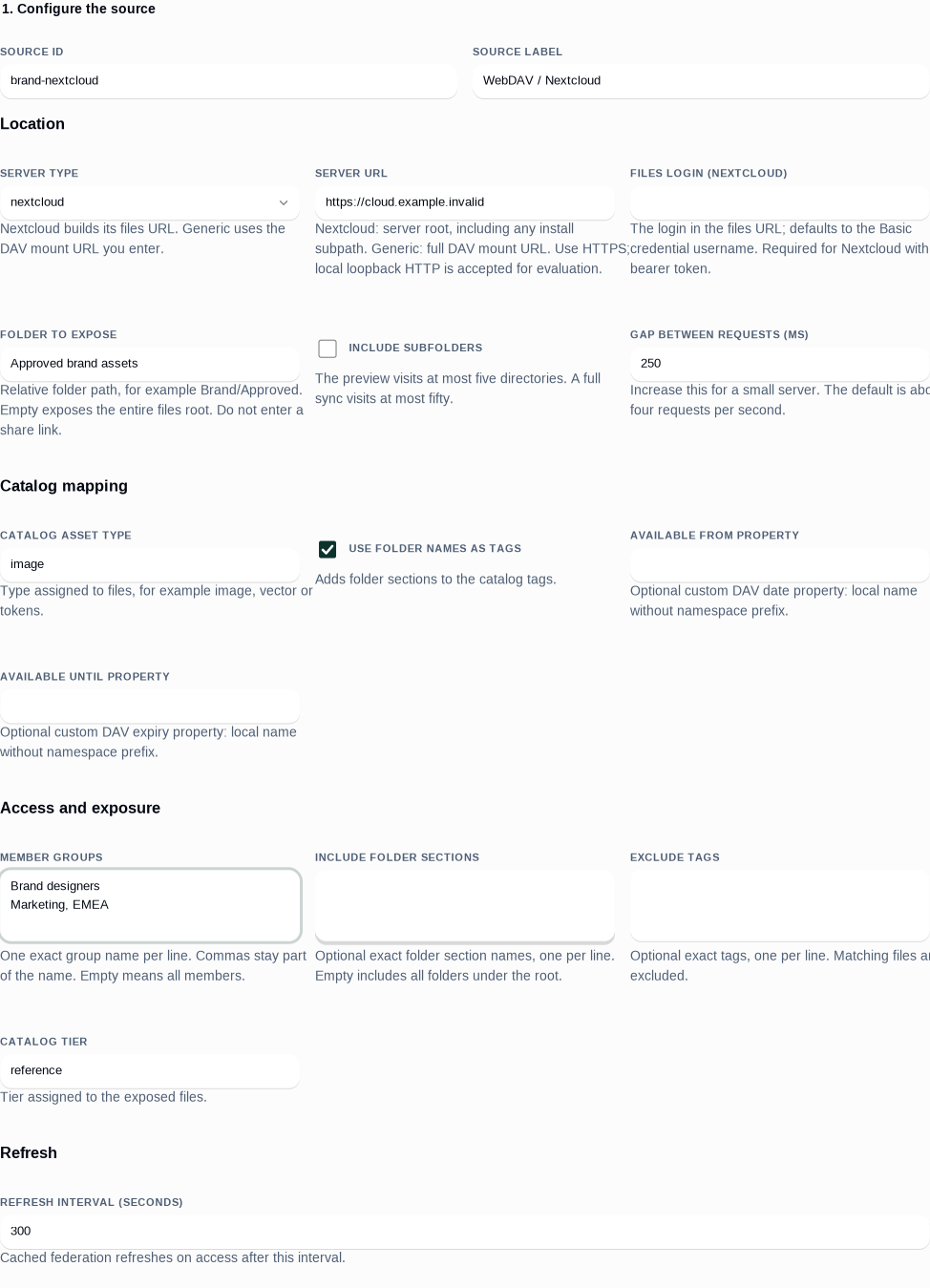
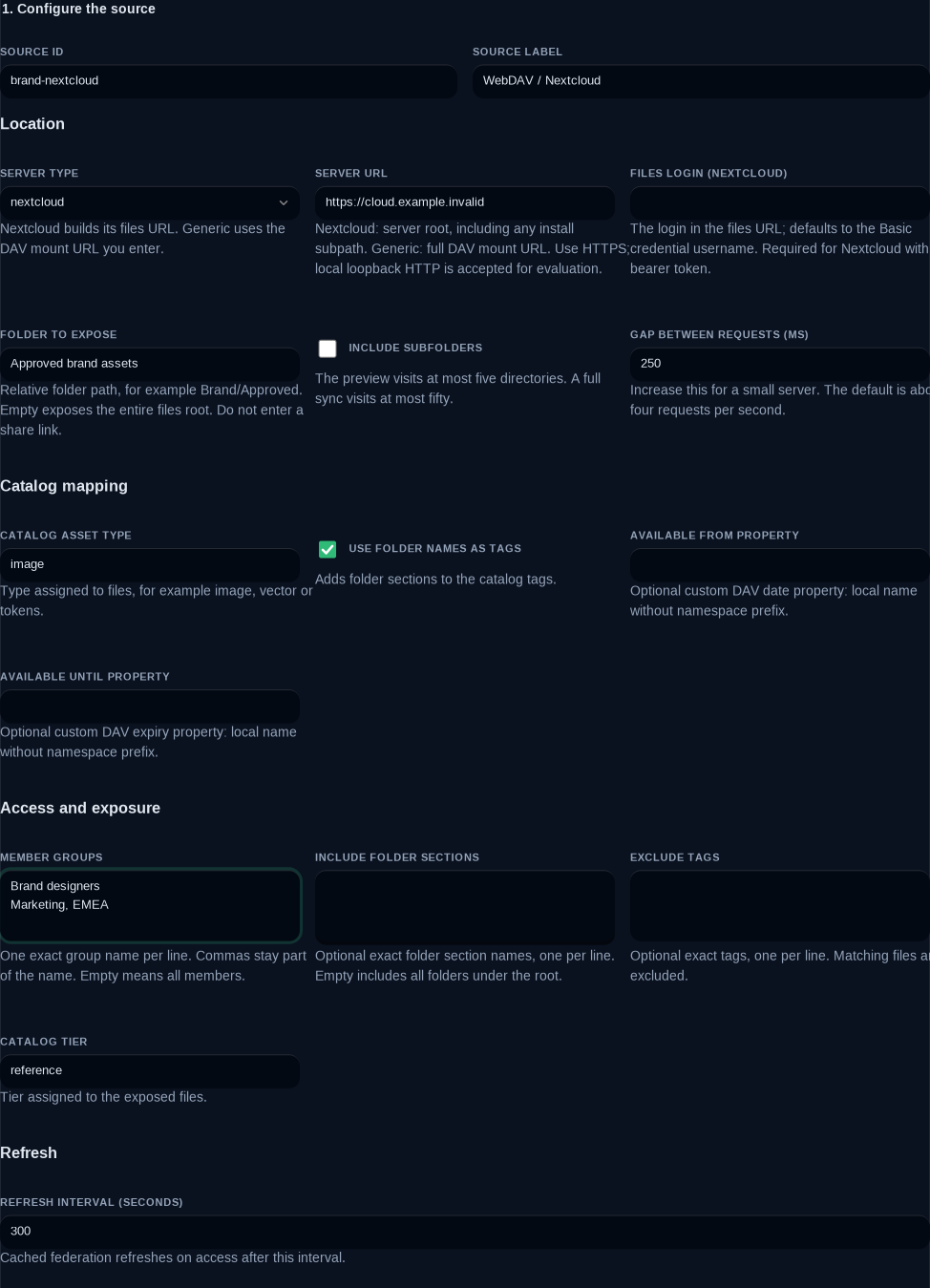
/admin#/providersand choose Guided connection on the WebDAV storage card. - Enter the server type and URL, the folder to expose, the catalog mapping and the member groups. Group and section fields take one exact name per line; a comma stays part of the name. An empty folder exposes the whole files root and empty groups expose the files to every member, so check both.
 signed by Lolly Demovector SVG16 paths198 nodes108 groups1 image191 KBCheck it yourselfGet the signed file
 signed by Lolly Demovector SVG16 paths198 nodes108 groups1 image191 KBCheck it yourselfGet the signed file


The example exposes one curated folder to two exact groups; Marketing, EMEA is one group name.
- Enter the read-only account's username and app password, or choose a bearer token. A Nextcloud bearer token also needs Files login, so the files URL can be built. The credential is used only for the test until you save, and is cleared when sealed, discarded or when the panel closes. Nothing goes into browser storage.
- Choose Test files and original. The preview lists a sample of the folder and reads one original, showing its byte count, content type and SHA-256. Compare that checksum with a copy of the same file you trust. The preview's limits are under Verify.
- An owner chooses Save source and seal credential. This creates a disabled source and checks the credential again before sealing the credential; the server needs
LW_CREDENTIAL_SECRETset first. If sealing fails, the panel keeps the disabled source and offers Retry credential. Closing the panel leaves the saved source disabled; carry on from its row. After a lost response or a reload, check that row before creating the same id again. - Choose Sync and enable source when the folder and groups are right. Lolly Work runs a full sync first and leaves the source disabled if listing fails or finds no exposed files. Then it checks health again and enables the source.
An admin can save a disabled source and hand the credential and the enable to an owner. Disabling the source from its row stops federation. A config-managed source stays read-only here: change your deployment and redeploy.
Credential shape
One string: the login and the password joined by a colon, or a bearer token for a server behind a token-issuing proxy. For Nextcloud the password must be the app password. The driver accepts nothing else and refuses before sending a request.
"<username>:<app password>"
"bearer:<token>"
lw providers credential acme-nextcloud # hidden prompt; never argv, never shell historyTo rotate, run the same command with a new app password, then revoke the old one in Nextcloud.
instance.json / lw providers add
Nextcloud:
{
  "id": "acme-nextcloud",
  "kind": "webdav",
  "label": "Acme Nextcloud",
  "options": { "baseUrl": "https://cloud.example", "flavor": "nextcloud", "username": "lolly-federation", "root": "Brand", "recursive": true },
  "exposure": { "groups": ["design"], "tier": "reference" }
}
Generic WebDAV:
{
  "id": "acme-dav",
  "kind": "webdav",
  "label": "Acme file server",
  "options": { "baseUrl": "https://dav.example/store", "flavor": "generic", "root": "brand", "recursive": true, "minGapMs": 500 },
  "exposure": { "groups": ["marketing"] }
}
Options
| Option | What it does |
|---|---|
baseUrl (required) | The server URL. Its host is the pin: an <href> naming another host is refused, and a redirect is an error naming its target, never followed. |
flavor | "nextcloud" or "generic" (default). Picks the URL template and whether Nextcloud's oc:tags is requested. |
username | The Nextcloud login in the DAV path. Defaults to the credential's username; set it when the login differs, and always with a bearer token. |
root | Federate only this folder under the files root. Point it at the shared folder rather than a whole home directory. |
recursive | Walk subfolders (default false). Each folder level below the root becomes a section, so exposure.includeSections works on the folders you already have. |
minGapMs | The gap between calls, default 250 (about four a second). WebDAV publishes no rate limit; raise it for a small server. |
Availability dates. WebDAV has no approval status, so curate a folder of approved files. If your server returns a custom DAV property carrying a date, name it in mapping.availabilityFields to import an availability window. Give the local name without the namespace prefix (embargo-until, not x:embargo-until). Setting it switches the listing to <d:allprop/> so the custom property comes back, which is a more expensive call.
Verify
lw providers preview --kind webdav --options '{"baseUrl":"https://cloud.example","flavor":"nextcloud","username":"lolly-federation","root":"Brand"}'
lw providers credential acme-nextcloud
lw providers health acme-nextcloud
health sends a PROPFIND with Depth: 0 to the files root, the cheapest call that proves both the URL and the credential. The console's preview follows up to five directory pages, inspects at most 1,000 files and reads one original of up to 32 MiB. Each listing is capped at 2 MiB and the whole preview at 30 seconds. A partial response, an empty original, a size mismatch or a refused download fails the check. A sample is not a full inventory.
What each error means
| Symptom | What it means |
|---|---|
webdav propfind 401 - the server rejected the credential | Wrong login or password, or the account password where an app password is required. |
webdav propfind 403 - the server rejected the credential | The credential works but this account may not read the folder. Check the share. |
webdav propfind 404 for /remote.php/dav/files/… | The files root is wrong: usually username is the display name rather than the login, or root is a folder the account cannot see. |
webdav propfind 405 for /… | The server, or a proxy in front of the server, does not allow PROPFIND. |
webdav propfind 301 for /… - the server redirected, sending it to … | Usually a missing trailing slash or a baseUrl one hop off. The driver refuses every redirect, so it never streams another origin's bytes as your file. |
webdav credential must be "<username>:<password>" … | The sealed string is neither accepted form. Nothing was fetched. |
none of the N resource(s) PROPFIND returned sit under the files root this driver built | The server describes its files by a different path: a proxy rewriting the prefix, or the wrong login. |
To see which properties your server returns (names and value types, never values), add --shape:
lw providers preview --kind webdav --shape --options '{"baseUrl":"https://cloud.example","flavor":"nextcloud","username":"lolly-federation"}'Notes / limits
The driver is not yet confirmed against a running server. The URL templates, property names and response layout come from RFC 4918 and Nextcloud's documentation, so treat the first sync as the check. Check a source on your own tenant lists what to look at. Contributors changing the driver follow its maintainer runbook in the Lolly Work repository.
- No search, thumbnails or expiring links. Nextcloud's SEARCH method is not used and there is no rendition endpoint. Files stream through Lolly Work on each request.
- A rename arrives as a new file. The catalog id is the file's path under the root, so moving or renaming a file upstream creates a new entry. Nextcloud's
oc:fileidsurvives a rename but cannot fetch bytes, so the driver does not use that property. - The walk is bounded. One walk visits at most 500 directories (
MAX_DIRS). A sync also stops at its page ceiling, one page per directory: at least 50 pages, rising withsync.maxAssets(5,000 at the default 100,000 assets), so 500 directories is usually the limit you meet. Either limit is reported as a note on the sync. Narrowrootrather than federating a whole home directory. - A destination as much as a source. You run this server yourself, so there is no vendor to leave. It is more often where an exit copies files to than where one starts.
Use as an offboarding destination
Nextcloud or another WebDAV server you run can hold the files after a DAM exit. Export permitted originals and supporting records, copy them with your file service's upload or sync tools, then connect a narrow root using this guide. Lolly Work's source is read-only; materialize cannot write a DAM library into this folder. Verify the inventory within the walk limits and plan replacement references and governance.
The path chooser compares this route with self-hosted Lolly Work storage and other destinations, with open-source options first.