
This guide covers the optional organisation service. Configuration, console and API paths refer to your Work instance. The packaged console keeps its release-matched copy of this guide.
Federate a WebDAV server read-only as a catalog source. The kind is the protocol, not a vendor: anything that answers RFC 4918 PROPFIND federates through here. Nextcloud is the primary documented flavor, because it is the open, self-hostable, sovereign option and it is the one most deploys already run; ownCloud, Apache mod_dav, Sabre/DAV and any other RFC 4918 server ride the same kind through flavor: "generic".
Zero-dep, like every driver here: HTTP Basic (or a bearer token) over fetch, and the 207 multistatus body is read by a small parser written for that one layout. No SDK, no XML library.
Guided connection in the app
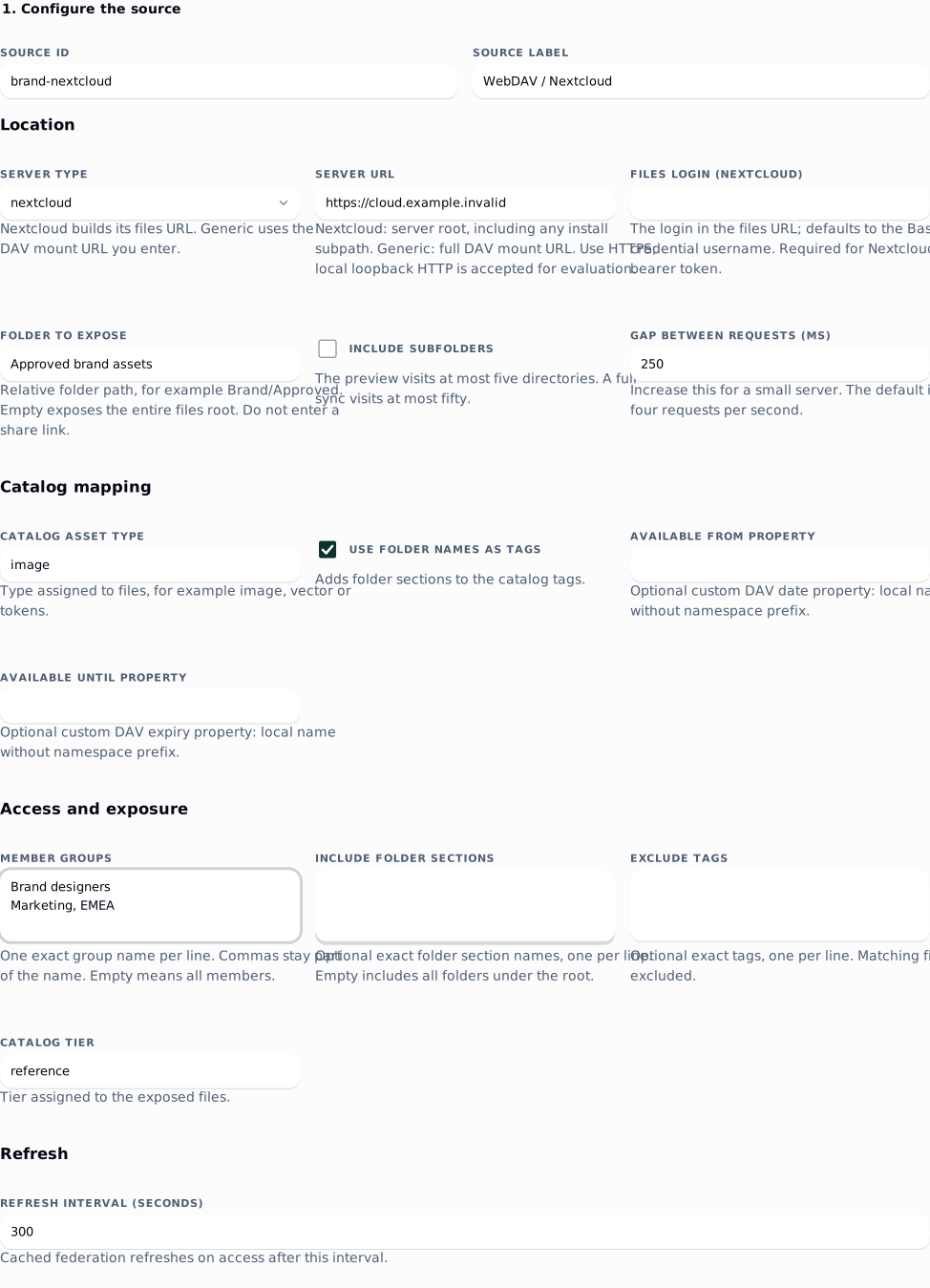
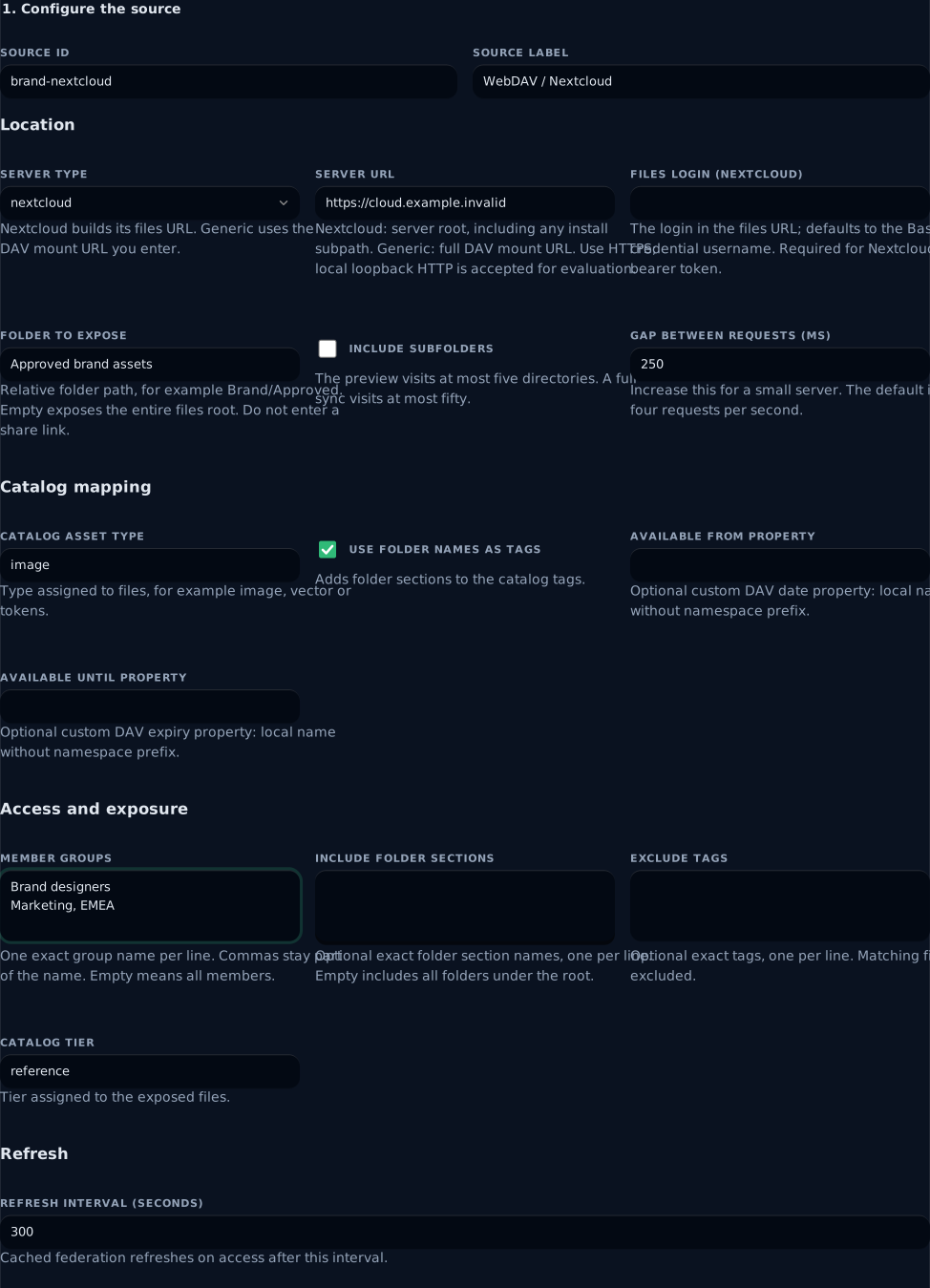
Open Instance → Providers at /admin#/providers and choose Guided connection on the WebDAV storage card. Enter the server type and URL, the folder to expose, catalog mapping and member groups. Group and section fields accept one exact name per line; a comma stays part of the name. An empty folder exposes the entire files root, and empty groups expose the slice to all members, so review both before saving.
 signed by Lolly Demovector SVG自分で確認する署名済みファイルを取得16 paths198 nodes108 groups1 image191 KB
 signed by Lolly Demovector SVG自分で確認する署名済みファイルを取得16 paths198 nodes108 groups1 image191 KB


The example exposes one curated folder to two exact groups. Marketing, EMEA is one group name. Enter your own server URL and folder; credentials are entered in the next part of the form.
Enter the read-only account's username and app password in their separate controls, or choose bearer token. With a Nextcloud bearer token, also enter Files login so the app can construct the files URL. Credentials are used only for the test until you save; they are cleared when sealed, discarded or the panel closes. No credentials or connection drafts go into browser storage.
Choose Test files and original. The read-only preview follows up to five directory pages and inspects at most 1,000 distinct files. It reports exposure exclusions, unavailable files, mapping omissions and whether more directories remain. It reads one currently available original up to 32 MiB and displays its byte count, content type and SHA-256. Compare that digest with a known source original. A partial response, empty original, size mismatch or refused GET fails the check. Each XML listing is capped at 2 MiB and the whole preview has a 30-second deadline. This sample does not verify every file, future access or a complete tenant contract.
After a successful preview, an owner can choose Save source and seal credential. This creates a disabled source and verifies the credential again before sealing the credential. Set LW_CREDENTIAL_SECRET in the server environment first. If credential storage fails, the panel keeps the same disabled source and offers Retry credential. Closing leaves the saved source disabled; continue from its source row. After a lost response or reload, inspect that row before retrying creation with the same id.
Choose Sync and enable source when the folder and groups are correct. The app runs a full sync first and leaves the source disabled if listing fails or finds no exposed files. It then checks health again and enables the source. Disabling from the source row stops future federation. Admins with configuration access can save a disabled source and hand credential storage and activation to an owner. Config-managed sources stay read-only here: change their deployment source and redeploy. Other provider kinds retain their advanced forms and documented consent flows; Google Drive also has a guided browser journey.
WebDAV does not provide approval status; use a folder curated to contain approved files. Availability controls apply only to custom DAV properties your server actually returns. Complete the live-verify runbook for customer acceptance.
What you need from the server
Nextcloud (the primary path)
- A dedicated read-only account. Make one (
lolly-federationis a fine name) rather than reusing a person's. Give it read access to what you want federated: share the folder or the Group folder with it as "Read only", or put the files in its own Files tree. A share shows up in that account's Files root under the share name, which is whatoptions.rootthen points at. No write, create, delete or reshare permission is needed. - An app password for that account, generated under Settings > Security > Devices and sessions > Create new app password. Nextcloud shows the generated password once - copy it then. Never use the account password: an account with 2FA on rejects it at the DAV endpoint outright, and an app password can be revoked on its own without touching the account or any other integration.
- The account's LOGIN name. The DAV path carries the login, which can differ from the display name (Settings > Personal info shows both, and it is the last path segment when that account opens Files). That is
options.username; it defaults to the username half of the credential. - The server root as
options.baseUrl, e.g.https://cloud.example. If Nextcloud is served under a subpath, include it:https://example.org/nextcloud. The driver builds the files root as<baseUrl>/remote.php/dav/files/<username>/<root>and pins every request to that host.
Generic WebDAV (ownCloud, Apache mod_dav, any RFC 4918 server)
- The URL your server mounts DAV at, as
options.baseUrl-https://dav.example/storefor an ApacheAliaswithDav On,https://cloud.example/remote.php/dav/files/<login>for ownCloud (its files path is Nextcloud's, so give the whole thing as the base and leaveflavorgeneric). The driver appendsoptions.rootand nothing else. - A read-only account, over HTTP Basic. Point it at a read-only mount, or give the account no write permission; the driver issues only
PROPFINDandGET. - That
PROPFINDwithDepth: 1reaches the server. A reverse proxy in front of that server often passesGETand drops every other method, which reads as a405on the first health check. - HTTPS. The credential is HTTP Basic, so a plaintext hop hands the password to the network.
Credential shape
One string, the username and the password joined by a colon - the s3 precedent:
"<username>:<app password>"For Nextcloud that password must be the app password from Settings > Security, never the account password. A server fronted by a token-issuing proxy can use the bearer form instead:
"bearer:<token>"No OAuth flow is invented for this kind: those two forms are all the driver parses, and anything else fails closed before a single request leaves.
lw providers credential acme-nextcloud # hidden prompt; never argv, never shell historyCredentials are write-only here: sealed at rest, and only a fingerprint is ever read back. Rotating one is another lw providers credential - revoke the old app password in Nextcloud afterwards.
instance.json / lw providers add
Nextcloud:
{
  "id": "acme-nextcloud",
  "kind": "webdav",
  "label": "Acme Nextcloud",
  "options": { "baseUrl": "https://cloud.example", "flavor": "nextcloud", "username": "lolly-federation", "root": "Brand", "recursive": true },
  "exposure": { "groups": ["design"], "tier": "reference" }
}
Generic WebDAV:
{
  "id": "acme-dav",
  "kind": "webdav",
  "label": "Acme file server",
  "options": { "baseUrl": "https://dav.example/store", "flavor": "generic", "root": "brand", "recursive": true, "minGapMs": 500 },
  "exposure": { "groups": ["marketing"] }
}options.baseUrl(required) - parsed at configuration time, and its host is the pin: request URLs are built from it, an<href>naming another host is refused, and redirects are never followed (a3xxis an error naming its target).options.flavor-"nextcloud"or"generic"(default). It picks the URL template and whether Nextcloud'soc:tagsproperty is requested. Everything else is plain WebDAV either way.options.username- the Nextcloud login the DAV path carries. Defaults to the username half of the credential; set it when the login differs, and set it outright when the credential is a bearer token, since that form carries no username.options.root- federate only this subpath of the files root. Leading and trailing slashes are tolerated. This is the scoping control: point it at the shared folder rather than federating someone's whole Files tree.options.recursive- walk subdirectories (defaultfalse, one directory only). Each directory level below the root becomes a section, soexposure.includeSectionsand section tags work on the folder structure you already have.options.minGapMs- minimum gap between calls to this provider, default250(about 4 requests a second). WebDAV publishes no rate limit, so that default is deliberate caution rather than a documented ceiling; raise it for a small self-hosted box.mapping.availabilityFieldsapplies only if your server exposes a custom DAV property carrying a date; naming it imports an availability window. Give the local name with the namespace prefix dropped (embargo-until, notx:embargo-until). Setting it switches thePROPFINDto<d:allprop/>so the custom property is actually returned (RFC 4918 section 9.1) - the more expensive call, which is why it is opt-in.
Verify
lw providers preview --kind webdav --options '{"baseUrl":"https://cloud.example","flavor":"nextcloud","username":"lolly-federation","root":"Brand"}'
lw providers credential acme-nextcloud
lw providers health acme-nextcloud
preview builds a throwaway provider record, asks the server, and discards it: nothing is created, stored or enabled, so a wrong option costs a retry. health runs a PROPFIND with Depth: 0 against the files root, which is the cheapest call that proves both the URL template and the credential.
| Symptom | What it means |
|---|---|
webdav propfind 401 - the server rejected the credential | Wrong login, wrong password, or the account password where an app password is required. |
webdav propfind 403 - the server rejected the credential | The credential parsed and the server refused it for this path. Usually that account may not read the folder: check the share in the Nextcloud UI. |
webdav propfind 404 for /remote.php/dav/files/… | The files root is wrong: usually options.username is the display name rather than the login, or options.root identifies a folder that account cannot see. |
webdav propfind 405 for /… | The server, or a proxy in front of that server, does not allow PROPFIND. |
webdav propfind 301 for /… - the server redirected, sending it to … | The server wants a different URL, usually the trailing slash on a collection or an options.baseUrl that is one hop off. The driver refuses every redirect, on either method, so it never streams another origin's bytes as your asset. |
webdav credential must be "<username>:<password>" … | The sealed string is neither documented form. Nothing was fetched. |
none of the N resource(s) PROPFIND returned sit under the files root this driver built | The server answered, but identifies its resources by a different path - a proxy rewriting the prefix, or the wrong login. |
To see what your server actually carries, property names and value types only, never values. This one asks with <d:propname/>, so it reports every property your server holds rather than only the five the driver names:
lw providers preview --kind webdav --shape --options '{"baseUrl":"https://cloud.example","flavor":"nextcloud","username":"lolly-federation"}'Run the WebDAV live-verify runbook against a real server before you commit to this kind: it is the ordered pass that confirms every assumption below and identifies the constant to edit when one is wrong.
Notes / limits
- This driver is fixture-verified only. Its URL templates, property names and the multistatus layout it reads come from RFC 4918 and Nextcloud's public documentation, and have not been confirmed against a running server by this repo. Nothing here is verified live. The open items are the
LIVE-VERIFYblock inserver/src/catalog/providers/webdav.tsand the runbook; read the first sync as the verification and report anything that does not match. - No server-side search, no thumbnails, no expiring URLs. WebDAV has no search this driver relies on (Nextcloud's SEARCH method is deliberately not built until one server confirms it), no rendition endpoint, and bytes stream through the driver per request rather than through a signed URL, so nothing expires.
- No availability window. A WebDAV file has a size, a modification stamp and a content type, and nothing that says when it may be published: the manual
catalog.expirearm is the whole story unless a custom property is named inmapping.availabilityFields(above). - A rename federates as a new asset. The federated id is the file's path relative to the files root, so moving or renaming a file upstream produces a new one downstream. Nextcloud's
oc:fileidwould survive a rename but cannot address bytes, so it is deliberately not requested. - The recursive walk is bounded. At most 500 directories per walk (
MAX_DIRS), and a single sync stops after 50 pages, one page being one directory - the smaller bound wins. Hitting either is reported as an operator note on the sync, never as silence. Narrowoptions.rootrather than federating a whole home directory. - Directories become sections, never assets. Each level of the path below the root is one section, which is what
exposure.includeSectionsscopes on. - Supports the exit (materialize then cutover): bytes stream per request, so a federated file can be pinned into this instance's own BlobStore and checksummed like any other source. This is a storage source you run yourself rather than a DAM held under someone else's contract, so it carries no vendor off-boarding story - it is far more often the destination of an exit than the start of one. See off-boarding.
- Does not accept published exports.
See also: catalog · permissions · the live-verify runbook.