
This guide covers the optional organisation service. Configuration, console and API paths refer to your Lolly Work instance. The packaged console keeps its release-matched copy of this guide.
Partners start with nothing internal. A programme receives your design system and only the assets you share with the programme or its companies. With the licence gate on, a shared file reaches partners only when its licence lets it be passed on, your team marked it as its own or someone chose to share it anyway.
This page is part of Run a partner programme.
What reaches a partner


- Your design system. They get your design system's tokens, fonts and palettes, because every tool draws with them.
- What the programme was given. Beyond those, only the assets in collections a programme includes, and any submitted asset or connected provider whose groups list the programme's group.
- What the company was given. A collection, an instance asset or a connected provider shared with a company's group reaches that company's people and nobody else's.
- Nothing shared with everyone. An asset, collection or provider shared with everyone does not reach them, and neither do announcements sent to everyone, projects shared with everyone in the workspace or injectables for everyone.
Choose its tools and share its assets
Open Choose what they get and tick the tools and the collections. A programme receives only the files you share with the programme, so share the logos and pictures your templates use, for example as a logos collection. Without them, a template is incomplete for partners, and, with the licence gate on, a render that uses a missing file is refused.
- Tools. Each tick is a
tool.useallow grant for the programme's group, listed in Grants and in the governance document like any other grant. - Collections. A ticked collection gives its assets to the programme's people even when your own people need a group to see them. Each tick adds the programme's group to the collection's groups, so the collection stays visible to everyone it reached before.
- One file. To give one asset to a programme without a collection, submit it with the programme's group, for example
lw catalog submit ./price-sheet.pdf --name "Price sheet" --groups programme-resellers-emea.
Give one folder of a source
Provider folders on the programme's page gives one folder of a connected source, such as your DAM, and everything inside it, to the programme or to one company in it, until an optional end date. Its people then get those files even when the source is otherwise for your own people, and nothing else from that source. Choose the source, then the folder: the list shows every folder the source's last sync found, with how many files each holds.
Nothing is chosen at first, and All of it comes last, so pressing the button without looking never gives the whole source away. When the folder you choose holds other folders, the line above the button lists them, so you can check what comes with your choice before you press the button. When the end date passes, the files go at once. When you give a folder, the form says how many of its files record no licence.
The licence gate
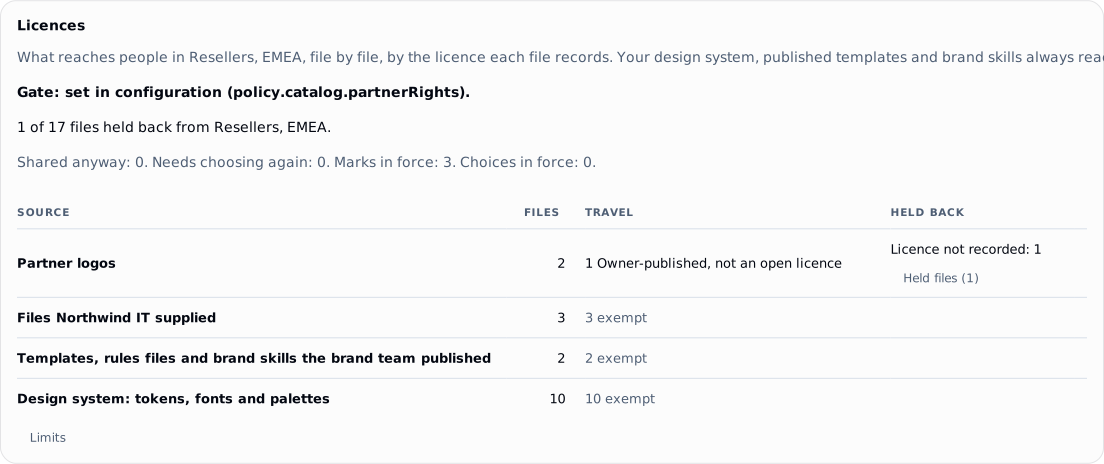
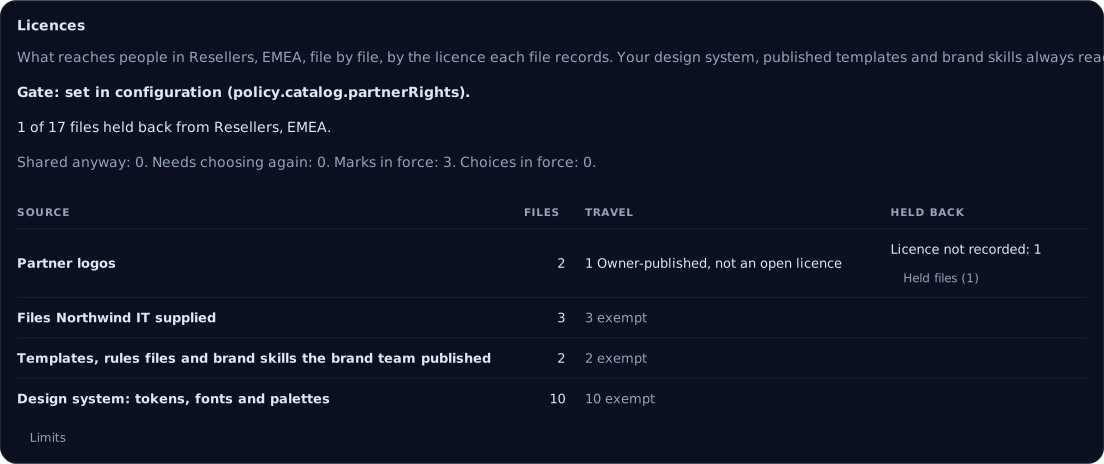
With the licence gate on, a file that records no licence stays with your own people. The programme's Licences card shows what reaches its partners, what is held back and why. Your brand team can mark a folder or a whole source as your own with These are ours, or record a file's licence on its page in the catalog. You can also Share anyway held files with one programme or company, with a note: the card shows who chose each file, and Withdraw takes a choice back.
 signed by Lolly Demovector SVG60 groups167 KBCheck it yourself서명된 파일 받기
 signed by Lolly Demovector SVG60 groups167 KBCheck it yourself서명된 파일 받기


In this example one logo in the Partner logos collection records no licence, so the gate holds the logo back: the row reads "Licence not recorded: 1". To send the logo, mark the file as your own with Mark on its page in the catalog, which records the logo as owner-published, or choose Share anyway for this programme.
One setting chooses the mode, policy.catalog.partnerRights:
gate. A catalog file reaches a partner, or anyone holding a link a partner made, only when one of four things holds: its recorded licence lets the file be passed on, your team marked it as your own, its type is exempt or a programme manager chose to share that file anyway with that programme or company.report. Nothing partners receive changes. The licence report says what the gate would hold back, so you can prepare before you turn the gate on.
Your own people receive exactly what they did before, in either mode. Some files are exempt, because every tool needs them or because they are yours by nature: tokens, fonts, palettes, templates, rules tools, user tools and brand skills, plus a company's own files for that company. A held file is simply absent for partners, and nothing tells a partner that more may come.
Mark your own files
Most brand teams never recorded a licence on their own logos and photographs. A mark says once that a set of files is your own, so they travel to partners. A mark covers one file, a folder of a connected source, a whole source or a pack's id prefix. A marked file travels as "Owner-published, not an open licence", and partners read that in its details. The mark is your own statement: "Recorded as <holder>'s own statement by <name> on <date>. Lolly does not check ownership."
A mark reaches only files that declare nothing of their own. A file's own licence, a provider's value and a reviewed licence are never replaced. You can also record the licence of one file that records none, as your workspace's own record of the licence. NC and ND licences are recognised, not interpreted, so those files stay held. Marks and licence records need catalog.edit, and nothing is written back to a provider.
lw catalog rights mark folder:partner-dam/Logos       # your own: the holder is your workspace's name
lw catalog rights licence ext/partner-dam/a1 CC-BY-4.0 --attribution "Photo by A. Person"
lw catalog rights                                      # the marks and records in force
Share a held file anyway
Someone with programme.manage can choose to send held files to one programme or one company, up to 200 files at a time, with an optional note. Each choice is remembered against the file's facts: a new version of the file, a changed licence record or a new version of the rules retires the choice, and the report lists the file as needing a new choice. A choice covers the file it names, never a file synced later. Withdraw a choice at any time; ending a partnership withdraws its choices.
Links, ZIPs and credits
- A link a partner makes carries only what their gated feed holds. A held file is refused when they make the link.
- A link your own people make leaves held files out, unless its maker chose them. Staff may include held files with a note; partners cannot.
- Every collection ZIP a link serves starts with
CREDITS.txtandcredits.json, the same credits a.lollypack carries. - The collection link page shows one credit line for a file whose licence asks for a credit, with the licence and the source.
Worked example: Northwind IT
The worked example on Run a partner programme follows Northwind IT, a reseller in Resellers, EMEA, through every subject. Its second step happens here.
2. Give the programme its tools and logos
Console. Open Choose what they get. Tick the tools, here Certificate and QR Code, and the Logos for partners collection, which holds the logos the data sheet uses.
lw. A collection reaches the programme when its groups include the programme's group:
lw programmes set resellers-emea --tools certificate,qr-code
lw catalog collection partner-logos --name "Logos for partners" \
    --members lolly/logo/primary,lolly/logo/reverse --groups design,programme-resellers-emea
Rita still sees nothing. Once she joins, she gets these two tools, your design system's colours, type and palettes, and the logos in the collection, and nothing else from your catalog.
Next: 3. Add Northwind IT and its details.
Every option
- Tools and collections: Choose what it gets
- Folders, how each source reports them and end dates: Provider folders
- The two modes, what the gate covers and the codes it answers with: Licences
- Marks, licence records and their rules: Mark your own files
- Choices and their limits: Share a held file anyway
- Dry runs, ZIPs and credit lines: Links, ZIPs and credits
- Everything on the card: The Licences card
- How licences are read: Creative rights