
An asset is a file plus one entry in an index: a logo, a mascot pose, a palette, a design-token document, an event tile, a font, a music bed or a video clip. Once an asset is in a library, every tool's picker offers the asset. This page is for the person who looks after those files for a design system: how they get in, what each index entry holds and the rules that keep links working for years.
Assets are global, versioned and controlled by the design system's owner. The type enum in schemas/asset.schema.json lists every kind: vector, raster, video, audio, lottie, model, lut, palette, tokens, font, profile, ratecard, text and data. The filter row in Assets is built from those types and offers only the ones the library holds, so a library of audio and tokens shows fewer filters than a library of logos and photos.
 signed by Lollyvector SVG23 paths~1.2k nodes30 groups22 KBПеревірте саміОтримати підписаний файл
 signed by Lollyvector SVG23 paths~1.2k nodes30 groups22 KBПеревірте саміОтримати підписаний файл
Two ways to add assets
From the app, with no Git
Drag files onto Assets or the Files room in Design System Setup, and they are in every tool's picker at once, on your device. Most people only ever need this route.
Into a shared catalog
Add the file and an index entry to a brand pack's catalog, rebuild and deploy. Everyone who syncs that catalog gets the asset. Use it when an organisation keeps one library for many people.
Add from URL takes the same files by web address: paste an image link, or a Lolly tool link that renders on your device, in the uploads section of Assets or a tool's asset picker, and it joins your uploads the same way. The web app may fetch only from its own origin, so a remote image is fetched for you by a small pass-through on the app's own origin; the desktop apps fetch it directly. Nothing is stored but the image, and the privacy policy covers that in its own words.
 signed by Lollyvector SVG10 paths~3.4k nodes12 groups41 KBПеревірте саміОтримати підписаний файл
 signed by Lollyvector SVG10 paths~3.4k nodes12 groups41 KBПеревірте саміОтримати підписаний файл
Files added in the app live under the user/ namespace and do not enter a shared catalog by themselves. For an organisation-managed library, optional Lolly Work adds uploads, metadata, collections, versions and approval workflows, and can federate assets from existing storage or DAM services; its catalog guide covers that, and provider-backed assets stay governed by their source. Use Lolly at your organisation explains the difference from the person's side.
 signed by Lollyvector SVG27 paths~1.9k nodes32 groups30 KBПеревірте саміОтримати підписаний файл
 signed by Lollyvector SVG27 paths~1.9k nodes32 groups30 KBПеревірте саміОтримати підписаний файл
Add an asset to a catalog
A catalog keeps its files under catalog/assets/<namespace>/<group>/<name>.<ext>, beside one index.json that lists every asset:
catalog/assets/
├── index.json                                   # the manifest of all assets
└── lolly/
    ├── logo/primary.svg
    ├── logo/reverse.svg
    ├── palette/riso-inks.json
└── tokens/demo.json- Drop the file under
catalog/assets/<namespace>/.... - Add its entry to
catalog/assets/index.json. Leavechecksumassha256-PLACEHOLDERandsizeas0; the next step fills them in. - Run
pnpm run build:catalog.scripts/checksum-assets.tscomputes the real SHA-256 (in SRI form) and byte size of every format and writes them into the index.pnpm run validate:catalogthen checks every checksum against the bytes on disk. - Review, if your organisation reviews brand assets. A pull request can carry that review.
- Merge, build the catalog and deploy. Clients pick the asset up at their next sync.
A reviewed Git flow suits a shared, governed catalog where each change should be reviewed. It is one option for that case, not how the app works day to day.
The asset entry (in index.json)
Each entry is validated against schemas/asset.schema.json:
{
  "id": "lolly/logo/primary",
  "name": "Lolly Mark - Primary",
  "type": "vector",
  "version": "1.2.0",
  "tier": "core",
  "tags": ["logo", "lolly", "mark", "primary"],
  "formats": [
    {
      "format": "svg",
      "url": "/catalog/assets/lolly/logo/primary.svg",
      "checksum": "sha256-...",
      "size": 19263
    }
  ],
  "license": "internal"
}id, type, version, tier and formats are required. The other fields:
| Field | What it holds |
|---|---|
name, description | What people see in Assets and the picker. |
tags | What the asset is. Assets groups its tiles by tag: logos, backgrounds and icons get their own sections once tagged, and a pack of audio beds and token documents appears under More. |
added | The date the file entered its pack. build:catalog stamps it from Git history, so never write it by hand. |
meta | Facts a shell needs before it downloads the bytes, such as an emoji pack's glyph count. |
locales | Locale-specific format variants (below). |
prefetch | Catalog tier only: fetch the bytes at sync time instead of on first use. |
deprecated, replacedBy | Retire an asset without breaking links (below). |
license, attribution, rights, aiGenerated | Where the asset comes from (below). |
brandLock | Tokens assets only. true makes that design system authoritative: the app uses its colours and fonts, ignores any brand the person installed and turns off brand customisation. |
 signed by Lollyvector SVG491 paths~33k nodes514 groups8 images1 373 KBПеревірте саміОтримати підписаний файл
 signed by Lollyvector SVG491 paths~33k nodes514 groups8 images1 373 KBПеревірте саміОтримати підписаний файл
A tool that embeds another tool's output through composes (Composition and brand overlays) receives the render as an AssetRef through the same {{asset id}} helper, but that is a runtime intermediate, not a catalog asset.
Rules that don't bend
idis forever. Once published, never rename or reuse an id. A different logo gets a different id.- Bump
versionon every byte change. Tools cache by id and version, so a missed bump means stale bytes everywhere. - Always include a
checksum. A SHA-256 in SRI form checks integrity end to end and stops a poisoned CDN copy. - Deprecate, don't delete. Set
"deprecated": trueand optionally"replacedBy": "new/asset/id". Existing references keep resolving, because a deprecated asset's own bytes keep loading.replacedByguides people and catalog screens to the successor and is never a runtime redirect:get(id)always returns the original asset, so a link or saved session renders exactly what it always did. The build checks that the chain points at a real asset that is not itself deprecated, but nothing follows the chain when an id resolves.
Rights and credits
Record where each asset comes from. A missing record means "not recorded", never permission.
license- the declared licence, such ascc-by-4.0orall-rights-reserved.attribution- the readable credit a licence requires, shown in the asset details.rights- a structured creative-rights record (CreativeWorkRecordV1in@lolly-tools/core), kept beside thelicenseandattributionstrings.aiGenerated-fullorpartialfor an asset made wholly or partly with a generative model; Assets then shows a GEN AI label. Leave it out for work made by people.
A .lolly pack holds back catalog files whose licence is unrecorded or not yet interpreted, unless the sender chooses to include them, so record license and rights on anything meant to travel. Creative rights and credits explains the rest.
Tiers
The tier decides when a device downloads an asset.
core
Bundled with the app and always available offline. For brand essentials: logos, the primary palette, design tokens, core mascot poses. Keep it small, a few dozen items.
catalog
Synced when the app starts and cached, so available offline once cached. Most assets belong here: event packs, icon sets. Add "prefetch": true to fetch the bytes at sync time instead of on first use.
on-demand
Fetched the first time something uses it, then cached, so it needs a network connection once. For heavy items such as high-resolution photos and video b-roll.
Kinds of asset
Palettes
A palette is an asset whose payload is JSON, not an image:
{
  "name": "Riso Ink Colours",
  "swatches": [
    { "id": "black", "label": "Black", "hex": "#000000" },
    ...
  ]
}
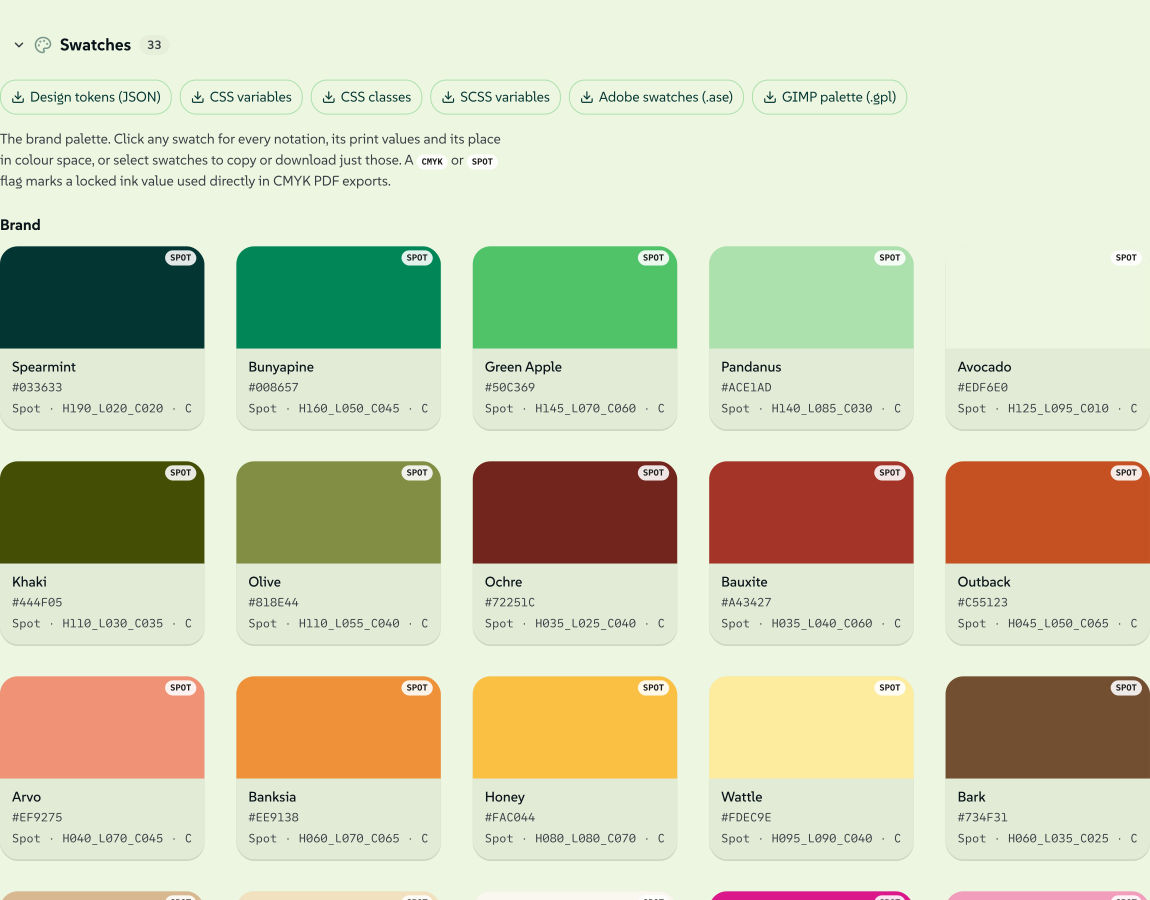
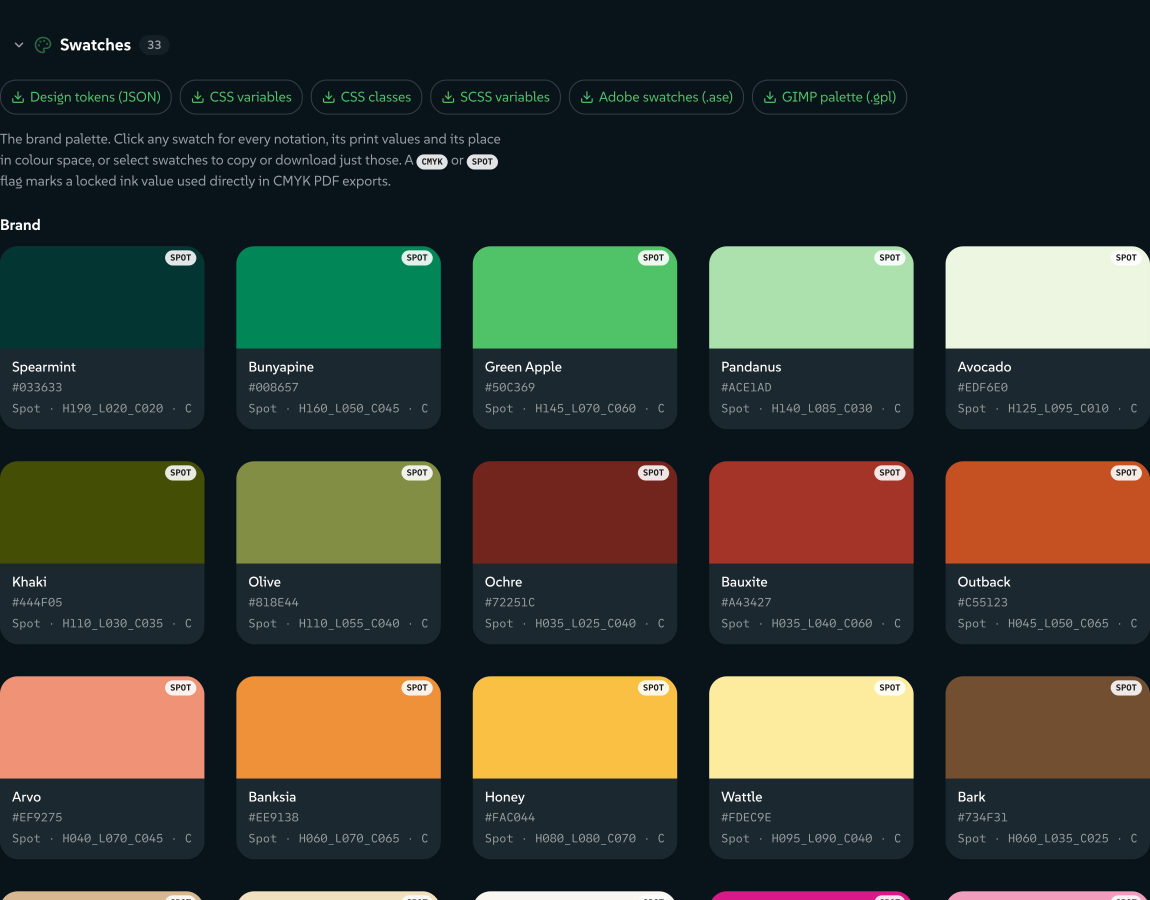
The Swatches section in Assets renders a palette as chips, one per step of each ramp. Each chip can be selected, so a few colours download as their own palette file, and clicking a chip opens that colour's details, the same sheet any asset opens: its linked print values and design token, every notation with a copy button, a gamut chart, its tones and its readability.
 signed by Lollyvector SVG87 paths~23k nodes204 groups290 KBПеревірте саміОтримати підписаний файл
 signed by Lollyvector SVG87 paths~23k nodes204 groups290 KBПеревірте саміОтримати підписаний файл
Tools read palette swatches through host.assets.get(id) as ref.meta.swatches. Only the CLI shell fills that in today, by parsing the palette JSON into meta; the web shell's assets bridge does not yet, so do not rely on it across shells. A color input's palette and swatchesOnly fields are on Tool inputs.
Themable two-colour icons
An icon tagged themable is an SVG that sets its two colours only through classes, with one default style block and nothing else: no other fill, stroke or style anywhere.
<svg xmlns="http://www.w3.org/2000/svg" viewBox="0 0 40 40" width="40" height="40">
  <defs><style>.c1{fill:#30ba78}.c2{fill:#0c322c}</style></defs>
  <path class="c2" d="…"/>   <!-- base (majority) shapes -->
  <path class="c1" d="…"/>   <!-- accent shapes -->
</svg>.c1is the accent and.c2the base. The defaults are plain class rules, so a page or tool that inlines the SVG can override them:.c1 { fill: … !important }wins.- The colour pairings the picker offers come from a palette asset tagged
icon-themes(lolly/palette/opal-icon-themesin the Lolly Demo pack). Its first pairing must match the defaults in the icons. - A pairing chosen in the picker travels inside the asset id, as
example/icons/chat?theme=green, because an asset value is kept as its id alone. Both shell bridges read that suffix (parseThemedAssetId) and apply the pairing when the asset resolves (applyIconThemeremoves the style block and writes the fills as attributes), so two copies in different themes never fight over class rules inside one exported SVG or PDF. - The validator checks the contract for every
themableSVG: exactly one default style block, only the classesc1andc2and no inline styles or strokes.
Design tokens
type: "tokens" is a DTCG (Design Tokens Community Group) JSON document, the canonical source of brand colour. The tokens asset given in the index's top-level brandTokens key (lolly/tokens/demo in the Lolly Demo pack) supplies the colour picker's swatches and the defaults for inputs bound to the brand. Beyond the usual asset checks, the validator checks the DTCG structure against schemas/tokens.schema.json. Design tokens covers the token model and how palettes relate.
Fonts
font is a valid asset type, but most fonts do not go through the asset index:
- Platform faces. The shell serves SUSE and SUSE Mono (variable, upright and italic, SIL OFL 1.1) and Outfit from
/fonts/on every brand pack (shells/web/src/styles/fonts.css). They are the defaults when a design system sets no font. - A design system's fonts. The tokens document gives the families in
font.brandandfont.mono, and the app and the community tools follow them throughvar(--font-brand)andvar(--font-mono). A brand pack can also ship font files undercatalog/fonts/, besidecatalog/assets/. Those are plain static files, soindex.jsondoes not version or checksum them the way it does catalog entries. - A person's own fonts. Font files dropped into the Type room in Design System Setup, and Google Fonts fetched once, stay on the device as user font assets.
When a vector export outlines its text (host.text), the shell looks for a font file in that order: the brand pack's own files, then the person's fonts, then the platform faces.
Locales
Locale-specific format variants go under locales:
{
  "id": "lolly/logo/horizontal",
  "version": "1.0.0",
  "tier": "core",
  "formats": [
    { "format": "svg", "url": "/catalog/assets/lolly/logo/horizontal.svg", "checksum": "sha256-..." }
  ],
  "locales": {
    "ja": [
      { "format": "svg", "url": "/catalog/assets/lolly/logo/horizontal-ja.svg", "checksum": "sha256-..." }
    ]
  }
}
Tools and the app pick a variant by BCP 47 locale matching, and fall back to the base entry when no variant matches.
Delivery addresses and display renditions
This section is for whoever builds and serves a catalog release. Keep the authored asset ID and source URL stable. A release creates actual copies such as primary.0123456789abcdef.png and points its extracted index at those copies. The suffix is a short address, not the integrity check: the full SHA-256 in checksum must match the decoded bytes. This pass changes the release output, not the authored catalog. Old hashed files and legacy URLs remain available for older clients. See Delivery deployment for retention.
The signed catalog envelope covers the tool index, asset index and slim index. Clients verify the signature first, then fetch the exact hashed indexes. A publisher's sequence and the last accepted catalog are stored together; a failed download or changed asset index cannot advance that sequence. A version number in an asset entry is still required for authoring and review.
A rendition is a display-sized copy with its own checksum and credentials.


The raster ladder uses WebP at widths 320, 640 and 1280, preserves aspect ratio and does not upscale a smaller source. Its format entry identifies the original by its full source SHA-256, rather than by an asset ID:
{
  "format": "webp",
  "url": "/catalog/renditions/example-640.webp",
  "checksum": "sha256-...",
  "size": 12345,
  "rendition": {
    "of": "0123456789abcdef0123456789abcdef0123456789abcdef0123456789abcdef",
    "spec": { "w": 640, "fit": "inside", "format": "webp", "q": 80 }
  }
}
The gallery and picker can use these formats for previews. Choosing or placing an asset, downloading the original or exporting a document uses the original format. A rendition must never silently replace the source used by a template.
Generate a signed rendition once for each source hash, sizing specification and signer version, then retain the bytes in version control or a persistent private rendition cache. Signing includes time and random values, so signing again on every build would create different files. The generator records resizing or transcoding, copies the source's credits and rights and records an existing Content Credential as a parentOf ingredient. When the source has no manifest, the ingredient records its hash without claiming who created that source.
Signing needs the asset owner's approval and the instance's configured authority. The public starter products are already generated; normal releases apply those products without issuing another signature:
node scripts/build-catalog-renditions.ts --root /path/to/extracted-releaseThat step checks the signature, the credit metadata and the source's identity and hash before adding the formats. Run it before final catalog signing. For an operator using the repository's private-CA wrapper, generation is explicit:
LOLLY_PRIVATE_DIR=/path/to/private-ca node scripts/run-private-ca.ts sign-renditions \
  --root /path/to/extracted-release \
  --output /path/to/extracted-release/catalog/renditions \
  --cache /path/to/private-rendition-cache \
  --source-base https://your-instance.example \
  --approve-signing
The private directory and cache must be readable only by their owner. Configure your own pinned signing authority; the public Lolly authority is not an instance credential. Keep signing keys out of release artifacts, logs and ordinary CI.
Serving a signed image, including a preview, OG card or documentation shot, must preserve its decoded bytes. Compression of a response is allowed when decompression returns those same bytes. Edge image optimisers, metadata stripping, resizing and transcoding must be off for these files. Verify a rendition's own credential and its parent in Verify, then check that an export using the asset still embeds the original.
Shared libraries from Lolly Work
When Lolly is connected to a Lolly Work instance, Assets shows the organisation's shared library beside the files on your device. Your device assets and design-system panels stay available separately, including when a source cannot be reached. These features need no AI processing.
Organisation metadata
Organisation metadata belongs to Lolly Work. The asset inspector's Organisation metadata section shows the Work fields, kept as organisation overlays separate from the upstream source's facts. A curator with catalog.edit can change the configured text, select, date and URL fields; other members see the values without edit controls. These fields never change names, descriptions or tags in the upstream library, and Work owns the field definitions and audits every change.
Open any asset to see its file details. The sidebar keeps Download and Inspect & verify in its header, with expanding sections for metadata, sharing, origins and technical details, and the provenance and content-signal lamps last under Checks. Drag the divider to resize the sidebar or pull it inward to collapse it; the divider also takes the arrow keys, Home to collapse and Enter or a double click to reset. Width and section choices are remembered, and phone layouts stay fully expanded.