
This guide covers the optional organisation service. Configuration, console and API paths refer to your Work instance. The packaged console keeps its release-matched copy of this guide.
This page is for anyone who hands Lolly output to someone else: a colleague, a partner or an agency. Work can render a tool on the server, then wrap the result, a library asset or a whole collection in a signed link that expires and that you can turn off at any time. Your organisation's input locks apply before anything renders, so a locked logo stays locked in every shared file.
 signed by Lolly Demovector SVG11 paths177 nodes104 groups194 KBخود جانچیںدستخط شدہ فائل حاصل کریں
 signed by Lolly Demovector SVG11 paths177 nodes104 groups194 KBخود جانچیںدستخط شدہ فائل حاصل کریں


Sharing a team project with colleagues, rather than a file, is on Team projects.
What you can share
| Link | The person who opens it gets | Who can make it |
|---|---|---|
share | the file, shown in the browser; for a collection, a listing page | every member (link.create) |
download | the file as a download; for a collection, a zip | every member |
embed | the file, for a web page's image tag | every member |
guest-edit | a seat in the tool or session, with no account | admins (link.create-guest) |
A link points at one target: a tool render (a toolId with its inputs), a saved session (a sessionId), a catalog asset (an assetId) or a collection (a collectionId).
- When the link is madeExposure: can the person making it see the asset, or every member of the collection? Otherwise
403. - Every time it is openedSignature, expiry and revocation, then lifecycle: an expired, scheduled or revoked asset stops serving (
410). - The person gets the filea file, a listing page or a zip
- A hold never blocks a linkIt only keeps an asset available, so a held asset keeps serving.
- Collections drop members, not linksAn expired member leaves the page and the zip; the page says how many, never which.
A link to library content is checked twice: once when it is made, and again on every visit.
signed by Lollywork-sharing-two-checks.htmlHTMLpixels, not shapes11 KBAI generatedgenerated by Claude Opus 5.5خود جانچیںدستخط شدہ فائل حاصل کریںSigned links
POST /api/v1/links      { kind, target, ttlHours?, password?, projectId? }
GET  /l/:id?s=<sig>
POST /l/:id?s=<sig>     { password } or, on a guest link's landing, { name, password? }
POST /api/v1/links/:id/revoke
GET  /api/v1/links[?all=1]
The signature covers the link id, kind, expiry and a digest of the resolved target. Nobody can change what a link points at, or when it ends, by editing the address, and the parameters fixed when the link was made are what gets rendered: the caller's query on /l/:id is ignored.
Failures are distinct: 403 BAD_SIGNATURE, 410 LINK_EXPIRED, 410 LINK_REVOKED, 401 PASSWORD_REQUIRED, 401 PASSWORD_INCORRECT and 429 PASSWORD_LOCKED. An API client gets them as JSON. A browser (a request that accepts text/html) gets a short page that says what happened in words: the link does not work, has ended, was turned off by the person who shared it, or has had too many wrong passwords.
Guest links in a browser
A browser that opens a guest-edit link gets a landing page, not JSON. It says who invited them, to which tool and when the link ends (in UTC, since the page runs no script). It asks for their name, and for the password when the link has one. Opening the page admits nobody, so a chat preview or a mail scanner that fetches the link is not counted as a guest.
Join as a guest posts the form to the link's own address. The server checks the password, sets the lw_guest cookie, records one guest.admit audit entry and answers 303 into the app at the link's tool, with the inputs the link was made with (/#/tool/<toolId>?…, under instance.appUrl on a split deployment). The app lets a guest past its sign-in screen. A wrong password shows the landing again with the reason and keeps the typed name. When guest links are switched off (policy.guestLinks.enabled: false), or the person who made the link can no longer share it, the page says that and admits nobody.
An API client that sends no Accept: text/html keeps the older answer: GET /l/:id with an optional &name= sets the cookie and returns { kind, toolId, sessionRef, guest } as JSON. What a guest session can do is on Sign-in and sessions.
Password links
A link made with a password asks for it, and the password never has to sit in the link's address:
- A browser that opens the link gets a short page with a password field, which posts to the link's own address.
POST /l/:id?s=<sig>takes the password as the form fieldpasswordor as JSON{"password": "…"}. The right password sets an HttpOnly cookie,lw_link_<id>, scoped to that link's path (Path=/l/<id>), for 12 hours at most and never past the link's expiry. A form gets a303back to the link; JSON gets200 {"ok": true}.- The cookie stands in for the password and nothing else. The signature, the expiry and revocation are still checked on every request, and one link's cookie never opens another.
- A collection link's item and Download all addresses carry no password: the cookie opens them.
- A password link answers
private, no-store, because the cookie, not the address, decides who reads the file. - The server keeps only an scrypt hash of a link's password.
- Ten wrong passwords from one address within 15 minutes lock the link for that address (
429 PASSWORD_LOCKED, withRetry-After).
Adding &pw=<password> to the link is deprecated. A password in an address stays in browser history and in server, proxy and CDN logs. It still opens the link for one more release: the answer carries a Deprecation header and sets the same cookie, and the server logs one warning per link. Move anything that builds &pw= links to the form or the POST.
Linking a catalog asset
share, embed and download also take a catalog asset as their target: an instance asset (inst/…), a federated one (ext/<provider>/<remoteId>) or a pack asset id, with an optional format choosing which of the asset's formats to serve (the first, otherwise):
POST /api/v1/links { "kind": "download", "target": { "assetId": "inst/hero", "format": "png" } }Two checks, at two different times:
- Exposure, when the link is made. The person making it must be able to see the asset: instance-asset groups, provider group visibility and the provider's exposure slice, exactly as the catalog routes apply them. Nobody can make a link to a file they could not fetch themselves (
403). - Lifecycle, on every visit. The link asks the same question the feed and the file routes ask, so an expired, not-yet-published or revoked asset stops serving on a link that is still live (
410 ASSET_EXPIRED). A hold is not a refusal: it only ever keeps an asset available, so a held asset keeps serving.
download sets Content-Disposition: attachment; share and embed serve inline. Either way the file carries the same private, no-CDN cache headers as /catalog/*, plus a content-security policy that sandboxes it and allows no script, so a shared SVG cannot run as the person who opens the link. An old federated id keeps resolving after leaving a DAM through its alias. Expiry, passwords, revocation, audit and link.visit telemetry work as for any link, and the console's Links view lists it like any other.
Linking a collection
share and download also take a collection as their target:
POST /api/v1/links { "kind": "share", "target": { "collectionId": "launch-kit" } }share opens a listing page with a download per asset and Download all, download serves the zip, and embed is refused (400). The same two checks apply to every member of the set. What the page shows and how members drop out are on collection links.
Turning a link off
- Expiry is enforced from the signature alone, so a link outlives a lost database row only until its own expiry.
- Revocation is immediate and ends live guest sessions that use the link. A member can always revoke their own link; revoking someone else's needs
link.revoke. - Guest links are also capped by
policy.guestLinks.maxTtlHours, and can be switched off outright (403 GUEST_LINKS_DISABLED).
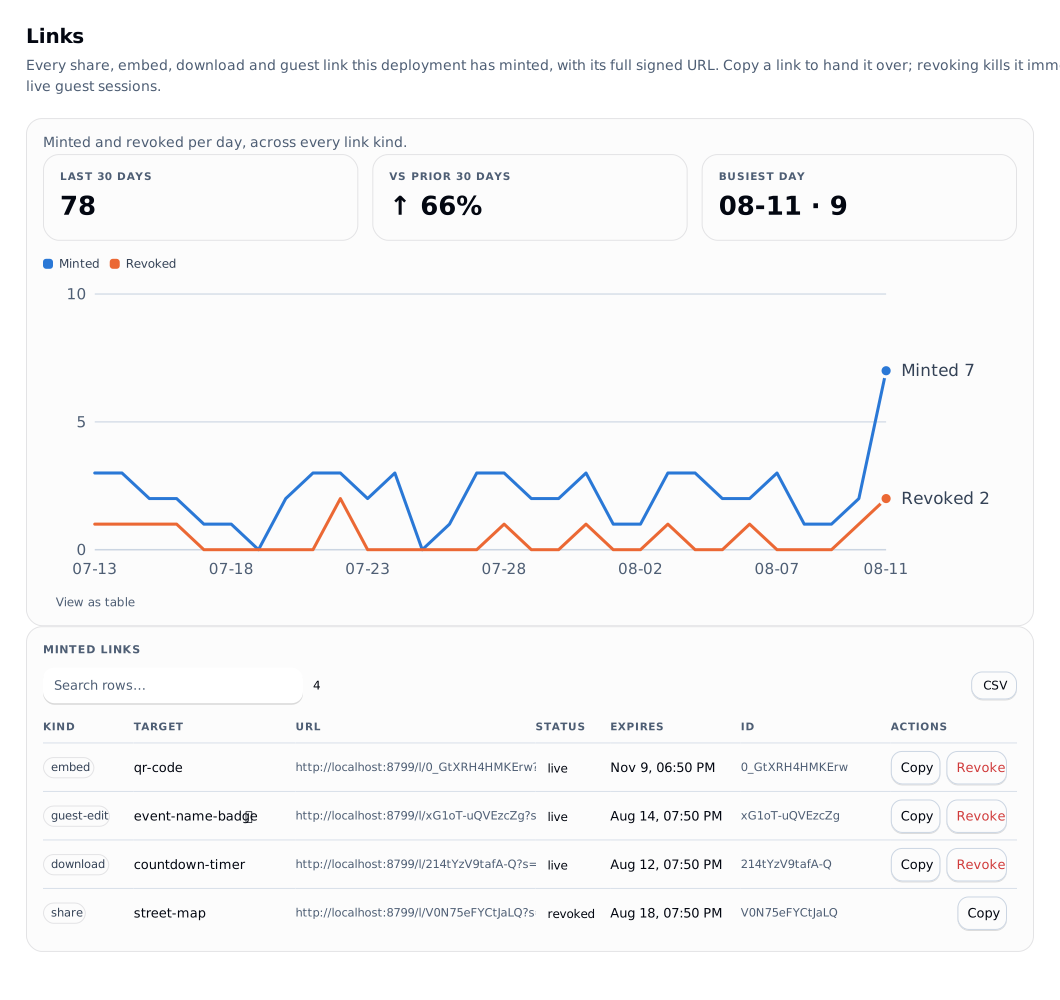
The console's Links view lists every link the deployment has made, with its full signed address, a one-click copy, its status and its expiry.
Server renders
GET /render/<toolId>.<format>?<tool inputs>Formats are svg and png (rasterised with resvg) always, and jpg and pdf too when a Chromium render worker is configured (deployment). Each render loads the tool through the real engine, resolves overlays for the caller's groups, refuses or fixes locked inputs, renders, optionally watermarks, optionally embeds provenance or signs, then caches.
- Who may render. A signed-in caller needs
export.server(admin by default, grantable). A guest admitted to that tool may render that tool. Under any access mode other thanopen(gatedorper-tool), a request with no principal at all gets401. - Policy first. A caller-supplied value for a
lockedinput is a422 INPUT_LOCKED, and the locked value is used whatever the query says.hiddeninputs are absent from the schema the shell ever saw. - Caching. An in-process LRU keyed by the render cache-key contract, plus an
ETagwithCache-Control: private, no-cache, no-transform, so a client revalidates before reusing a copy. A render that ran brand rules answersprivate, no-storeand is never answered from theETag. The key includes the pack version, the overlay state, provider fragment hashes and a fingerprint of the instance's own assets, so a policy edit, a catalog refresh or a new asset version invalidates exactly the affected renders. - Hooked tools. A tool with
hooks.jsdoes not run in the in-process jsdom fast path unlessrender.allowHooksInFastPathis on. With a Chromium worker configured it goes there; without one it is refused with501 HOOKED_TOOL_NEEDS_CHROMIUM. Policy stays in Work either way: the worker returns SVG, and watermarking, provenance and rasterisation happen in Work. - The engine, jsdom and resvg load only when needed, so a deployment that never renders never loads them.
Renders you want to keep, retry or run in batches are on Render jobs and batches.
Preview watermarking
enforce.watermark on a tool overlay adds a diagonal, tiling PREVIEW brick pattern to the SVG root before any rasterisation, so both svg and png carry the pattern. Alternating brick rows use #0002 and #fff2, so the watermark reads on light and dark artwork alike. Which settings are enforced today is in the enforce block.
Provenance
Every server render that used catalog assets carries a machine-readable ingredients list in the C2PA shape, embedded with no extra dependencies:
- SVG: a
<metadata>JSON island. - PNG: an
iTXtchunk (keywordlolly:provenance) placed afterIHDR. - HTTP: an
x-lolly-provenanceresponse header.
Both survive ordinary copying and can be read with exiftool or pngcheck. Each ingredient's c2pa field is the upstream manifest when the source supplied one, and null when it did not, so "«filename» from «provider» was used" still travels with the export, labelled as unsigned.
With a signing identity configured, exports carry a real, signed C2PA Content Credential instead of the unsigned island. Setting one up is one command: Configure Work export signing.
Related
- Restricting formats and inputs: governance
- What renders are recorded as: telemetry, audit
- Worker deployment: deployment