
Once a tool works on your machine, the next job is getting it to other people. Try it on any Lolly by dropping a zip, test its hooks without a browser, send it as a file, publish it to a catalog many people sync and translate its labels. Pick the route by who should receive it and what they may change.
A tool with your rules
Share with rules turns a Lolly Design document into a portable .lolly tool. Recipients change only the inputs you approved. The tool is compiled for you, and its fonts and images travel inside the file.
An editable starting point
In a Lolly Design document, choose Save, then Save as a template. It joins that tool's New from template chooser on your device, with no tool.json, catalog build or Git. A template holds starting values for a tool people already have, and recipients can edit the whole design. Share it as a .lolly file, or ship it with the tool as Templates people save describes.
Your own tool, as a file
Zip your tool folder, or download a .lolly that includes the tool. The recipient's device runs your hooks.js after they accept the Trust this tool? prompt.
A shared catalog
Add the folder to a catalog that many people sync, such as this repository's community/. An organisation can run the catalog as a Git repository with review and an audit trail, which is an option, not a requirement.
Try it without the monorepo
You do not need the full clone to run a tool you wrote. Zip the tool folder and drop the zip on lolly.tools or any Lolly instance. The drop sheet offers Install this tool; take it and the tool installs on that device and opens. Zipping the folder and zipping its contents both work, because a single top-level folder is stripped. Nothing is uploaded: the zip is read in the page, and the files go to the same device-local store a .lolly's carried tool uses.
Your hooks.js is executable code, so the install asks the same Trust this tool? question a .lolly asks.
Drop an edited zip again and Lolly offers to replace your copy, which is the loop to use while you iterate. An id the catalogue already lists is refused rather than installed, because an installed tool never replaces a catalogue one, so give yours its own id.
Test hooks without a browser
Install the tool-author SDK from npm:
npm i -D @lolly-tools/coreIt exports createMockHost, an in-memory host bridge a plain node test can drive; validateTool, the same manifest check the catalog CI runs; and the HostV1 types for your editor. It depends only on ajv, so nothing else from the platform comes along. The package's README on npm walks a four-file tool through a test.
Sharing a tool without a catalog (.lolly)
A hand-written tool can travel without a catalog. Open the tool, choose Share → Download .lolly and tick Include the tool. The file then carries tool.json, template.html, styles.css, hooks.js, icon.svg, the sibling text templates its formats need and the translation file for the active language, beside the design, so it opens on a device that has never seen the tool. The box arrives ticked for any tool the deployment's signed catalog does not list, which is the state of anything you just wrote, and of every tool on a build that signs nothing.
A tool made with Share with rules packages its checked fonts and images automatically. For a hand-written tool, review the share dialog's file list and dependency warnings before you send the file.
The recipient's consent is what stands between your hooks.js and their device. On import Lolly asks Trust this tool?, naming the tool, naming you as its author when the file carries your details and saying that opening it runs the tool's own code on their device. Trust & install is the way through. For a file that carries a saved design, declining leaves that design in Projects until they have the tool; a standalone rules tool is installed only after consent. Two things to write for:
- Classic
hooks.jsonly. Write hooks as a classic script, not an ES module. The manifest has no way to declare module hooks, and install refuses them as well. - Integrity is not authorship. Package checksums prove the bytes arrived intact, not who wrote them. The recipient decides on trust, the loader validates the manifest and sideloaded hooks run in the strict isolated executor. Keep shared hooks small enough to review.
Sharing your work describes the same file from the recipient's side, and the boundary itself is a row in the Threat Model.
Publish to a catalog
A catalog is the shared library people's Lolly syncs from. To add a hand-written tool to one:
- Place the folder. A brand-neutral tool goes under
community/<tool-id>/; a tool for one brand goes in that brand pack'stools/directory. - Rebuild the index. Run
pnpm run build:catalog:all. It regenerates each profile'scatalog/tools/index.jsonfrom the manifests and refreshes asset checksums. The index is generated, so never edit it by hand. - Validate. Run
pnpm run validate:catalog:allto confirm every profile's catalog is consistent. - Build and deploy the catalog. The app picks it up on its next start.
While you work, pnpm run dev:web serves the app locally with your tool in the gallery.
To contribute a tool to Lolly itself, open a pull request against lolly-tools/lolly with your tool directory under community/<tool-id>/. Run pnpm run ci:local before you push: it runs the checks CI runs for a pull request, on your machine, and --changed keeps to the checks your change touches.
For an organisation using Lolly Work
The manifest and template stay the portable source. Optional Lolly Work adds organisation permissions and input policies around the tools an instance offers, plus a shared asset catalog with uploads, federation and review workflows. Installing a portable tool on your own device does not publish it to every member or grant access to organisation content. On an instance that allows it, a saved template's menu also offers Submit to the workspace catalog.
Coordinate pack publication with the instance operator. Configuration and the Lolly Work pages Catalog and content and Policy and governance describe the controls.
Localizing a tool
A tool's words live in the manifest, in English by default. To translate them, add an i18n/<lang>.json file: a sparse, flat overlay of only the strings a translator touched, keyed by dotted paths.
// community/your-tool-id/i18n/de.json
{
  "name": "…",
  "description": "…",
  "inputs.headline.label": "…",
  "inputs.headline.help": "…",
  "inputs.size.options.a4": "…"
}
The same sidebar, opened with ?lang=de: labels, help text and select options all come from the file, and the tool's code is untouched.
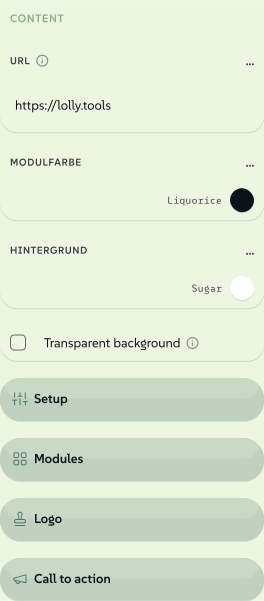 signed by Lollyvector SVG44 paths~2.8k nodes55 groups44 KBCheck it yourselfRécupérer le fichier signé
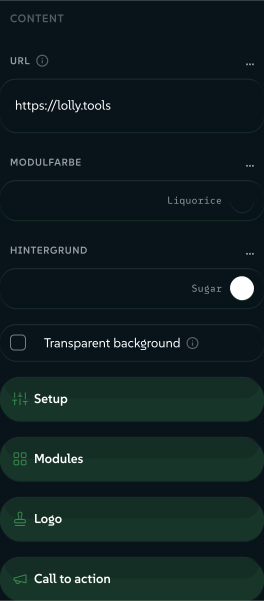 signed by Lollyvector SVG44 paths~2.8k nodes55 groups44 KBCheck it yourselfRécupérer le fichier signé


When a tool loads with a language set, through the reserved lang URL or CLI parameter or the person's profile language, the engine fetches the matching i18n/<lang>.json if there is one and merges the file onto the manifest before any shell or the input model reads the manifest. One overlay point serves every shell: web, CLI and TUI. Anything missing, whether the file, a key or valid JSON, falls back to the manifest's English, so a translation gap never stops a tool loading. validate:catalog checks the keys, so a typo is caught at build time.
Which strings a translation file can hold
name, description, a11yLabel and featured.blurb. For each input: label, help, notice, placeholder, section, suffix, options.<value>, addMenu.label, tableEditor.title and tableEditor.fields.<key>.label, with block and vector fields as inputs.<id>.fields.<fieldId>.…. And the walkthrough: guide.title, plus guide.tracks.<id>.label, .note and .steps.<index>.
- Prefill the person's language. An input can declare
bindToProfile: "lang"to start from the active language, as a short code such asen,deorar. - Right-to-left. Arabic and other right-to-left languages mirror the whole interface, and the shell sets the document direction from the active language. Write your template and CSS so they mirror too: prefer logical properties and
[dir]-aware rules to fixed left and right. Exports follow the direction the browser resolved, fromdiron the element or an ancestor,dir="auto"or CSSdirection: a right-to-left line keeps its order and its right edge in SVG. In a native<svg>template,text-anchor="start"in right-to-left text means the right edge, on the page and in the file.
Example tools
Every tool below is in community/, so you can open it in Lolly and read it in the repository.
color-palette- simplecolor,select,number,booleanandtextinputs, withonInitandonInputworking out the palette. It is the tool shown on Tool inputs.qr-code-hooks.jswithonInit,onInputandbeforeExportto encode the QR matrix.multi-page-pdf- a form withlongtext,selectandassetinputs, usingallowUpload: truefor the person's image library.meeting-planner- ablocksinput for repeating rows,onInitandonInputshaping and an ICS data export.deck-studio- advancedblocks: a typedaddMenuwithshowForandmultilineForfor rows of different kinds.wayfinding-signage-blocksrows whose label text shrinks to fit or shows a sponsor image, and asizeselect that sets the print page size; CMYK export.wordmark- a hook shapes the text into one vector<path>throughhost.text.toPath, for true vector SVG with no font installed.lottie-digi-ad- video and GIF output withrender.videotiming.battlecards-render.paginate: one card per row of a pasted table.strip-data- an on-device utility with afileinput and anexportFilehook.