
Look up export settings, packed links, units, print marks and contact sheets.
Part of URL Mode.
Reserved parameters
These keys are never treated as tool inputs. They control shell-level behaviour.
| Param | Where | Description |
|---|---|---|
format | web + CLI | Output format (png, svg, pdf, …). Used by export and copy. |
export | web + CLI | Presence flag - trigger an immediate download on page load. |
copy | web only | Presence flag - arm copy-to-clipboard on first interaction. |
full | web only | Presence flag - open in fullscreen (sidebar collapsed). |
options | web only | Presence flag - open with the export-settings panel expanded instead of the collapsed Render button. full wins if both are set. |
filename | web only | Name for the downloaded file (no extension). Defaults to the tool ID. |
slot | web only | Name of a saved state slot to pre-load. URL params override saved values. (The one-shot CLI has no saved-state store, so it ignores slot.) |
template | web only | Id of a templates[] entry in the tool's manifest to seed a fresh session from, skipping the "New from template" chooser (a launcher for a retired tool id, e.g. ?template=carousel). The entry's values are read in-process (never packed into the link); an unknown or absent id falls through to the normal fresh-open flow. The CLI has no chooser, so it ignores template. |
preset | web only | Id of a preset inside the named template - a preset is a curated values overlay on its template's base values, so ?template=poster&preset=story seeds the Poster template in its Story variant. Only read alongside template; an unknown or absent id applies the template base alone. Ignored by the CLI. |
output | CLI only | File path to write the exported file. Defaults to stdout. |
_v | web + CLI | Tool version pin (e.g. 1.0.0). Ignored if not matched - forward-compat safety. The _ prefix as a whole is a reserved namespace: any param starting with _ is skipped before input matching, and no tool input or urlKey may claim such a name - future reserved params are minted there so they can never collide with a tool's inputs. |
width / w | web + CLI | Output width, as a value in unit. Also pre-fills the export dimensions panel. On a multi-artboard document, see the note below the table. |
height / h | web + CLI | Output height, as a value in unit. Also pre-fills the export dimensions panel. On a multi-artboard document, see the note below the table. |
unit | web + CLI | Physical unit for width/height: px (default), mm, cm, in, pt, pc. |
dpi | web + CLI | Raster resolution for physical units (default 300). Ignored for px and for vector formats. |
password | web + CLI | Open password for pdf and zip - the standard tier only (the export panel's strong AES-256 tier, which also covers pdf-cmyk, is typed at export and deliberately never travels in a link). The CLI applies it wherever it can render a PDF. A basic lock, not strong encryption; it travels in clear text in the URL, so it's a light deterrent, not protection for confidential material. Ignored when bleed/marks are on (encrypted PDFs can't carry print finishing). |
profile | web + CLI (press condition) | Colour profile, two roles by format. For ordinary raster (png / jpg) it selects the ICC profile: srgb (the default) embeds an sRGB profile; none omits it. For the print formats (pdf-cmyk / cmyk-tiff) it is the CMYK press condition, e.g. fogra51 - named in the PDF's output intent (no profile bytes: no CMYK ICC ships with Lolly), recorded in the TIFF's provenance. profile=own instead embeds a CMYK profile loaded on the device the link is opened on, which is what a conformant PDF/X-4 Print PDF needs (see the print section for what else can withhold the claim); it resolves only when exactly one such profile is loaded, and otherwise writes no output intent and declares nothing. A digest is deliberately never in the link - which profile is embedded is the recipient's device's business, and so is the resulting file size. |
bleed | web + CLI (browser tier) | Bleed amount for the print formats (pdf / pdf-cmyk / cmyk-tiff), as a dimension (e.g. 3mm, 0.125in). The artwork is scaled to fill the bleed; the PDF declares TrimBox/BleedBox, the TIFF is enlarged to the full sheet. |
marks | web + CLI (browser tier) | Print marks for the print formats (pdf / pdf-cmyk / cmyk-tiff) - a CSV of crop, reg, bleed, bars, prov. Drawn in the page margin (PDF) or rasterised into the image margin (TIFF); registration prints on all four plates in pdf-cmyk and cmyk-tiff. prov (provenance credit text) is PDF-only. |
c2pa | web + CLI (both default-on) | Content Credentials for the stampable formats. On by default on both surfaces - a tool opts out with render.c2pa:false, an on-device privacy utility never carries them and c2pa=off forces it off per export. c2pa=7/30/90/365 sets the ephemeral-certificate lifetime in days; c2pa=1 (or a bare --c2pa on the CLI) uses the default (30). Web: an enrolled identity's certificate window (fixed at enrolment) takes precedence and the lifetime value is ignored. CLI: ephemeral signing only; --no-provenance turns this and the imprint off together, which is how you get byte-identical output run to run. Mutually exclusive with password on PDFs. |
durable | web (opt-in) | Durable Content Credential for raster exports (png / jpg/jpeg / webp / avif / tiff): an opt-in neural TrustMark-format watermark carrying Lolly's own identifier, so the "made with Lolly" link survives a metadata strip (a social upload, a re-save) and any TrustMark-aware tool can recover it. Off by default - a heavy on-device neural encode that also needs a model fetched once - so pass durable=1 (or durable=on) to turn it on. A no-op if the encoder model isn't on-device (see scripts/convert-trustmark-encoder-onnx.py); raster-only for now (not the pdf/pptx container rasters). Complements - does not replace - the default imprint and the c2pa credential. Recognised on-device on the /verify page as a "Lolly durable mark" pip. See plans/28-durable-content-credentials.md. |
imprint | web + CLI (both default-on) | Lolly pixel watermark for raster exports (png / jpg/jpeg / webp / avif / tiff - the RGB TIFF, not Print/CMYK TIFF), plus Lolly-rendered raster content embedded inside a pdf, pdf-cmyk or pptx export - a composed tool render, a gradient/filter fallback or an SVG illustration that gets walked to pixels still carries the mark even though the container itself isn't a raster format (a zip bundle carries it through to whichever of its members qualify). It never marks a user's own uploaded image - only art Lolly itself rasterised. On by default, like c2pa - embedded unless explicitly disabled; imprint=0 (or imprint=off) turns it off (as does the CLI's --no-provenance). imprint=1 (or a bare ?imprint) is still accepted for existing links (redundant with the default). The CLI defaults it on too, and the browser-free resvg PNG path now embeds the mark itself rather than escalating to the browser tier; a render below the watermark's detection floor is reported and written unmarked. Unlike c2pa - which lives in a metadata container and dies to any re-save or strip - the imprint survives metadata stripping, recompression (down to ~JPEG q50) and an 8-pixel-aligned crop, so it's a durable complement to the credential. TIFF (lossless) round-trips the mark exactly; AVIF's AV1 encode applies the mark pre-encode but its survival through that encode is not yet calibrated/verified. It does not survive an arbitrary resize, and it is security-through-obscurity (the detector key is public), so it's an integrity hint, not a hardened claim. Detected on-device on the /verify page - for pdf/pdf-cmyk/pptx files, detection scans the embedded Lolly-rendered rasters, not the page/slide as a whole. |
meta | web + CLI (default-on) | Generator-metadata toggle. A generated export normally records its source in the format's own generator field - EPS %%Creator, DXF 999 comment, EXR/Radiance software/SOFTWARE=, PDF Producer - plain ASCII Lolly lolly.tools, no scheme or punctuation a vintage reader could choke on. On by default, like imprint/c2pa; pass meta=off (or meta=0) to strip that source field for a metadata-free export. This is a generated artifact's generator field only - a user's own file goes through the on-device transform path (Strip Hidden Data), which never adds metadata. Distinct from c2pa (the signed credential) and imprint (the pixel watermark): meta=off drops only the plain generator text, not the credential. |
hdr | web + CLI/MCP | HDR raster export (png / jpg/jpeg / avif / tiff): re-encode the pixels to Rec.2100 PQ - BT.2020 primaries, SMPTE ST 2084 transfer - so brand colours and white text reach peak brightness on an HDR display, and tag the container so a colour-managed viewer reads them that way (an ICC v4 profile carrying a cicp tag for jpg/tiff, a cICP chunk for png, a rewritten colr box for avif). Off by default - it changes the pixels rather than labelling them - so pass hdr=1 (or hdr=on/hdr=pq) to turn it on. A tuned form carries the export panel's four author dials in the same value: hdr=<peakNits>-<reach>-<lift>-<focus>, e.g. hdr=1600-60-0-50 (White 1600 nits, Reach 60, Dark lift 0, Focus 50); hdr=1 means the defaults (1000-45-0-40). The boost is gated on OKLab lightness and hue-preserving, so darks stay dark and a brand green doesn't drift minty. webp is deliberately excluded (8-bit, no working HDR decode path - a PQ WebP just looks dark), as are the vector formats and PDF. Note that many platforms re-encode uploads and strip the HDR signal, which can leave the image looking dark - see Exporting → HDR. On the CLI and MCP it is also what makes the float formats possible: --export=exr and --export=hdr REQUIRE --hdr=1, because the terminal render path rasterises to 8-bit sRGB and the view transform is the only thing that generates genuine above-1.0 range (without it, and when a render has nothing to lift, the export refuses rather than padding 8 bits into float). |
depth | web, CLI | Requested bit depth for the export: 8, 16, float or auto (the default). Bits per channel for 8/16; float means floating-point samples, the depth the film and VFX formats speak. It is a request, not a promise: depth follows provenance, so a consumer writes deep bits only where the pipeline actually produced them - a 16-bit file made from an 8-bit canvas render is padding, and Lolly would rather hand you the honest 8-bit file than a bigger one that carries no more picture. auto asks for the deepest the chain supports, which is how deep output becomes the default as more of the pipeline earns it (the same rule gamut follows - see Colour spaces). Formats that are inherently deep (OpenEXR, Radiance .hdr) ignore the param except for one choice - on the CLI, depth=float writes an EXR with 32-bit float samples instead of the default 16-bit half - and an HDR PNG is written at 16 bits regardless because 8-bit PQ bands (depth=8 there falls back to the legacy encode). What the CLI does not do is honour depth=16 on png/tiff: the terminal render path rasterises to 8-bit sRGB, so those bits would be padding, and the request is ignored silently rather than obeyed. Junk (depth=32, depth=deep, an empty value) reads as auto rather than failing the export. See HDR export. |
cuts | web export panel; CLI refuses cuts>1 | Contact sheet for a still export (png / jpg / webp / svg / pdf) of a timed composition - a Sequence timeline, or any tool whose stage carries data-sequence. An integer, default 1. cuts=1 renders the frame at the playhead (what you see is what you get) and is identical to leaving the param off. The web shell takes the count from the export panel's Frames field, not from the link; the CLI reads the param and exits 3 on cuts>1, writing nothing, rather than quietly handing back one frame. cuts=N for N > 1 samples N stills at equal intervals across the sequence and hands them back together: raster and SVG as N zipped files (<filename>-01.png, -02.png, …), pdf as one document of N pages. Sampling is midpoint, not endpoint - t_i = duration x (i + 0.5) / N - because at t = 0 an enter transition is still at alpha 0 (a blank card) and at t = duration every clip has ended, so endpoint sampling would waste the first and last frame of a sheet on blanks. Clamped to 1-64; junk (non-numeric, 0, negative, Infinity) falls back to 1 rather than failing the export. Ignored for non-still formats (video/animation already have every frame) and for stages with no sequence. |
fps | web + CLI/MCP | Frame rate for the motion formats (mp4 / webm / gif / apng / webp-anim): an integer 1..120, the URL form of the export panel's Frame rate select (24, 25, 30, 50, 60 there; any integer here). Absent or junk leaves each format's own default (30 for the video containers). On the CLI, --fps=60 is this param forwarded to the browser tier. |
seconds | web + CLI/MCP | Clip length in seconds (0.5..3600) for the motion formats - the panel's Duration field. A length given here is a deliberate one: the export carries it as durationUserSet, so a tool whose hook would otherwise stretch the clip to its material (the Audiogram runs to the end of its audio; a Sequence to its timeline) renders exactly this long instead. Named seconds because duration is an input id in several tools (3d, flythrough, spatial-photo) and a reserved name must collide with none. |
wait | web + CLI/MCP | Settle time in seconds (0..30) before the first frame is captured - the panel's Start after field. For a tool whose first frames are a fade-in or a data fetch. |
codec | web + CLI/MCP | Video codec for mp4 / webm: h264, hevc, vp9 or av1 (aliases avc, h265, vp09, av01 read the same). The panel's Codec select; absent means Auto, the best the encoder offers, which on many machines is AV1 - so pin codec=h264 when the file has to play in every browser's <video> or on an older phone. |
vq | web + CLI/MCP | Video quality stop: smaller, balanced (the default) or best - the panel's Quality select, which drives the bitrate ladder. Named vq because quality is an input id (convert-image). |
lang | web + CLI | UI/content language as a canonical short code: en (default), es, de, fr, zh (Simplified), zh-hant (Traditional), ja, ko, vi, pt, it, nl, sv, no, pl, cs, ro, tr, uk, bg, ms, id, tl, hi, bn, ur and ar (the LANGS set in engine/src/lang.ts is the source of truth). Arabic and Urdu render right-to-left (the whole UI mirrors). Informal aliases (cn, jp and in for id) are accepted and normalized on parse. Applies for that session only - it does not overwrite the recipient's saved language preference. Unset/unrecognized falls back to the profile, then localStorage, then the browser's language, then English. |
designv | web + CLI | The design-system version this render resolves against: a published version's slug, or latest for the edit head. Highest rung of the resolution ladder - it beats a tool's designVersion manifest pin and the active version, and it falls through to the next rung when it points at nothing this device has, so a link never fails to draw. A testing lever for authors ("check against latest, fix, then publish"); it is never written into a generated share link, because a version belongs to the design system it was published in, not to whoever opens the link. On a device that has never published a version, every value resolves to the edit head - the behaviour before versions existed. One difference between the two shells today: the CLI reads the pin out of the tool's manifest as the rung below this param, while the web shell resolves this param and the active version only, so a manifest pin does not change what a browser draws yet. |
ds | web + CLI | The design system this render resolves against: the id of one of the design systems held on the device (default, shipped, or a slug like acme-2026). A value that fails the id grammar reads as absent, and an id for a system the device does not hold falls through to the active one with a warning, so a link never fails to draw. Like designv, it is never written into a generated share link: a design system belongs to whoever holds it, and a link must not pin its recipient to one that isn't theirs. Pair it with designv to name a published version of that system. |
nostage | web only | Presence flag - for the html export only, drop the fixed-size canvas frame ("stage") so the saved page fills the whole window: the tool's content becomes the document body, with no centred card or grey backdrop. Mirrors the Full page toggle in the export panel. |
present | web only | Presence flag - open a frame document (Design) as a fullscreen, click-advanced deck. The document's frames become slides in presentation order (order, tie-break x); a non-frame timed document instead mounts normally and starts its sequence transport. The CLI documents it as a no-op (there is no fullscreen to present into). |
s | web + CLI | The state address of a deck. s=2 is the 1-based position in presentation order; anything else (s=slide1, a ULID) is a frame id; an .N suffix (s=2.3) picks a build step. With present it deep-links that slide (and that build step); without present the editor centres that frame on mount. It is also a still-export filter: ?s=2&format=png renders just that one slide, so every slide of a deck has its own image link, and lolly design --s=2 --export=png means the same thing (both shells resolve the address with the same engine code). Build steps are presenter-only - a still export always shows every build. Formats that carry the whole deck by construction (pdf, zip, pptx, html) and the motion formats (where time selects the frame, not s) are rendered whole; the CLI says so rather than obeying a filter it cannot apply. An address that matches no slide never falls back to slide 1: the web shell exports the whole deck and announces the mismatch, the CLI exits 2 and writes nothing. |
kiosk | web only (present mode) | Presence flag - the presenter wraps at the ends and a timed document's transport loops, so ?present&kiosk is digital signage (pair with per-frame dur for dwell). This flag was named loop until 2026-08-28; it was renamed and reserved because loop is a real input id in several tools (3D, Flythrough, …) and could never be reserved without stripping their value. Old ?present&loop links no longer loop - re-mint them with kiosk. |
z | web + CLI | A packed whole-state token - the entire readable query, compressed (raw DEFLATE) and base64url-encoded, for complex tools whose readable link would blow past practical URL limits. See Packed links below. |
zx | web only | An encrypted whole-state token - the packed state AES-256-GCM-encrypted under a password-derived key (PBKDF2). Opening the link prompts for the password in the browser (no server); the password itself is never in the link. See Encrypted links below. |
emoji | web + CLI (--emoji=) | The emoji set this render draws its emoji from, as <id>@<version> - emoji=community/emoji/twemoji/color-starter@17.0.3, or the short emoji=twemoji/color-starter@17.0.3 when those last two segments name one set the device holds. Every emoji in the text is then drawn from that set's pinned vector artwork rather than whatever emoji font the machine happens to have, so the same link draws the same picture everywhere. A glyph the set does not carry, or a set this device does not hold, draws a neutral placeholder rather than falling back to a system glyph (a device that holds no sets at all has nothing to choose, so it leaves the characters as the tool wrote them). The convenience form resolves its checksum from the local listing; generated links also carry the exact emojistyle snapshot. Unlike ds and designv, this is written into a share link: the emoji a document draws belong to the document. |
emojifx | web + CLI (--emojifx=) | The brand treatment applied to that artwork: original (the upstream colours), influence:<bps> (pull every colour toward its nearest brand colour, 1 to 9999 basis points), snap (take the nearest brand colour outright), mono (one brand colour's hue over each colour's own lightness) or duotone (ramp between a dark and a light brand colour). Skin tones, flags and custom brand symbols keep their own colours unless you add the ,unprotected suffix (emojifx=snap,unprotected). Without emojistyle, the palette comes from the brand in force when the link opens. Generated links pin the original palette in their style snapshot. A treatment named with no emoji set is reported rather than guessed at, since there is no artwork to treat. |
emojistyle | web + CLI (--emojistyle=) | Exact EmojiStyleV1 JSON snapshot, including manifest checksums, ordered fallback sets, palette and protection. Generated links preserve it. It takes precedence over emoji and emojifx; malformed or oversized snapshots are reported. Pack bytes travel in portable .lolly documents, not URLs. |
licence | web + CLI (--licence=) | The licence you declare for your own export, as one of CC0-1.0, CC-PDM-1.0, CC-BY-4.0, CC-BY-SA-4.0, CC-BY-NC-4.0, CC-BY-NC-SA-4.0, CC-BY-ND-4.0 or CC-BY-NC-ND-4.0. Its name and deed link are written into the file's licence metadata (EXIF, XMP, RIFF and the Content Credential's rights field, where the format carries one). Absent, or any other value, means no declaration: all rights reserved. A tool with its own licence input (Claim) keeps that input's value. It travels in a share link, because a licence belongs to the document. |
The reserved z (and zx) above is a top-level param only - the whole-state packed/encrypted token. A box's own z depth field and a keyframe track's z channel token live inside the boxes block's per-box sub-fields, a separate namespace decoded positionally, so there is no collision between the two.
Dimensions on a multi-artboard document (a Design doc with more than one artboard): the artboards are the size truth, and width/height describe the active artboard - the selected one for still formats, the one under the playhead for animated ones. In the app the export panel mirrors that artboard live, and editing the fields resizes it. At export time each format resolves the boards its own way: still images fan out to one file per artboard at that board's own size (zipped when there is more than one, and ?s= narrows to one board), PDF and PPTX carry every board as a page at its native size, and the animated formats composite every scene into a width×height output frame, letterboxing a board whose aspect differs. So on a framed document w/h never scales the whole set - it is the size of one board, and the video frame.
export, copy, full, options, nostage, present and kiosk are presence flags - the parameter value is ignored; what matters is whether the key appears in the URL.
lang is the one reserved param that changes the interface rather than the file. Adding ?lang=ja to any tool link hands the recipient the whole sidebar in Japanese for that session, without touching their saved preference.
 signed by Lollyvector SVGSprawdź samodzielniePobierz podpisany plik29 paths~1.4k nodes61 groups2 images29 KB
 signed by Lollyvector SVGSprawdź samodzielniePobierz podpisany plik29 paths~1.4k nodes61 groups2 images29 KB


Building share links in the UI. In the web shell you don't have to hand-write these. The Share button (in the export panel) opens a dialog with the ready-to-copy link plus a toggle for each on-visit flag - _open fullscreen_ (
full), _open with the export panel expanded_ (options), _download automatically_ (export), _copy to clipboard_ (copy) and _pin tool version_ (_v). The copy toggle appears only for clipboard-friendly formats (bitmap/text/html) and is hidden for SVG, PDF and video. Ticking a box rewrites the link in place. The same dialog is reachable from Projects → Share link on any saved session (it reconstructs the tool URL from the saved inputs).
Packed links (z)
Readable URLs are first-class - a simple ?color=30BA78&theme=dark link can be hand-edited. But a complex tool (e.g. Design, with dozens of boxes each carrying coordinates, colours and text) serialises to thousands of characters, past the ~2000-char ceiling that pasted links, social crawlers, QR codes and some servers still enforce.
For those, the app compresses the entire readable query into one z param:
/t/design?background=…&boxes=…&format=png   ← readable (e.g. 2729 chars)
/t/design?z=1eJyFkc… ← packed (e.g. 1059 chars)- Codec.
z's value is<tag><payload>. Tag1is raw DEFLATE (RFC 1951, a frozen standard) via the platform-nativeCompressionStream, carried as base64url - the default, and the shortest form in characters. Tag2is the same DEFLATE bytes carried as unpadded upper-case base32 (RFC 4648): about 20% more characters, but every character sits in a QR code's alphanumeric set (5.5 bits per character instead of 8), so the Share dialog's QR button re-mints large links this way and the printed code comes out a version or two smaller. Both tags decode everywhere, forever; the tag byte versions the codec so future variants can be added without breaking links minted today. - Stable by construction. The packed form compresses the app's own canonical readable query, so there's no separate encoding to keep in sync - and DEFLATE is standard, so a link packed in a browser decodes identically in Node's
zlib(and the CLI), across app versions. There is no server-side or app-side lookup table that could drift. - When it kicks in. Packing is used only when it's actually shorter (it loses on short links - DEFLATE framing plus base64's ⁴⁄₃ blow-up exceed tiny payloads), and the address bar switches to it automatically once the readable query passes ~1800 characters. Below that, links stay readable and editable. The Share dialog surfaces a Shortest link checkbox (auto-ticked for large states) showing the character saving.
- Expansion.
expandQuery()(engine) turns azlink back into a plain query before parsing, so everything downstream - the web shell, the CLI (lolly <id> --z=1eJ…) and pasted-link composition - behaves identically to the readable form. On-visit flags (export,full,_v, …) can ride alongsidezin readable form and still take effect.
Encrypted links (zx)
A password-gated variant of a packed link: share a link that only opens for someone who knows the password - with no server and no account.
The state is DEFLATE'd then AES-256-GCM-encrypted under a key derived from a password (PBKDF2-SHA256), and carried in a zx param. Opening the link prompts for the password, derives the key and decrypts entirely in the recipient's browser, then rebuilds the tool content. Wrong password → it asks again; cancel → the tool loads at its defaults.
- The password never travels. Only the ciphertext (plus a random salt and IV) is in the link. You share the password separately - and because it's not stored anywhere, it can't be recovered if lost.
- Turn it on in the Share dialog - tick Password-protect this link and set a password; the link updates to the
zxform. On-visit flags still ride readable alongside it. - Interactive-only. An encrypted link can be opened in Lolly but not embedded as an image (the embed path renders headless and can't prompt) - such a link simply renders at defaults there.
- Independent of
z.zxis its own codec (<tag><base64url>ofsalt‖iv‖ciphertext), so it versions separately andexpandQuerydeliberately never touches it - decryption happens only at the interactive load boundary that can prompt.
Physical units (unit= + dpi=)
width/height are plain numbers; unit says what they mean. With a physical unit the output is rendered at the correct physical size for the format, not just a pixel count:
- PDF → a true page of that size (points, resolution-free).
?w=210&h=297&unit=mm&format=pdfis a real A4. - SVG →
width/heightcarry the unit (e.g.210mm) with a pxviewBox, so it scales cleanly. - PNG / JPG / WebP → pixels at
dpi(e.g. 210mm @ 300dpi = 2480px). PNG also embeds the DPI (apHYschunk) so print/layout software places it at the intended size.
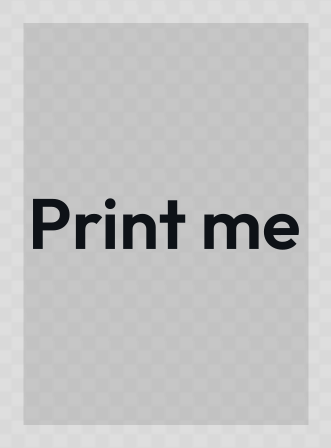
px is the default and behaves exactly as before (the CSS 96-DPI convention). The canvas takes the physical shape straight away, so ?w=210&h=297&unit=mm&format=pdf shows you a portrait A4 before you export anything.
 signed by Lollyvector SVGSprawdź samodzielniePobierz podpisany plik1 path141 nodes4 groups5 KB
 signed by Lollyvector SVGSprawdź samodzielniePobierz podpisany plik1 path141 nodes4 groups5 KB


lolly quotes --quote="Print me." --width=210 --height=297 --unit=mm --export=svg --output=a4.svgPrint marks & bleed (bleed= + marks=)
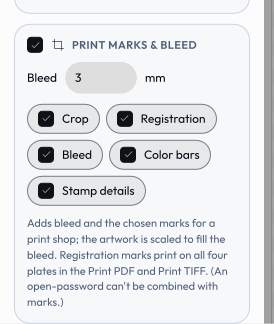
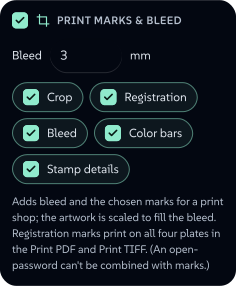
For print-ready output, bleed= and marks= add the prep a print shop expects to the pdf (RGB), pdf-cmyk (Print PDF) and cmyk-tiff (Print TIFF) formats. They're ignored for every other format. The two CMYK formats apply the same engine geometry - the PDF as vectors with declared page boxes, the TIFF rasterised onto an enlarged sheet.
 signed by Lollyvector SVGSprawdź samodzielniePobierz podpisany plik16 paths~5.7k nodes25 groups6 images67 KB
 signed by Lollyvector SVGSprawdź samodzielniePobierz podpisany plik16 paths~5.9k nodes25 groups6 images118 KB


bleed=3mm- the design is scaled to fill the bleed (the trim area is unchanged). The PDF declares itsTrimBox(final cut) andBleedBoxfor the RIP; the TIFF is enlarged to the full sheet, the artwork composited over white to cover the bleed.marks=crop,reg,bleed,bars- draws, in the margin: crop (trim) marks, registration targets, bleed marks and a colour bars. Inpdf-cmykthe line marks are DeviceCMYK1 1 1 1so they print on every plate; incmyk-tiffthey're written straight into the pixel buffer as all four channels at full ink (C=M=Y=K=255, the raster analogue), drawn after the RGB→CMYK pass so they aren't remapped; in the RGBpdfthey're black. Mark length, gap and stroke weight are fixed to print standards.- In
pdf-cmykthe bar becomes a brand verification strip: the four solid process primaries (C, M, Y, K) come first as a fixed calibration reference, then - after a wider gap - each brand colour that actually substituted in this artwork appears as an RGB reference swatch touching its CMYK substitution, so a press operator can confirm the RGB→CMYK swap was applied. Only the inks really used are shown (substitution records which palette colours were hit); the pairs are capped by the available margin width and a flat ceiling of 12 brand cells. The RGBpdfand thecmyk-tiff(which does a flat per-pixel conversion with no exact substitution to verify) show a generic process/overprint/tint control bar instead. prov(PDF only) - adds small provenance credit text in the proof margin, taken from the export's authorship metadata: the export timestamp {YYYY-MM-DD HH:MM} at the top-left, "Made with https://lolly.tools" at the top-right and "{Tool} by {Author}" climbing the bottom-left. Like the other marks it sits outside the trim, so it's removed at the final cut (a proof annotation, not artwork). The author appears only when the user has opted into personal details (Profile → "Use my details").
The CMYK press condition (profile=, e.g. fogra51) is carried for both CMYK formats: the Print PDF declares it in the document's output intent; the Print TIFF records it as provenance in ImageDescription (the pixels stay untagged DeviceCMYK - no embedded profile, so the file is never mislabelled).
A named condition tells a RIP what the DeviceCMYK values mean, but PDF/X-4 also wants the profile itself inside the file, and no CMYK ICC ships with Lolly. So a named condition writes the output intent and not the GTS_PDFXVersion conformance claim. Load a CMYK profile of your own (Colour Lab, or the export panel's Colour profile control) and pick its Embed row - profile=own in a link - and the profile is embedded as the DestOutputProfile, at which point the file can claim PDF/X-4 - and does, unless something else in the export makes the claim untrue: RGB artwork the CMYK pass couldn't convert, marks=prov (its credit text is set in a standard font that isn't embedded, which X-4 doesn't excuse) or a strong password (X-4 forbids encryption). The output intent is written either way. The intent then declares the registered condition only where the profile itself proves one (its own targ characterization data, or a fetch Lolly made from the ICC registry); otherwise it declares Custom under the profile's own name, which is the honest reading of an unpaired profile.
?format=cmyk-tiff&bleed=3mm&marks=crop,reg,bleed,bars&profile=fogra51&exportMarks/bleed and the PDF open-
passwordare mutually exclusive: print finishing is applied via pdf-lib, which can't write encrypted PDFs, so apasswordis ignored when marks/bleed are on. (cmyk-tiffhas no password concept.)
Contact sheets (cuts=)
A still export of a timed composition renders the frame at the playhead. That's the contract: what you see on the stage is what goes into the file. A contact sheet asks for more than that frame - N stills sampled at equal intervals across the sequence, for a storyboard, a thumbnail sheet or a social carousel.
Set this in the export panel, not the link. The Frames field in the export panel is what produces a contact sheet today - see Exporting.
cutsis reserved, parsed and clamped by the engine, but the web shell takes the count from that field rather than from the URL, so a link carrying?cuts=6renders the single playhead frame and a Share link never carries the value. The CLI does read it, and answers plainly:--cuts=6(or a pasted link carrying it) exits 3 and writes nothing, because the sequence renderer lives in the web shell and a single frame under the filename you asked for would be a different artefact. The rest of this section describes the behaviour the Frames field drives.
With N > 1 and PDF chosen you get one N-page PDF, one page per sample, in time order; with png/jpg/webp/svg you get a zip of N files (-01 … -0N) instead, because PDF is the only still format that can hold several frames in one file. 1 is the single playhead frame.
Samples land at the midpoint of each slice - t_i = duration x (i + 0.5) / N, so a 6-cut render of a 12-second sequence samples at 1s, 3s, 5s, 7s, 9s and 11s. Sampling the endpoints instead (0s and 12s) would hand you two blank cards: at t = 0 an enter transition hasn't faded in yet, and at t = duration every clip has already ended.
Values are clamped to 1-64 (a contact sheet is for a human to look at; 64 is already an 8x8 wall), and anything unparseable falls back to 1 rather than failing the export. Non-still formats ignore cuts entirely - a video already contains every frame.