
Validate, distribute, test and translate a reusable tool.
Part of Authoring Tools.
Publishing
Choose how people receive your work:
- A tool with your rules. Use Design → Share with rules to expose only approved inputs and download a single portable
.lollytool. - An editable starting point. In the open Lolly app, Save a Design doc as your own template or variation and it joins that tool's "New from template" chooser on your device - no
tool.json, no catalog build, no git. Share it as a.lollyfile for anyone to import, or submit it for catalog inclusion. Anyone using the open version can do this; it's the fastest path to a personal or team starting point. A saved template supplies starting values for an existing tool; recipients can edit the design. - Into a catalog, for a shared library. To publish a hand-authored tool into a catalog that many people sync - the model an organisation can manage as a Git repo so every change gets review and an audit trail (an option, not a requirement) - add the folder and rebuild the index:
- Place a brand-neutral tool under
community/<tool-id>/, or a brand-specific tool in that brand pack’stools/directory. - Run
pnpm run build:catalog:all- this regeneratescatalog/tools/index.jsonfrom the manifests (don't hand-edit the index; it's generated) and refreshes asset checksums. - Run
pnpm run validate:catalog:allto confirm the catalog is consistent. - Build & deploy the catalog. The shell picks it up on next boot.
For development:
pnpm run dev:web
# open localhost - your tool appears in the gallery
Try it without the monorepo
You do not need the full clone to run a tool you wrote. Zip the tool folder and drop the zip on lolly.tools or any Lolly instance. The drop sheet offers Install this tool; take it and the tool installs on that device and opens. Zipping the folder and zipping its contents both work, because a single top-level folder is stripped. Nothing is uploaded: the zip is read in the page, and the files go to the same device-local store a .lolly's carried tool uses.
Your hooks.js is executable tool code, so the install asks the same Trust this tool? consent a .lolly asks, and you should read a stranger's tool before you accept it. Drop an edited zip again and Lolly offers to replace your copy, which is the loop to use while you iterate. An id the catalogue already lists is refused rather than installed, because an installed tool never shadows a catalogue one, so give yours its own id.
When it works, open a pull request against lolly-tools/lolly, adding your tool directory under community/<tool-id>/. To test hooks without a browser, install the tool-author SDK from npm:
npm i -D @lolly-tools/coreIt exports createMockHost, an in-memory host bridge a plain node test can drive, validateTool, the same manifest check the catalog CI runs, and the HostV1 types for your editor. It depends only on ajv, so nothing from the platform comes with it. The package README on npm walks a four-file tool through that test.
Sharing a tool without a catalog (.lolly)
A hand-authored tool can also travel without a catalog: open your tool, choose Share → Download .lolly and tick Include the tool. The file then carries tool.json, template.html, styles.css, hooks.js, icon.svg, whichever sibling text templates the declared formats call for and the sidecar for the active language, all alongside the design, so it opens on a device that has never seen the tool. The checkbox arrives ticked for any tool the deployment's signed catalog doesn't list, which is the state of anything you just authored (and of every tool on a build that signs nothing).
A tool generated by Share with rules packages its checked fonts and images automatically. For a hand-authored tool, review the share dialog’s file inventory and dependency warnings before distribution.
Their consent is what stands between your hooks.js and their device. On import Lolly asks Trust this tool? - naming the tool, naming you as its author when the file carries your details, and saying that opening it runs the tool's own code on their device - with Trust & install as the way through. For a file carrying a saved design, declining leaves that design in Projects until they have the tool. A standalone rules tool is installed only after consent. Two things to author for:
- Classic
hooks.jsonly. A manifest declaringhooks.moduleis refused at install, so a module-code tool cannot travel this way yet. - Integrity is separate from authorship. Package checksums verify transferred bytes, not who wrote them. The recipient reviews trust, the loader validates the manifest, and sideloaded hooks use the strict isolated executor. Keep shared hooks small enough to review.
The end-user view of the same file - what it carries, what it asks and what happens on a decline - is Sharing your work, and the boundary itself is a row in the Threat Model.
Localizing a tool
A tool's user-facing strings live in the manifest (English by default). To translate it, add an i18n/<lang>.json sidecar - a sparse, flat, dotted-path overlay of just the strings a translator touched:
// community/your-tool-id/i18n/de.json
{
  "name": "…",
  "description": "…",
  "inputs.headline.label": "…",
  "inputs.headline.help": "…",
  "inputs.size.options.a4": "…"
}
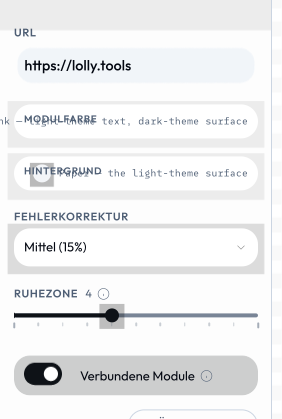
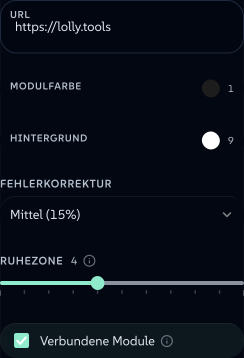
The same sidebar, opened with ?lang=de: labels, help text and select options all come from the sidecar, and the tool code is untouched.
 signed by Lollyvector SVGPrüfen Sie es selbstSignierte Datei holen39 paths~3.0k nodes58 groups2 images45 KB
 signed by Lollyvector SVGPrüfen Sie es selbstSignierte Datei holen39 paths~3.0k nodes58 groups2 images45 KB


When a tool loads with a language set (the reserved lang URL/CLI param, or the user's profile language), the engine best-effort fetches the matching i18n/<lang>.json and merges it onto the manifest before any shell or the input model sees it - one overlay point, every shell (web, CLI, TUI) benefits. Anything missing - no sidecar, an absent key, a malformed file - falls back to the manifest's English, so a translation gap never breaks a tool load. Keys cover name, description, a11yLabel, per-input label / help / placeholder / section / suffix / options.<value> (block and vector sub-fields as inputs.<id>.fields.<fieldId>.…) and the walkthrough (guide.title, guide.tracks.<id>.label / .note / .steps.<index>). validate:catalog checks the keys, so a typo is caught at build time rather than silently ignored.
- Pre-fill the user's language. An input can declare
bindToProfile: "lang"to seed from the active language (a canonical short code -en,de,ar, …). - Right-to-left. Arabic and other RTL languages mirror the whole UI. Author your template and CSS so they mirror too - prefer logical properties and
[dir]-aware rules over hard-coded left/right - and the shell sets document direction from the active language.
Example tools
community/color-palette/- one input per simple type (color,select,number,boolean) withonInit/onInputderiving the palette - the tool shown in Tool inputscommunity/qr-code/- useshooks.js(onInit/onInput/beforeExport) to encode the QR matrix; composed as ansvgchild byevent-name-badgebrands/suse/tools/quotes/- multi-input form withlongtext,selectandassetinputs withallowUpload: true(personal-image library)community/meeting-planner/-blocksinput for repeating rows;onInit/onInputshaping; ICS data exportbrands/suse/tools/color-block/- advancedblocks: typedaddMenudiscriminator +showFor/multilineForheterogeneous rowscommunity/wayfinding-signage/-blocksrows that auto-shrink label text to fit (or show a sponsor image), and asizeselect that drives the print page size; CMYK exportbrands/suse/tools/tool-logo/- auto-switching brand logo: a hook picks the rightsuse/logo/SVG by background/orientation; true vector SVG exportbrands/suse/tools/digi-ad/- video/gif output withrender.videotiming config