
This guide covers the optional organisation service. Configuration, console and API paths refer to your Work instance. The packaged console keeps its release-matched copy of this guide.
Lolly Work is the server an organisation runs beside Lolly. People keep making things on their own devices. Work adds the parts a team shares: one sign-in, shared projects, a governed library of brand assets, server renders, links you can turn off, approvals and an audit trail.
The current release is Work 1.1.2, published on 2026-10-20 and paired with Lolly 1.1.2. The release notes list the exact component versions. This page groups what the release does into three lists: ready to use, worth checking against your own systems first and not built yet.
Ready to use
- Sign-in: OpenID Connect, GitHub, email and password, passkeys, proxy and device code
- SCIM provisioning and back-channel logout
- Roles, grants, invitations and requests
- Team projects with files, comments and versions
- A governed library with 15 kinds of source
- Rules for tools, feature flags and managed AI
- Server renders, durable jobs and signed links
- Delivery to five kinds of destination
- Approval chains and source review
- Signing, audit log, telemetry and SIEM
Check on your own systems
- Your identity provider: callbacks, groups and SCIM
- Each DAM tenant: field names and original files
- WebDAV and signed HTTPS delivery receivers
- Image digests, and arm64 at runtime
- Your pack against the installed engine
- Employee client binaries and their notices
- Audit heads kept outside the database
Not built yet
- Scoped service tokens
- Editable overlay defaults
- Watermarks tied to approval
- Ending one chosen session
- An organisation-wide MCP endpoint
- Render dependency locking
- A delivery claimant and staged-byte retention
- Moving a project between instances
- Live editing across several server nodes
- Direct SAML
What Work 1.1.2 does, what to check on your own systems before you rely on it and what is not built.
signed by Lollywork-status-capabilities.htmlHTMLpixels, not shapes12 KBAI generatedgenerated by Claude Opus 5.5自己验证获取已签名文件Ready to use
- Sign-in. Your own OpenID Connect provider (one or several), GitHub, email and password, passkeys, a reverse proxy or a short code for the CLI and native apps. SCIM adds, changes and disables people from your directory. Back-channel logout from your provider ends the Work sessions that came from one provider session. See Sign-in and sessions.
- People and access. Roles that follow your directory groups, allow and deny grants, invitations with personal links, requests to join and requests for access. See Roles and grants and Invite people and handle requests.
- Team projects. A role on each project, shared files and subfolders, comments, saved versions, live editing and a safe choice when two people save the same session. See Team projects.
- A governed library. Your design system, assets members submit with optional review, your own metadata fields, collections, versions, expiry and holds, plus 15 kinds of DAM and storage source. See Catalog and content.
- Rules for tools. Lock, restrict or hide a tool's inputs per group. Govern feature flags and managed AI. Keep the whole policy as one document. See Policy and governance.
- Renders and links. Server renders in SVG and PNG, and JPG and PDF with a render worker. Durable render jobs and batches that recover after a restart. Signed links that expire and that you can turn off, including guest links. See Share renders and links and Render jobs and batches.
- Delivery. Send finished exports to S3-compatible storage, WebDAV, a signed HTTPS receiver, Brandfolder or Cloudinary, with an optional approval step. See Organisation delivery destinations.
- Approvals. Ordered chains with
any, quorum andallrules. Separation of duties. Review of a frozen set of source files. See Approvals. - Records. Content Credentials signing, a hash-chained audit log, telemetry dashboards and SIEM forwarding. See Audit log and Telemetry and dashboards.
- Agents. Invite an MCP agent to one document or one project, under your own identity. See Invite an agent to a document.
- Setup and packaging. A six-step guided setup in the console, container images, Compose and a Helm chart with an optional render-worker tier. See Configure your first Work instance and Install Lolly Work.
Try the hosted demo at lolly.work before you install. It renders for real: GET /render/<toolId>.<format> serves live output. It holds sample data that does not persist and runs apart from private workspaces, so use it for a trial, not as a production instance.
Check on your own systems first
Work's tests use recorded fixtures for identity providers and DAMs. They check the code against each vendor's published contract. They cannot show that your tenant matches that contract, so run these checks before you rely on an integration.
- Identity. Check your registered callbacks, real owner groups, SCIM subject correlation, denied groups, revocation and source disable. Customer setup walks through each one and shows which integrations it has actually observed.
- Sources. Each provider guide says what has been confirmed against a real tenant and what to verify on yours: field names, approval mapping and original-file checksums. Check a source on your own tenant gives the steps.
- Delivery. The S3 adapter has been checked live against an S3-compatible host. WebDAV and signed HTTPS have wire tests and opt-in checks that have not yet run against a real receiver. Brandfolder and Cloudinary are fixture-tested.
- Release artifacts. Work 1.1.2 ships signed server and render-worker images for Linux amd64 and arm64, and its release record does not claim native arm64 runtime qualification. Choose and verify the image digests, client and worker versions, registry access and any
imagePullSecretsbefore you install. - Your pack.
inspect:packand Customer setup load your tools through the installed engine and report incompatible requirements, missing files and unsupported server formats. A passing engine-pin check does not establish that your clients and workers match. - Employee clients. Work's audits, SBOM and notices cover its own deployment. Review the desktop and mobile binaries, their third-party notices and their distribution terms in the Lolly release you deliver.
- Audit anchoring. Work logs the audit head at boot and every hour. A database superuser can still bypass the append guard or truncate the tail, so collect heads in a store that your database administrators cannot change. See Audit log.
- Shell and pack on Kubernetes. Bring a built web shell on a volume you populate; brand packs are bring-your-own too (
pack.typedefaults tonone). A wrong shell path fails at boot rather than serving an ungoverned app.
 signed by Lolly Demovector SVG10 paths128 nodes141 groups194 KB自己验证获取已签名文件
 signed by Lolly Demovector SVG10 paths128 nodes141 groups194 KB自己验证获取已签名文件


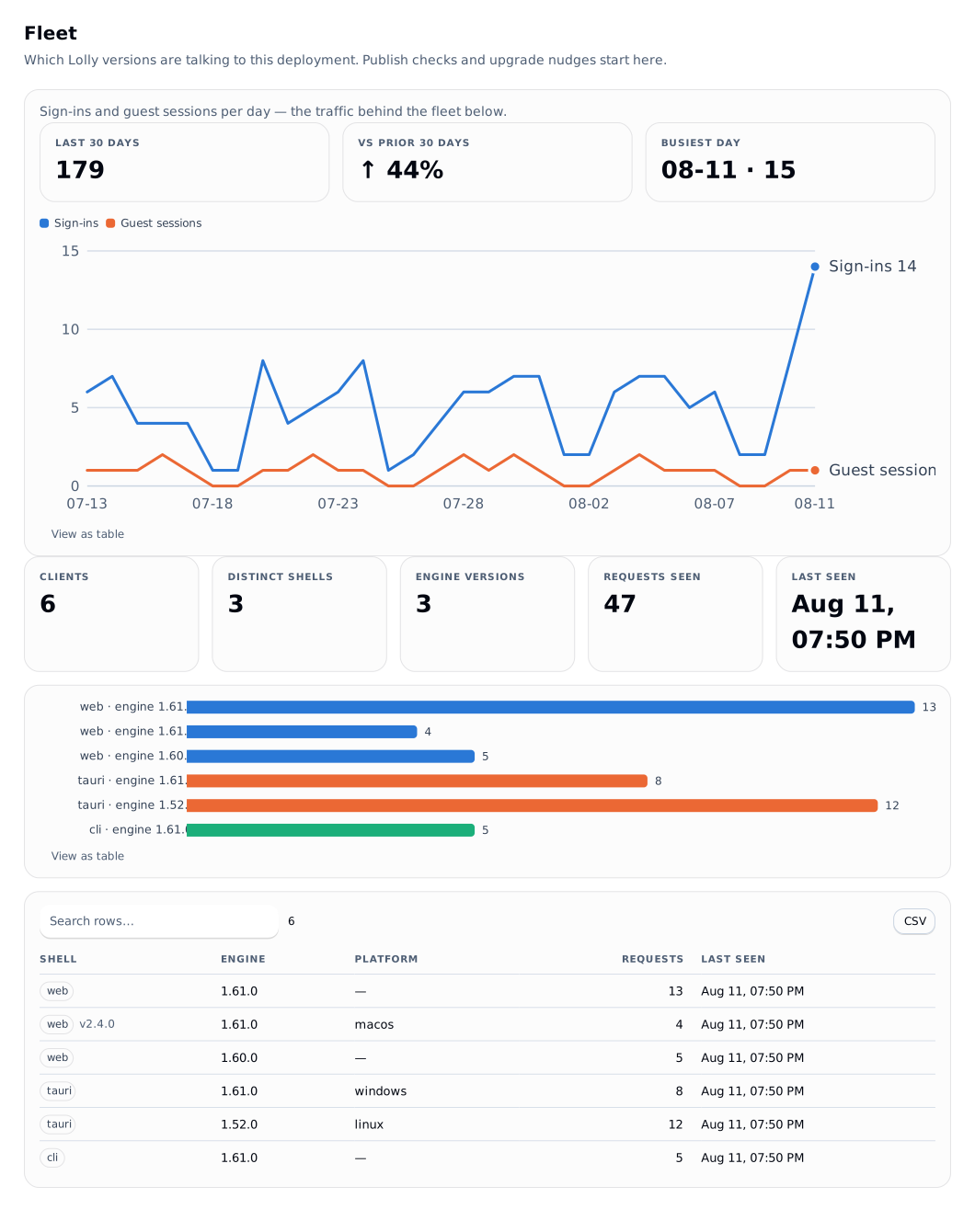
The console's Fleet view lists the Lolly versions that talk to your server, which helps when you match clients to a release.
Not built yet
- Scoped service tokens. A token has a role, an expiry, last-use metadata and revocation. Narrower scopes are not built.
- Editable defaults. An overlay stores
defaultsbut does not apply them. Clients, collaboration, automation and server renders still need one agreed precedence. - Watermarks tied to approval.
until-approvedis not linked to approval state, and binding an ordinary export to reviewed final bytes is not built. See the enforce block. - Two overlay keys.
enforce.c2paandenforce.escalationare declared but the write paths do not accept them. - Ending one chosen session. An admin can end all of a person's sessions, not one of them. See Sign-in and sessions.
- An organisation-wide MCP endpoint. Agents connect per document or per project.
- Render dependency locking. Receipts are partial, campaign reconciliation is not built, and a durable render resource cannot yet be delivered by reference. See Render jobs and batches.
- Delivery operations. A replica-safe background claimant for queued deliveries, retention for staged retry bytes, and destination setup in the console or CLI.
- Moving a project between instances. Work previews what a move would involve; export and import are not built. See Preview a project transfer.
- Several server nodes for live editing. The live-editing server runs on one node.
- High availability and central publication. Trusted central pack publication, high availability and unattended delivery recovery have no selected deployment contract yet.
- Direct SAML. Connect a SAML-only provider through an OpenID Connect broker such as Keycloak.
Release history
- 1.1.2, 20 October 2026. The current release, matched to Lolly 1.1.2. Release notes.
- 1.1.1, 15 October 2026. Matched to Lolly 1.1.1.
- 1.1.0, 12 October 2026. Released together with Lolly web 1.1.0.
For contributors
A local pnpm test exercises only the memory store. CI runs the PostgreSQL leg with LW_TEST_DATABASE_URL set.